Artificial intelligence agents.Applied to your business.
Create AI agents, copilots and connections through chat in yaAgents. Use knowledge, data and existing APIs to serve customers, guide your team and perform configured actions. Your team can lead the application and work with specialists for implementation and improvement.
1,900+ companies have trusted New Way with their operations
Artificial intelligence applied to everyday work
Where does your team need more capacity to deliver?
Repeated answers, questions during work and searches in other systems take time. Explore six situations to apply artificial intelligence agents, copilots and integrations to your business processes.
How yapt. helps01 / 06
“The team repeats the same answers and has less time for cases that need attention.”
Create agents to serve your customers.
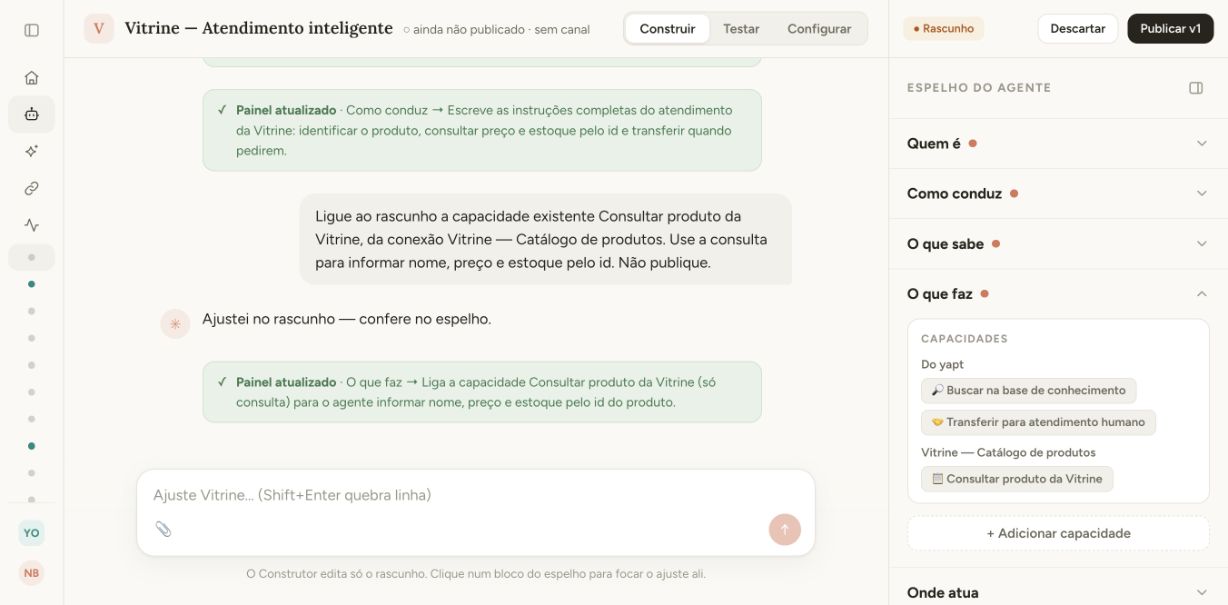
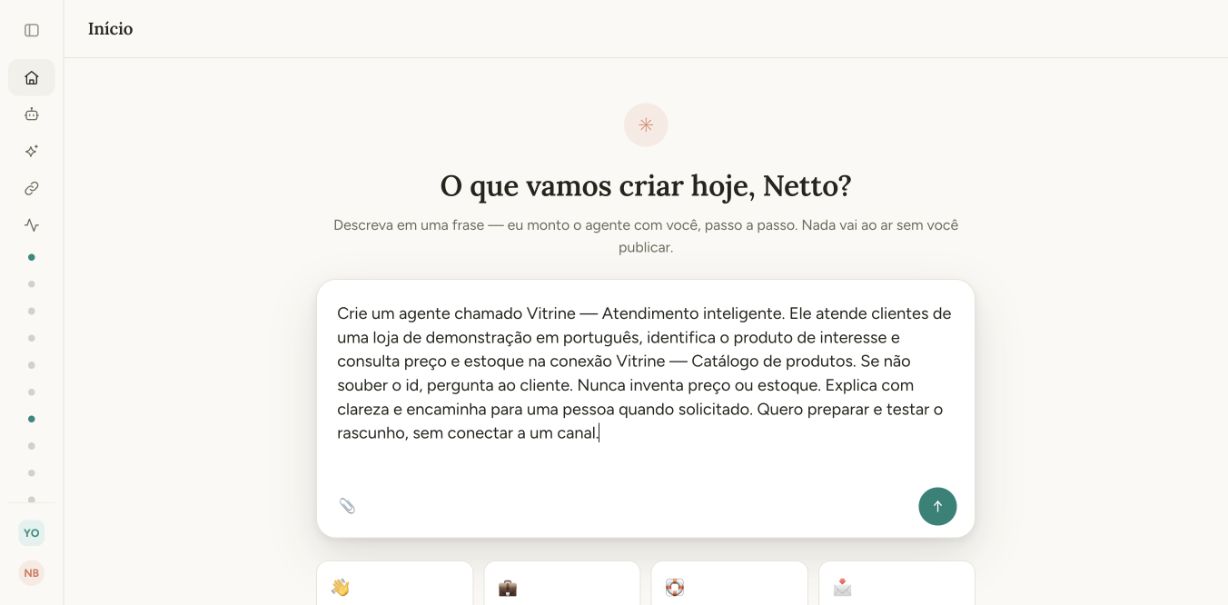
Describe the agent’s role, what it needs to know and when it should bring in a person. Build a draft through conversation, review the instructions and test responses before publishing.
Handle the requests you have planned for with knowledge and instructions defined for your business.
Keep your team’s attention available for referred cases, with the conversation context at hand.
In practice
01Describe
The goal, audience and boundaries of the service.
02Prepare
Knowledge, instructions and the capabilities needed.
03Test
Responses and handoffs to a person before publishing.
From creation to the customer conversation.Real captures + demonstration conversation
yapt. · SupportFrom creation to the customer conversation.Real captures + demonstration conversation
Workspace
DashboardVeja os números do atendimento e das vendas em um só lugar.
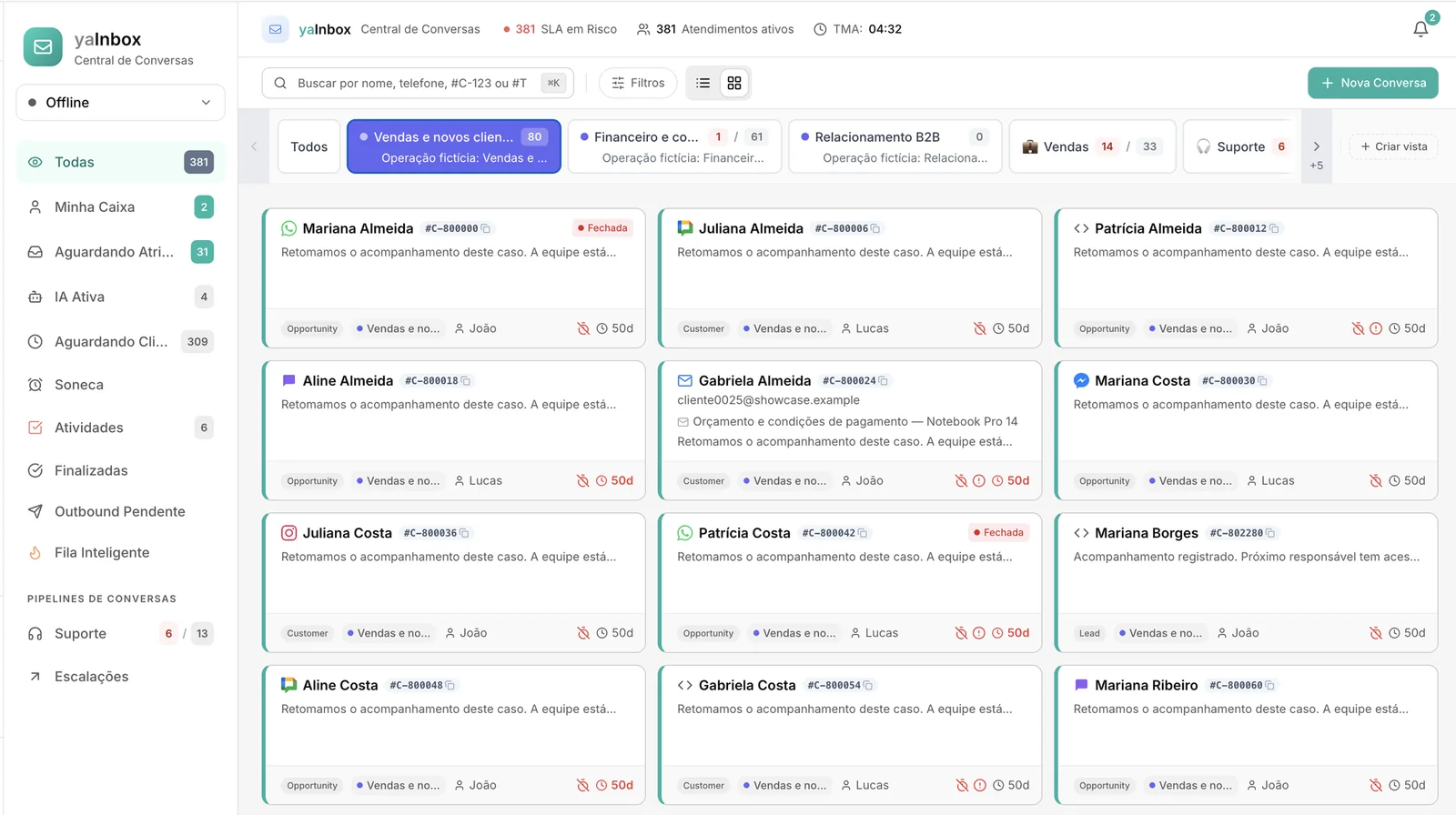
InboxAtenda seus clientes por WhatsApp, e-mail e redes sociais em uma tela só.
HistóricoEncontre qualquer conversa já encerrada, com tudo que foi dito.
CalendárioGerencie agendamentos e disponibilidade da sua equipe.
Operações
Inteligência em CanaisSaiba quais linhas oficiais pode usar, quanto pode enviar e o que a Meta mudou.
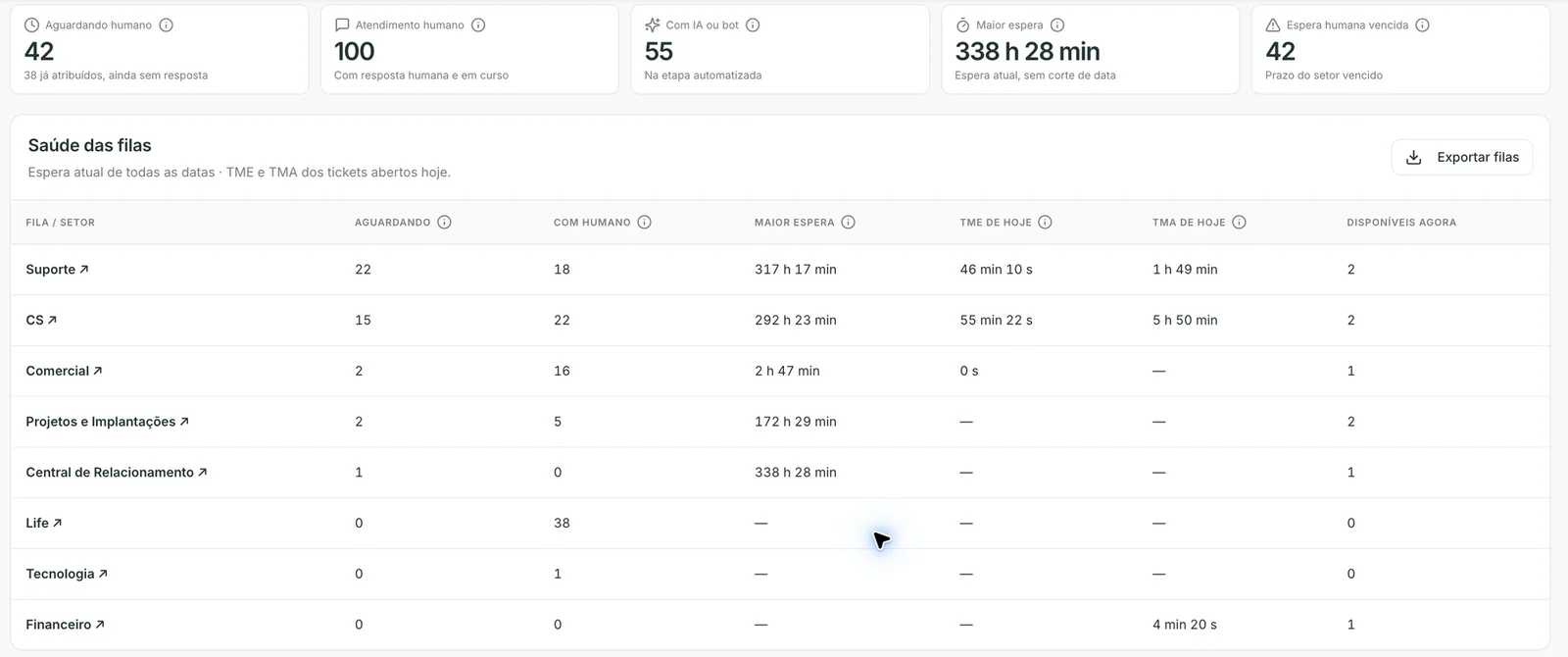
Filas e gestão de filasDistribua as conversas entre a equipe com regras de fila e prioridade.
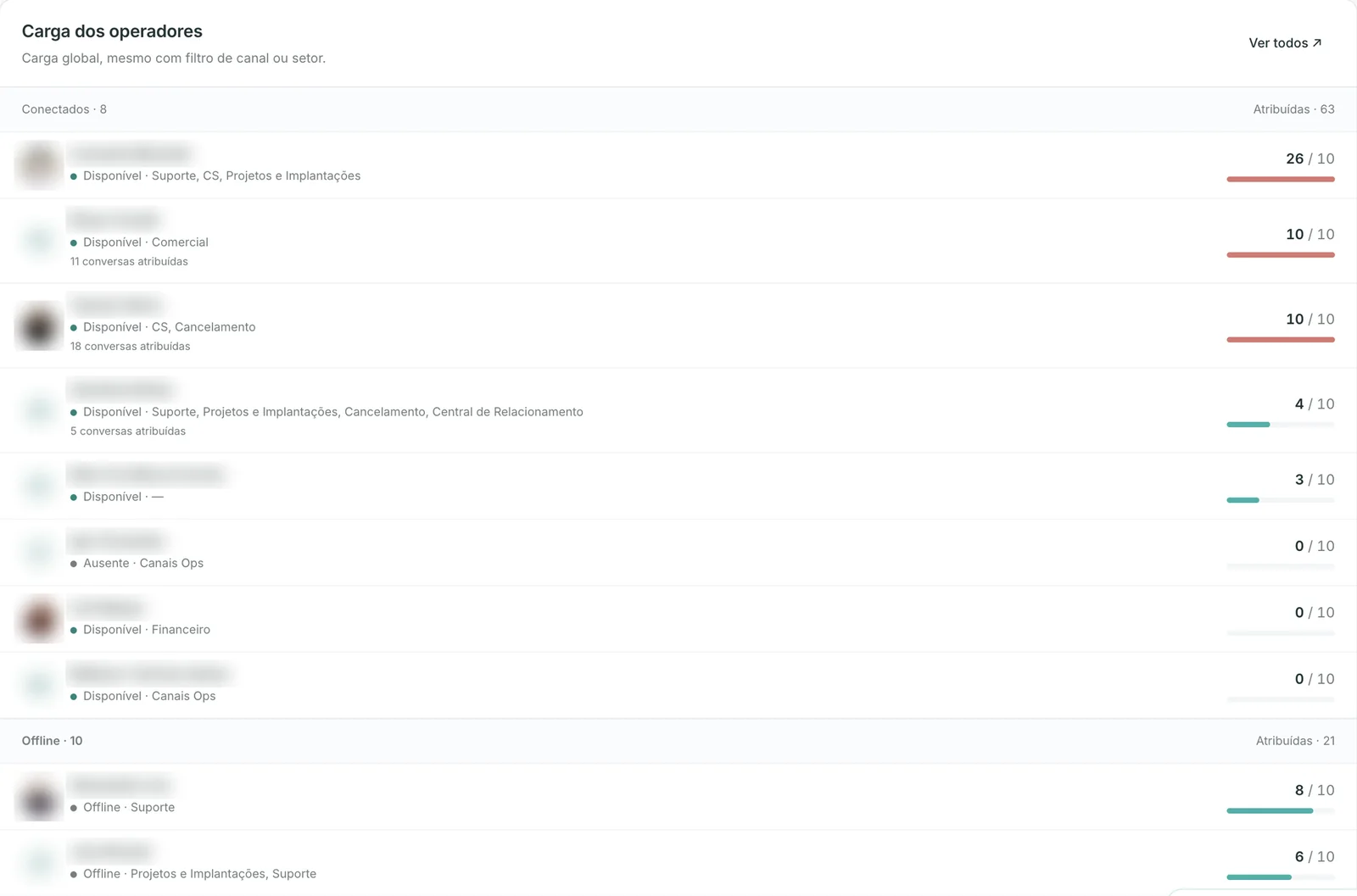
Operadores e produtividadeAcompanhe sua equipe em tempo real: quem está online, em pausa ou atendendo.
IAVou chamar o time de suporte. O histórico do ticket e o resumo desta conversa vão junto.
Conversa atribuída a Ana Pereira
NOTA INTERNA
Resumo para o time: Caio, da Solare Saúde 40, quer continuar o ticket #T-1042 (instalação dos headsets). A falha continua em todos os equipamentos. Já consultamos o histórico; cliente pediu atendimento humano. O ticket #T-1087, de faturamento, segue separado.
Ana PereiraOlá, Caio! Já li o resumo e o histórico do #T-1042. Vou continuar daqui com você.
ResponderNota interna
Escreva sua mensagem...
1
Suporte6 / 13
‹TodosVendas e novos clientes 80Operação fictícia: Vendas e atendimentoFinanceiro e cobrança 61Operação fictícia: FinanceiroSuporte 6 / 13Relacionamento B2B 0›
#T-1042 · Instalação dos headsets: precisamos confirmar o ajuste com a equipe.
Isabela Melo#C-801856Aberta
Gostaria de acompanhar o chamado que já está em aberto.
Felipe Duarte#C-800736Aberta
Enviei a documentação solicitada. Podemos continuar o atendimento.
Mariana Almeida#C-800000Aberta
Obrigada! Estou verificando a orientação com o nosso time.
Juliana Almeida#C-800006Aberta
Precisamos de ajuda para concluir a configuração.
Patrícia Almeida#C-800012Aberta
Vou enviar os dados para a análise técnica.
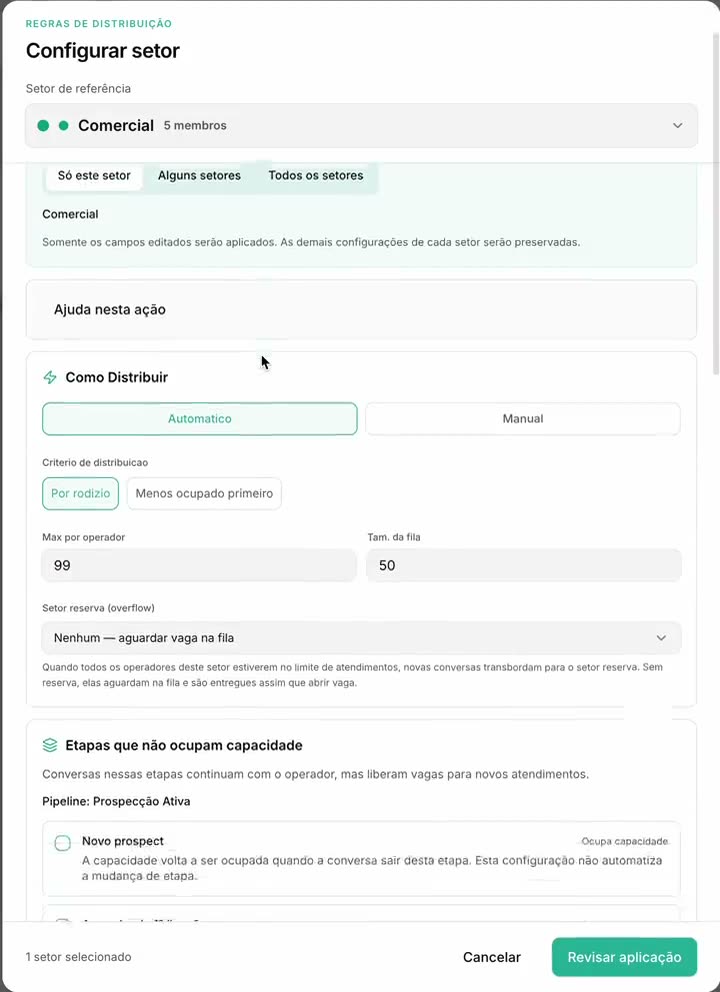
Filas
RadarRegrasExperiência
Filas
RadarRegrasExperiência
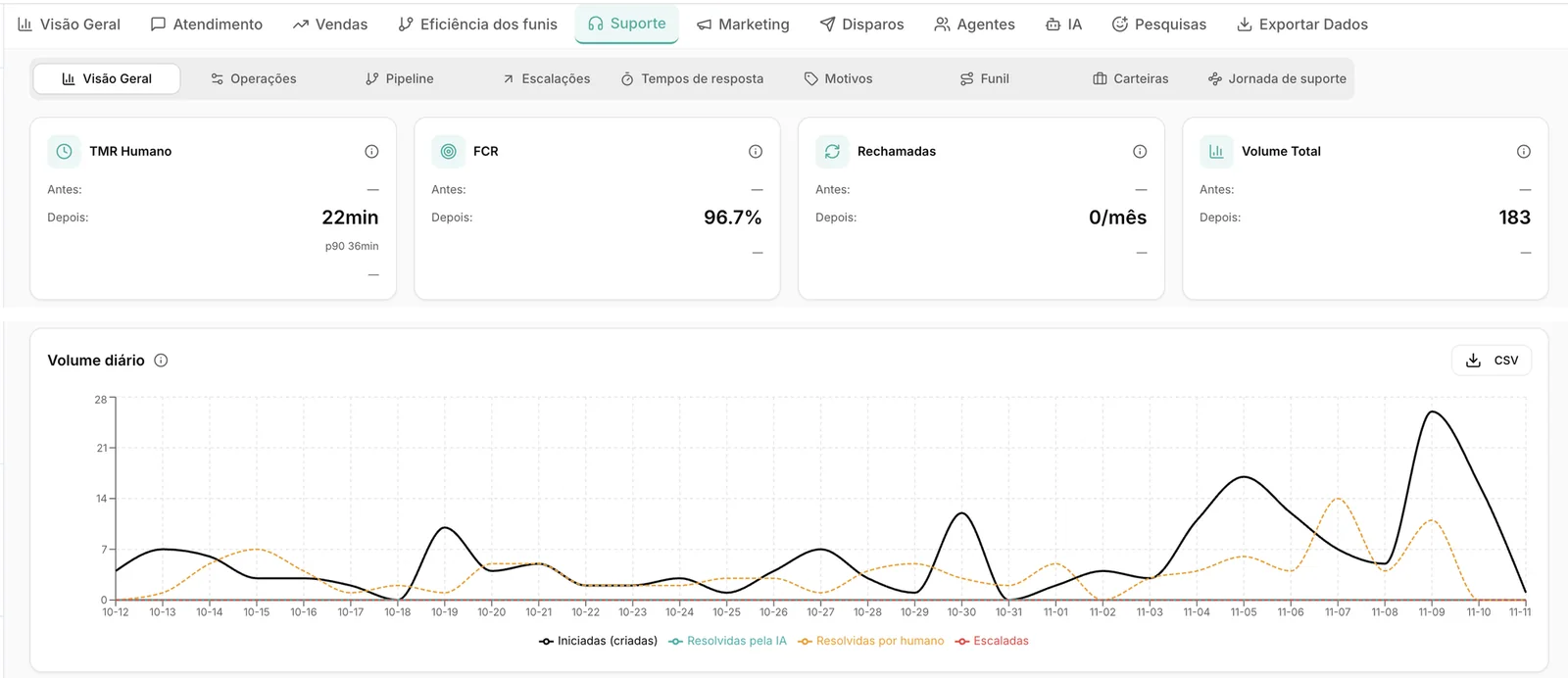
Painel de Suporte
Acompanhamento de performance — antes vs depois
12/10/2026até11/11/2026
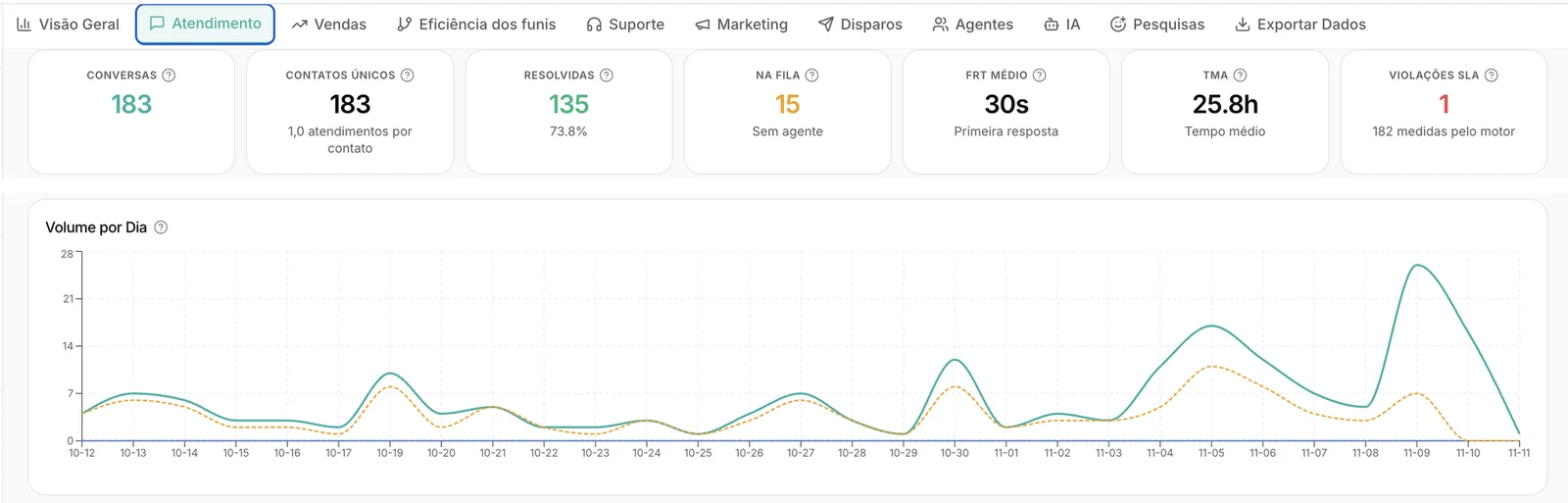
Atendimento
12/10/2026até11/11/2026Todos os canaisTodos os setores
Visão GeralAtendimentoVendasEficiência dos funisSuporteMarketingDisparosAgentesIAPesquisasExportar Dados
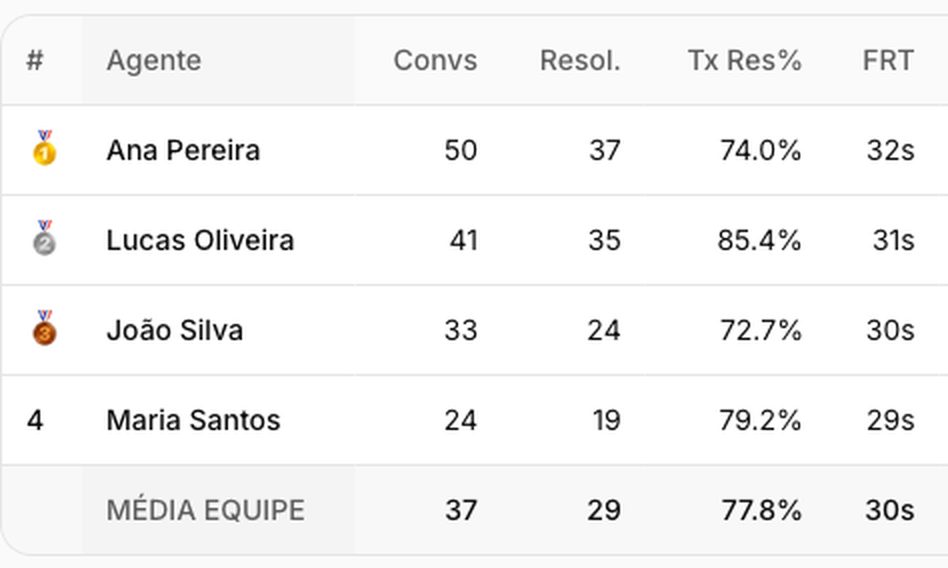
Relatório de Agentes
Ranking, performance individual e produtividade
12/10/2026até11/11/2026Todos os agentesTodos os canais
RankingIndividualProdutividade
CSV
Describe the service you need. yaAgents prepares the agent by conversation.
00:00 / 00:20
Creation shown with real screens; service reproduced from the product with a demonstration conversation. Product interface in Portuguese.
Three-stage demonstration: real agent creation, reproduced WhatsApp service and continuity with a human agent. Product interface in Portuguese. Describe the service you need. yaAgents prepares the agent by conversation. Review the instructions and the capability to look up the data needed for service. In the demonstration conversation, the customer arrives on WhatsApp. AI recognizes the customer and uses the available context to begin service. It identifies two open tickets and asks which one to continue. The customer chooses a case. Service stays linked to the right ticket. AI uses the history to continue the conversation and understand what remains unresolved. When the customer asks for a person, the operation prepares the handoff. The history and the actions already taken stay with the conversation. An internal note brings together the AI summary for the person taking over. The person continues with context, without asking the customer to repeat the whole story.
How yapt. helps02 / 06
“Training takes time — and every salesperson or support agent handles things differently.”
Bring your best expertise to the whole team.
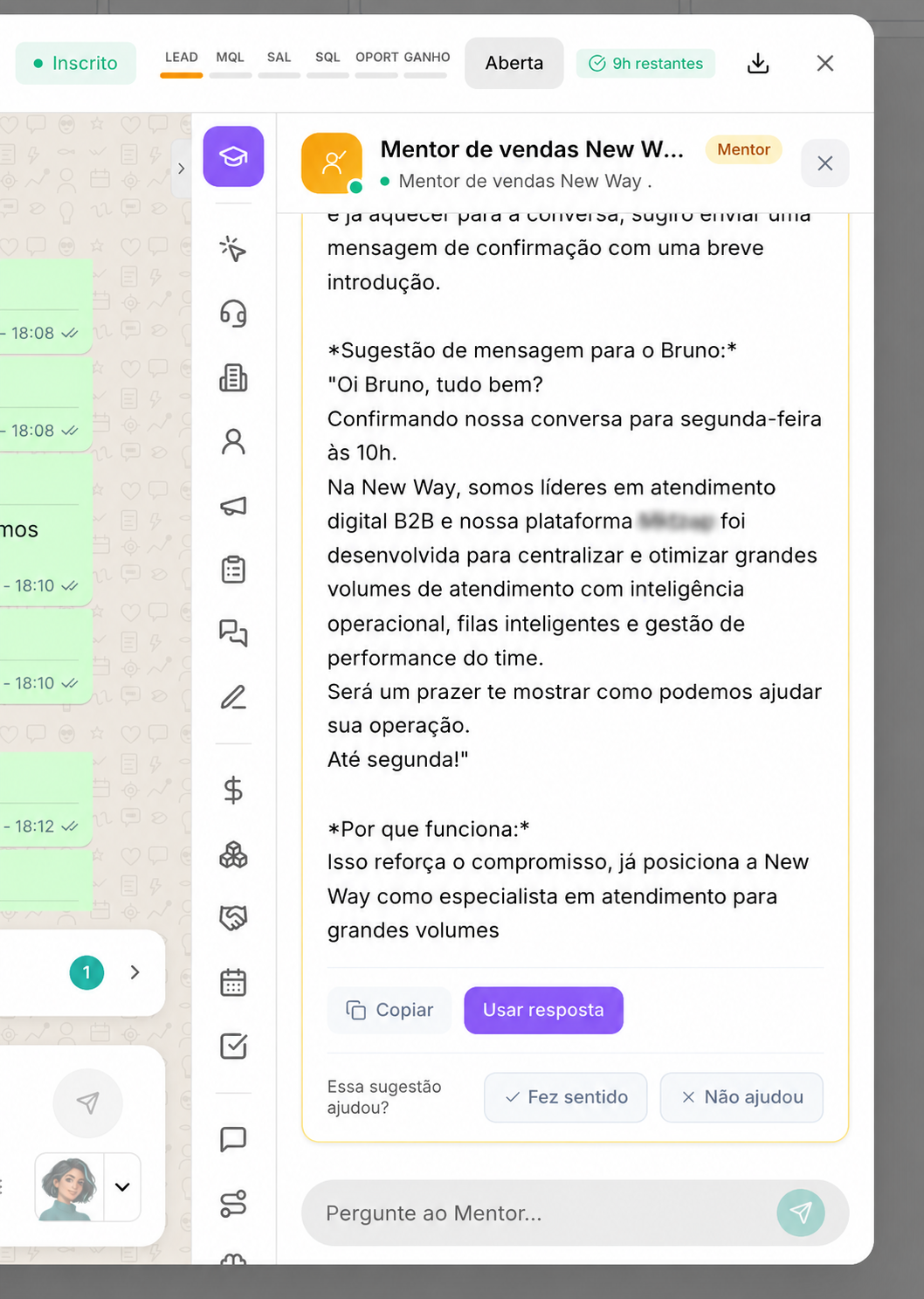
Turn good practices into guidance for the people who sell and the people who solve problems. The Mentor combines conversation context, company knowledge and permitted system queries to suggest responses and next steps. The team learns while working, with less searching and less reliance on help.
Bring sales approaches and support guidance from your reference team to people who are getting started.
Reduce searching in other systems and interruptions to ask for help, with guidance in the conversation context.
In practice
01Prepare
Define the Mentor’s good practices, knowledge and permitted queries.
02Guide
Bring the suggested reply and the right information to the case in progress.
03Develop
The person reviews, applies and learns from the explanation behind the guidance.
Your best expertise, with the whole team.Real screens · demonstration
yapt. · MarketingYour best expertise, with the whole team.Real screens · demonstration
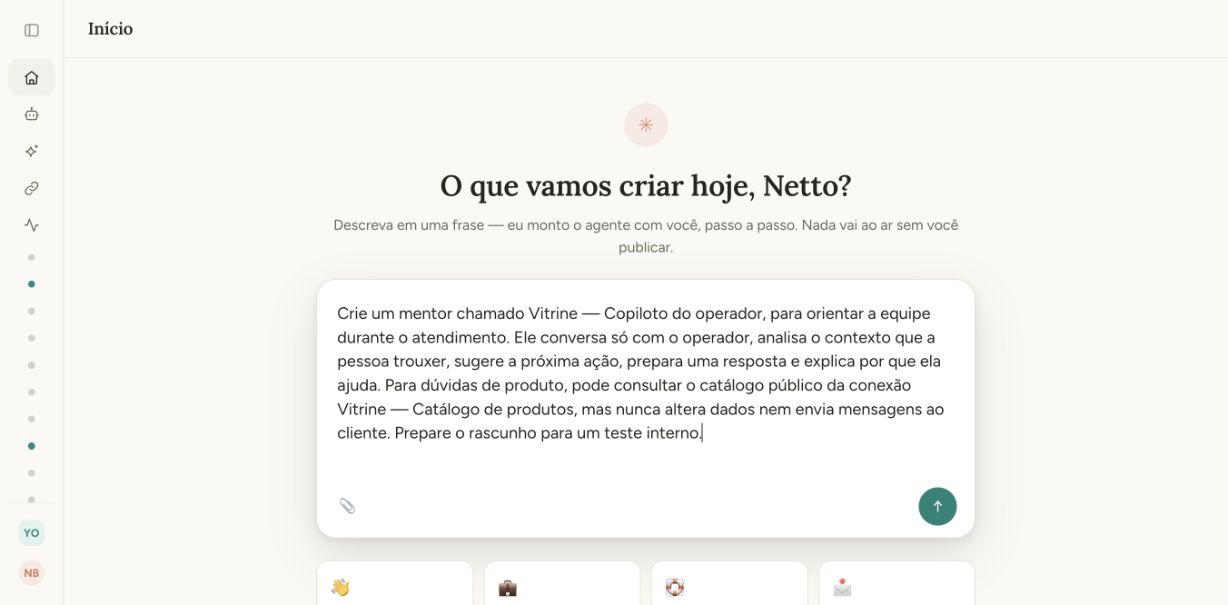
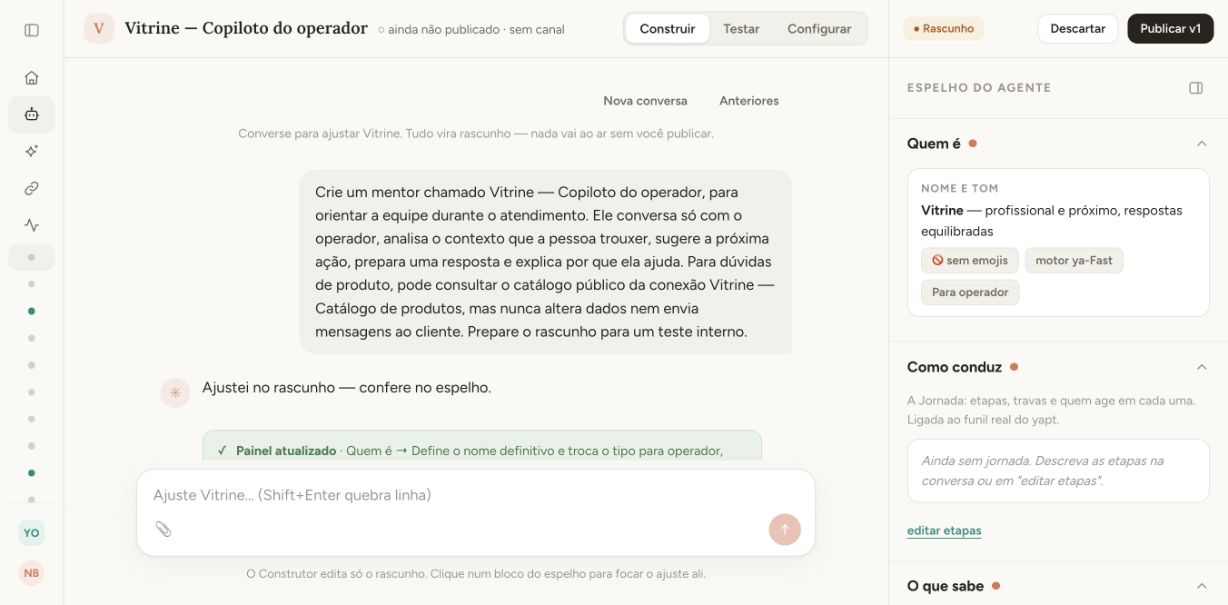
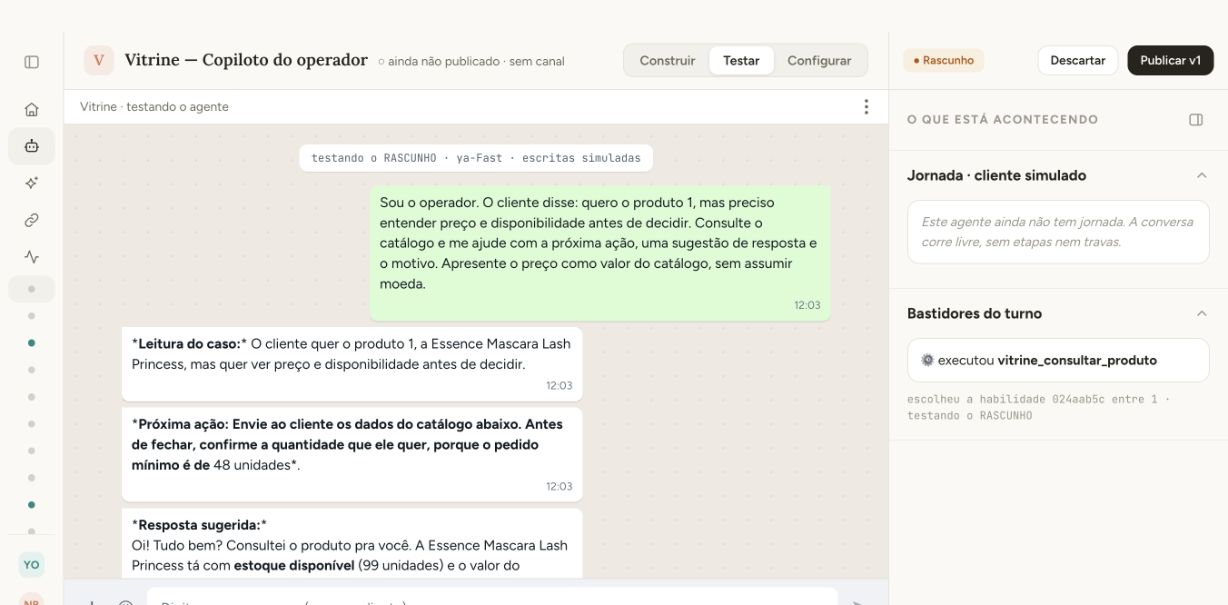
For the human team, describe a copilot that guides the operator during service.
00:00 / 00:16
Real product screens. Configuration and usage examples; interface in Portuguese.
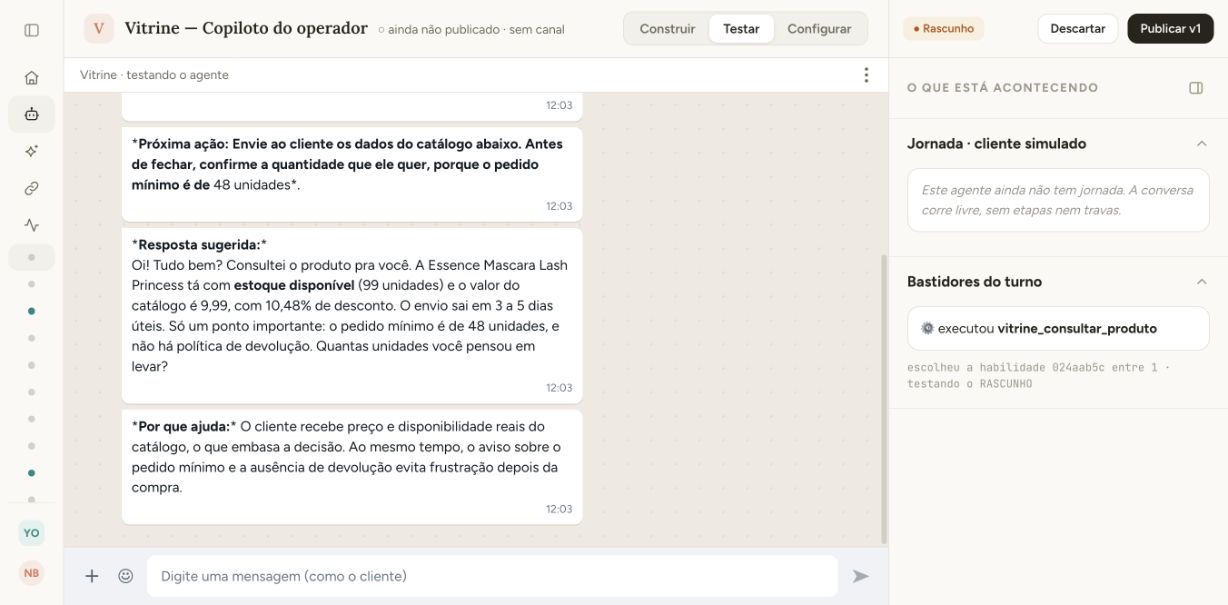
Your best expertise, with the team For the human team, describe a copilot that guides the operator during service. The preview records the “For operator” role. This example remains a draft, with no channel. Within the conversation, the Mentor suggests a reply for the operator to review. The explanation helps the team learn from the case and apply good practices. In the real test, the copilot queried the catalogue and suggested the next action using product data.
How yapt. helps03 / 06
“To answer the customer, we need to open another system and look for the information.”
Create connections to your systems through conversation.
Describe the system, its available API and what you need to query. yaAgents helps build the connection and its capabilities to bring information to the agent and the team member, according to the access granted.
Bring data from internal systems into customer service, reducing manual searches and copying.
Reuse permitted capabilities with agents and team members; the Mentor can use allowed queries.
In practice
01Describe
The system and the information needed for the work.
02Connect
Configure access and test the API query.
03Make available
Link to the agent and grant team access according to permissions.
From connection to conversationReal screens · demonstration
yapt. · MarketingFrom connection to conversationReal screens · demonstration
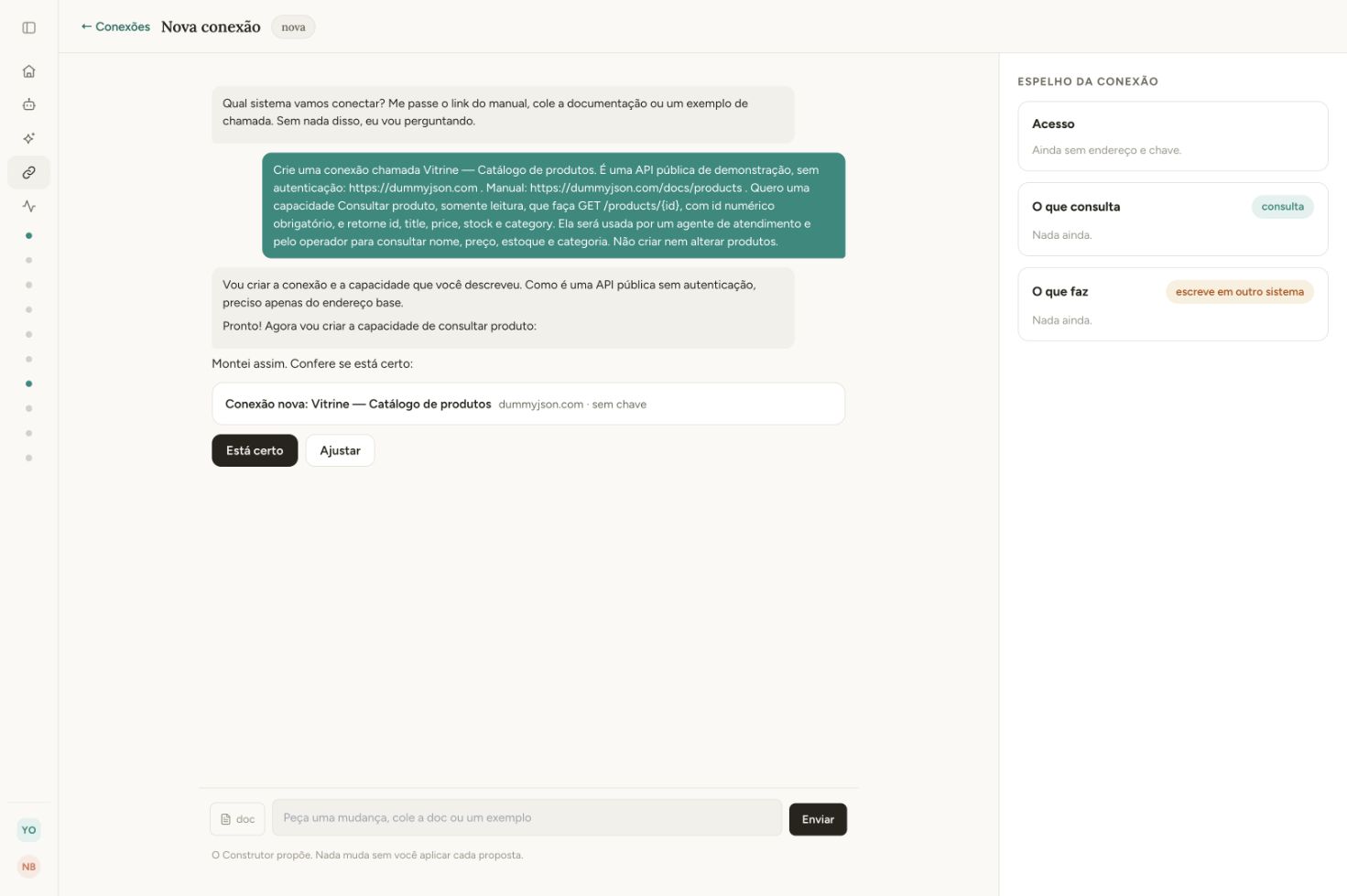
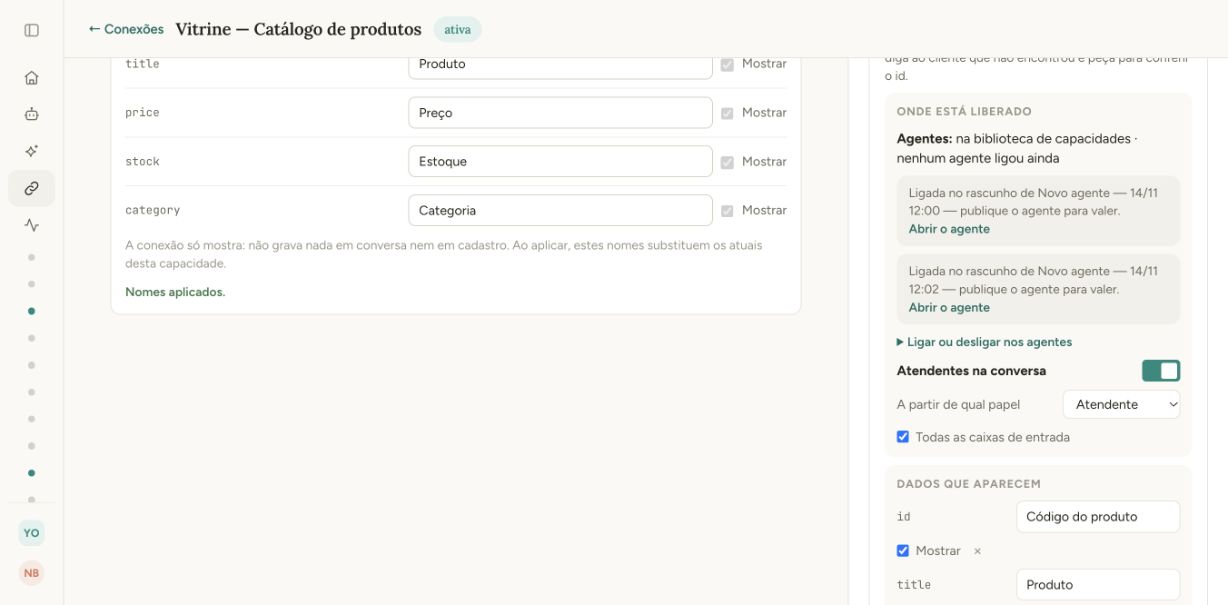
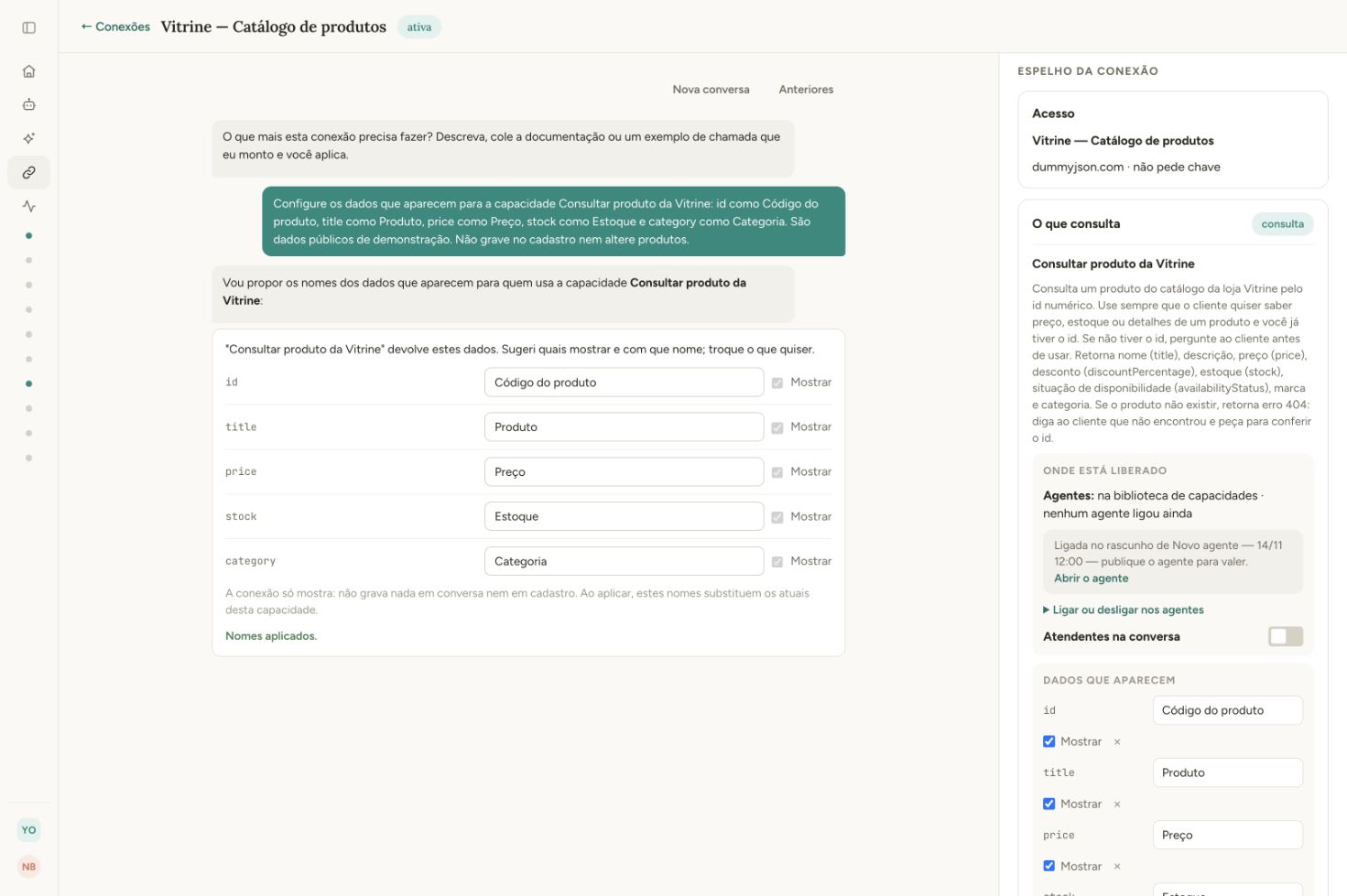
Provide the documentation and what you need to look up. The builder proposes a connection for review.
00:00 / 00:16
Real product screens. Configuration and usage examples; interface in Portuguese.
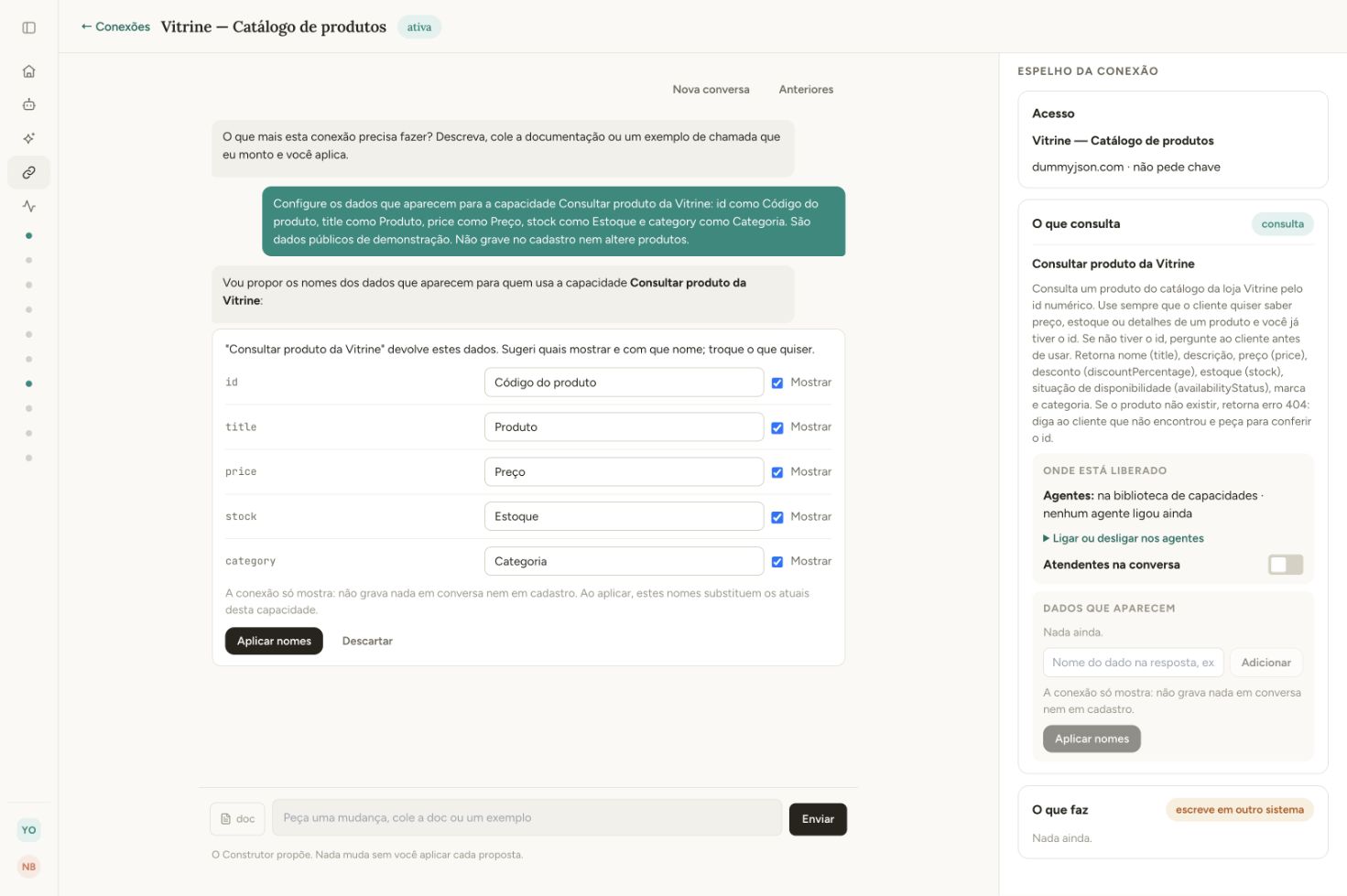
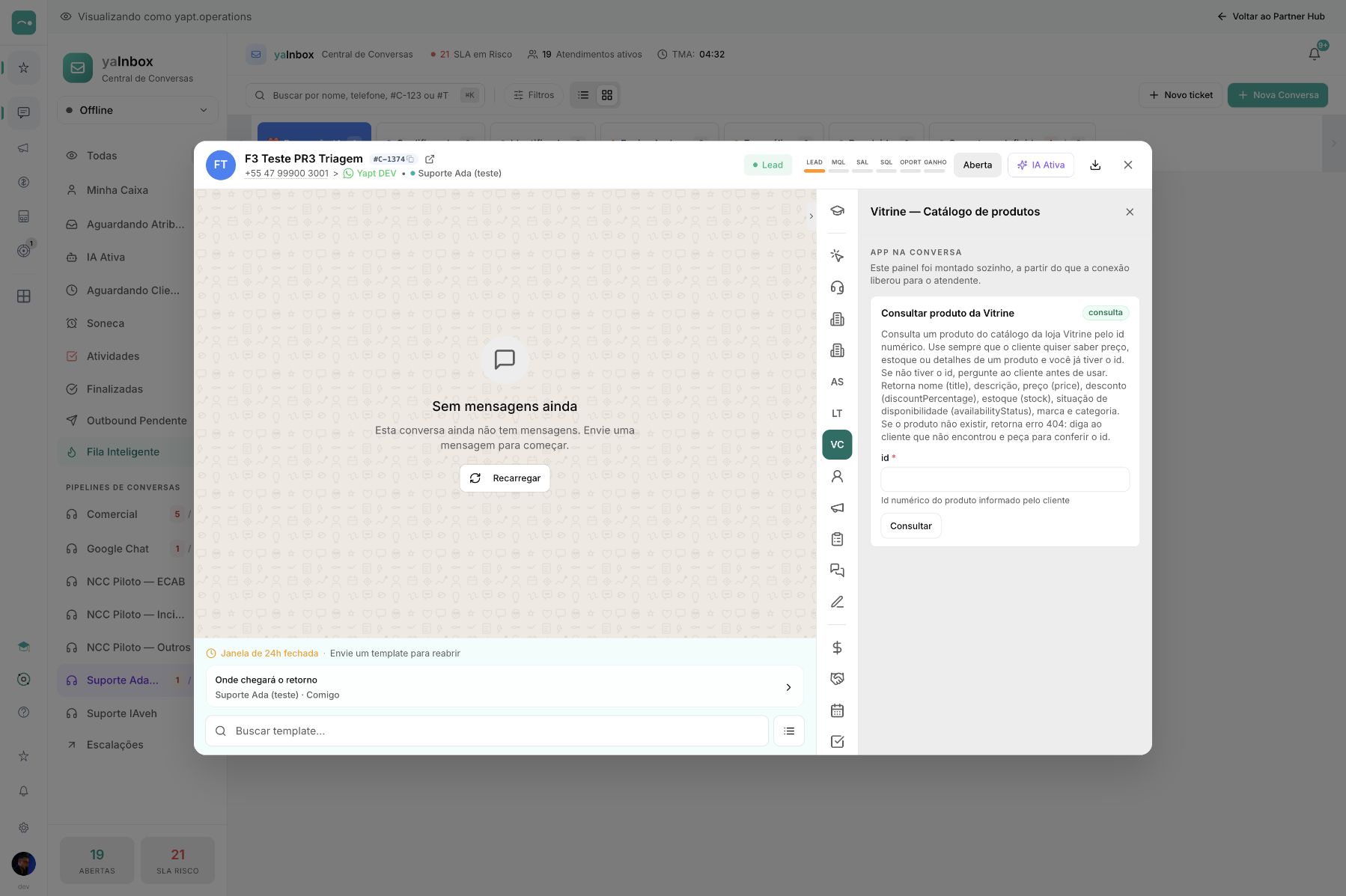
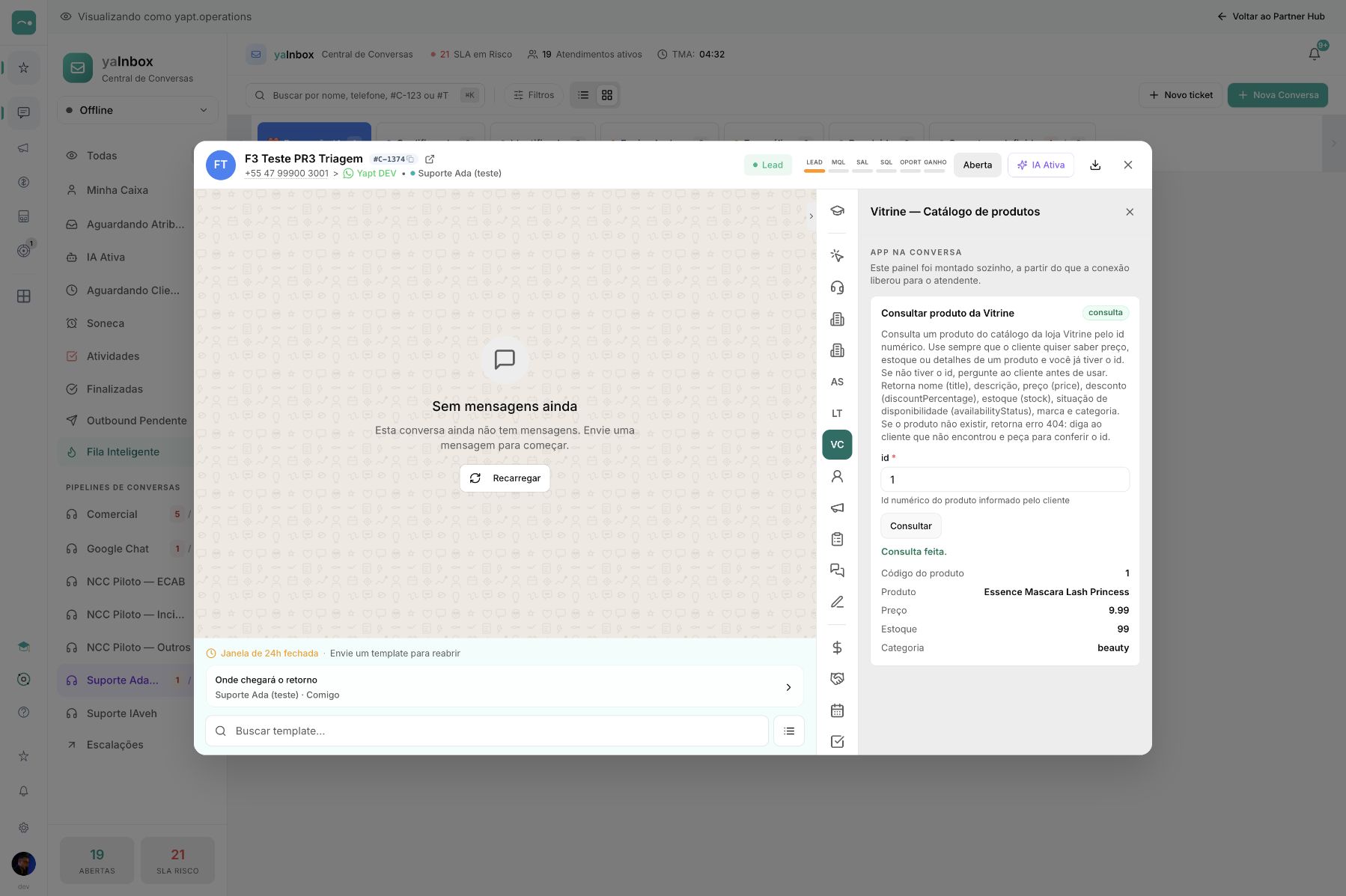
From connection to conversation Provide the documentation and what you need to look up. The builder proposes a connection for review. Review the proposal and the displayed data names: product, price, stock and category. Make the query available to operators according to role and inbox permissions. The connection appears as an app in the conversation sidebar. Query completed: name, price and stock reach the operator within the service conversation.
How yapt. helps04 / 06
“An invented answer costs customer trust and creates rework.”
Reliable answers, grounded in your company’s knowledge.
yaBrain connects documents, manuals and procedures to products, agents and team guidance. AI searches the defined knowledge base and uses conversation context. Grounding and handoff rules help prevent technical guidance without a source and route matters that need review to the right person.
Support AI service and Mentor guidance with a knowledge base connected to the business.
Link content to products and review sources, versions and coverage to reduce ungrounded answers.
In practice
01Organize
Gather documents, manuals and procedures with their sources.
02Connect
Link knowledge to the products and agents that will use it.
03Validate
Test answers, review gaps and define when to hand off to a person.
yaBrain: knowledge connected to the answer.Real screens · demonstration
yapt. · MarketingyaBrain: knowledge connected to the answer.Real screens · demonstration
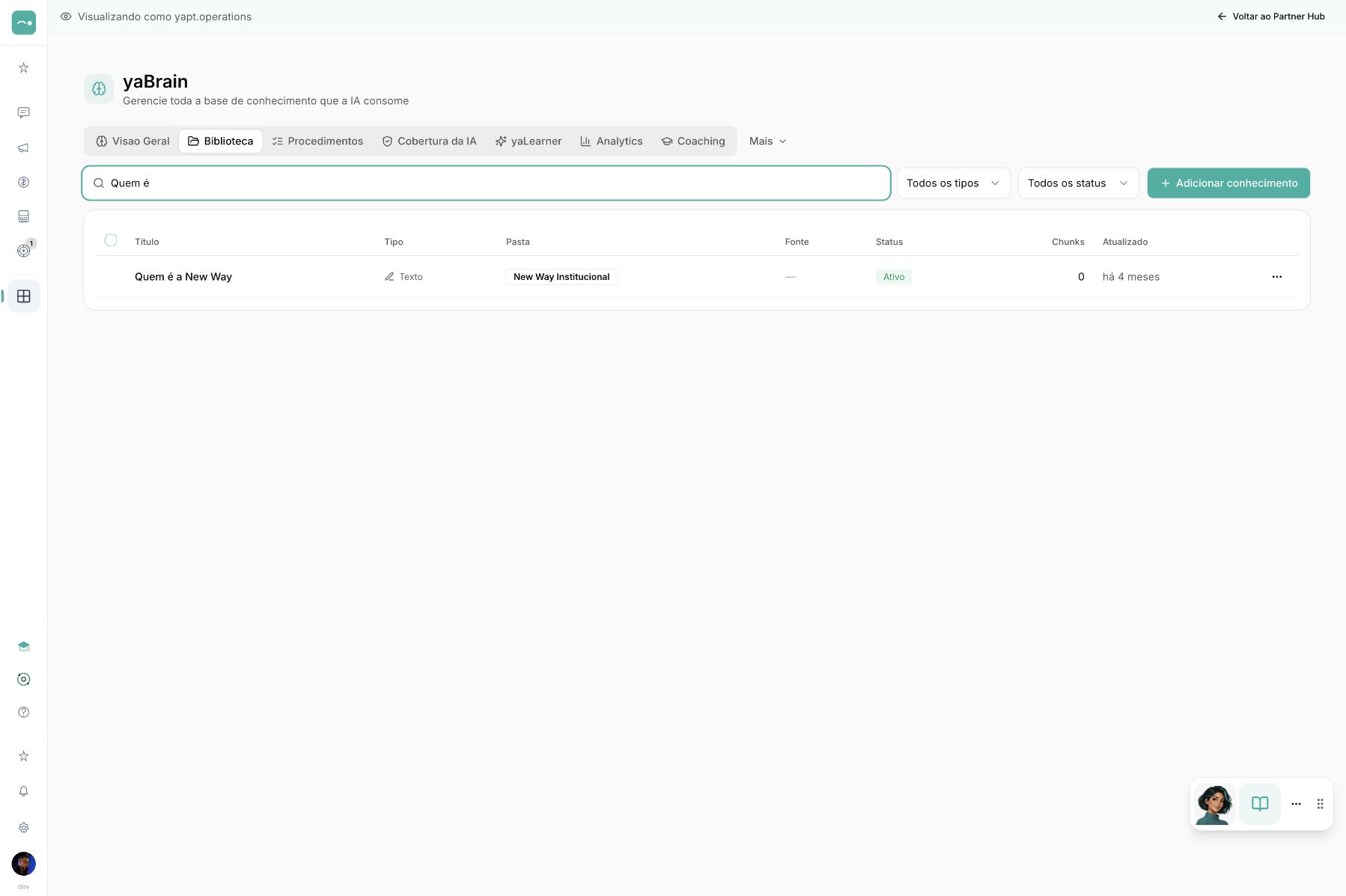
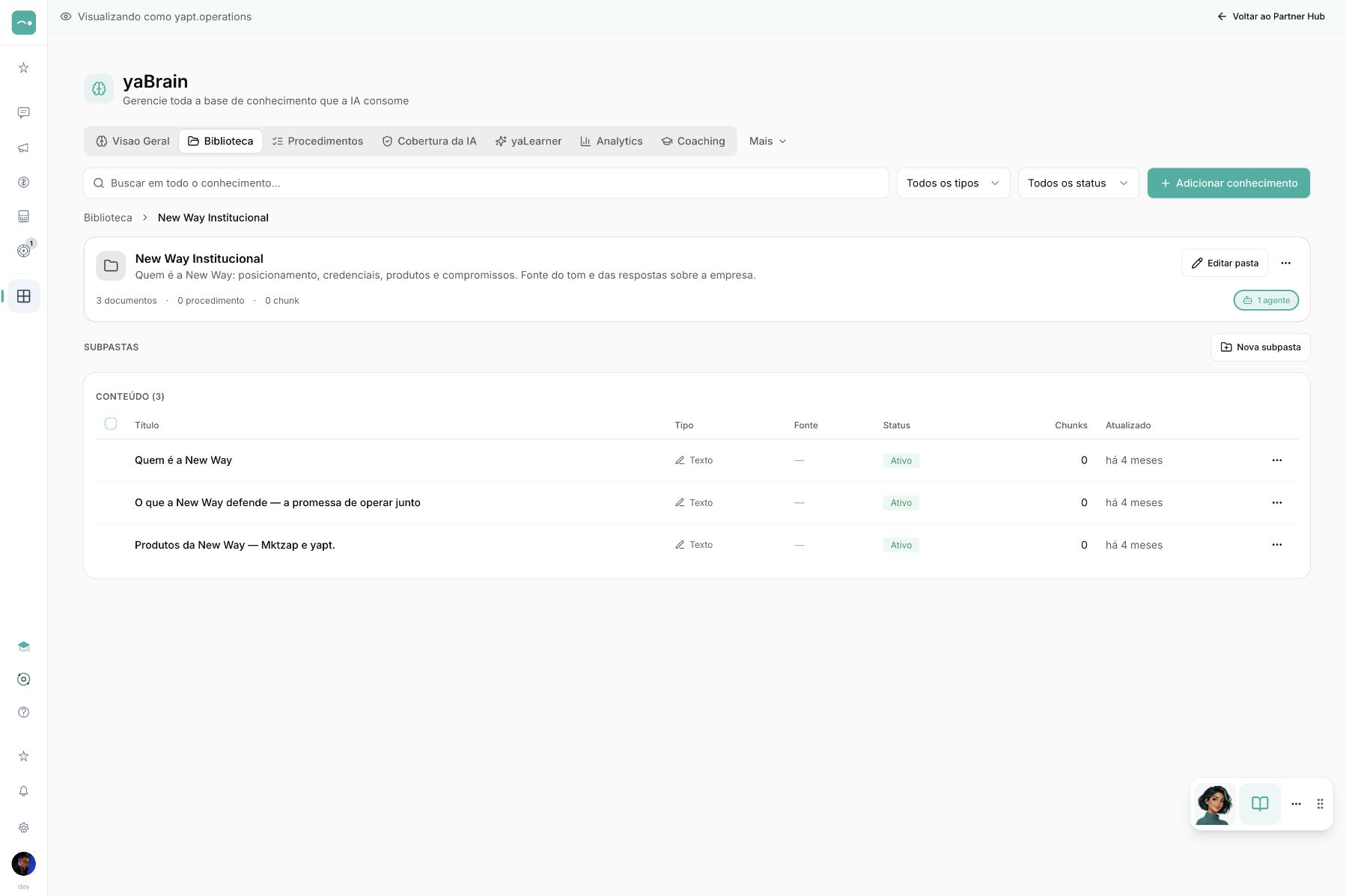
yaBrain brings together the knowledge AI can consult in a searchable library.
00:00 / 00:16
Real product screens. Configuration and usage examples; interface in Portuguese.
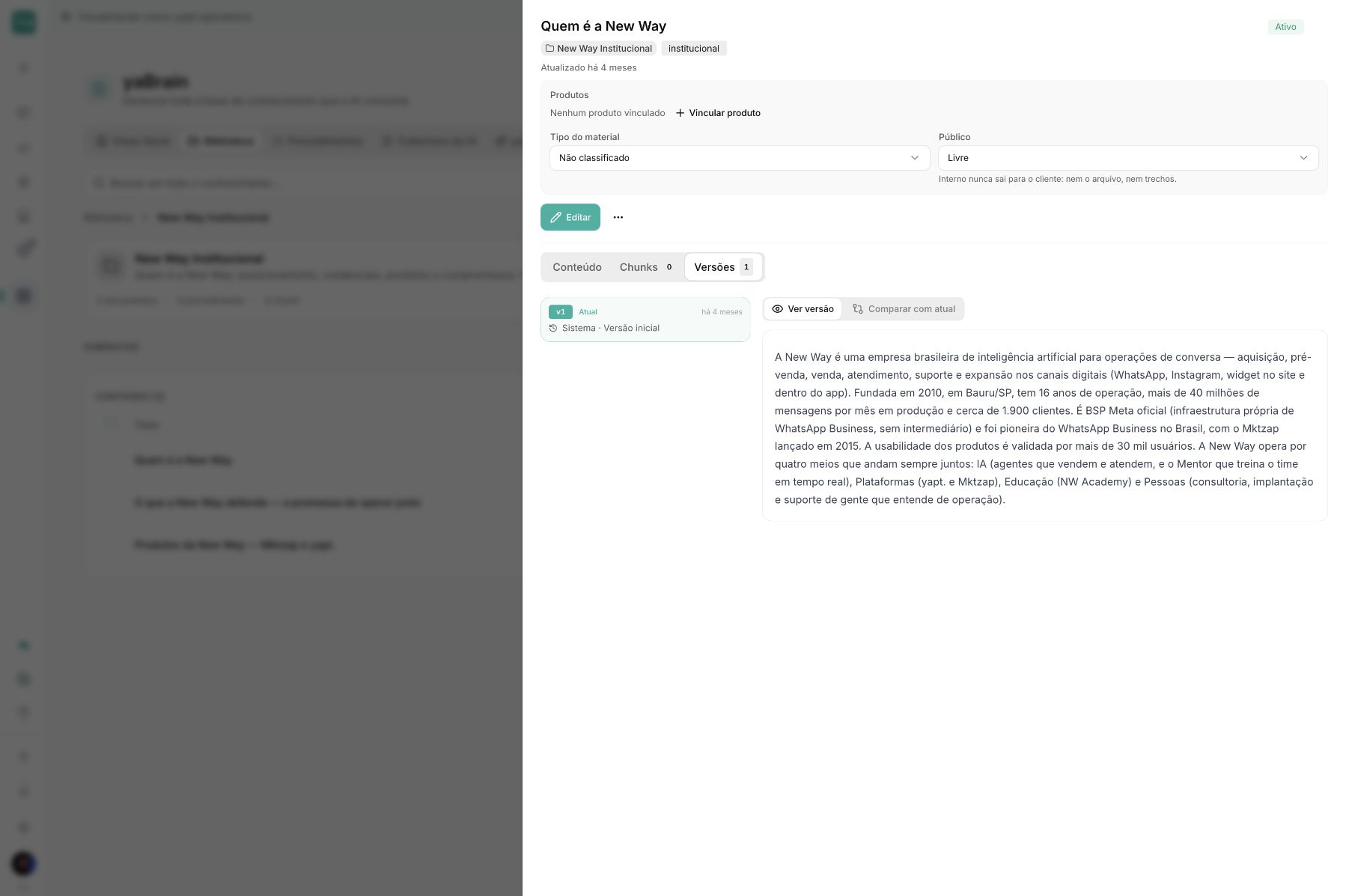
Knowledge behind every answer yaBrain brings together the knowledge AI can consult in a searchable library. Documents organized by folder keep references available for work. Folders can be linked to agents, defining the knowledge available to each role. Audience settings and versions help review and govern AI references. Knowledge and context support the Mentor’s guidance during service.
How yapt. helps05 / 06
“Queries help, but we still need to repeat the same task in another system.”
Bring queries and actions to where the work happens.
Define what can be queried or executed through the API and who can use each capability. The agent follows its tools and rules; in human customer service, write actions require confirmation. Combine the application with flows and sequences to keep other business routines moving.
Reduce repetitive data entry with actions configured for the process and available access.
Give team members queries and actions within the conversation, with confirmation before writing to the system.
In practice
01Scope
The data needed and the action the system allows.
02Configure
The capability, rules and access granted.
03Execute
Track the result and the confirmations required.
Data where the team serves customers.Real screens · demonstration
yapt. · MarketingData where the team serves customers.Real screens · demonstration
The app brings customer and internal system data into the conversation.
00:00 / 00:14
Real product screens. Configuration and usage examples; interface in Portuguese.
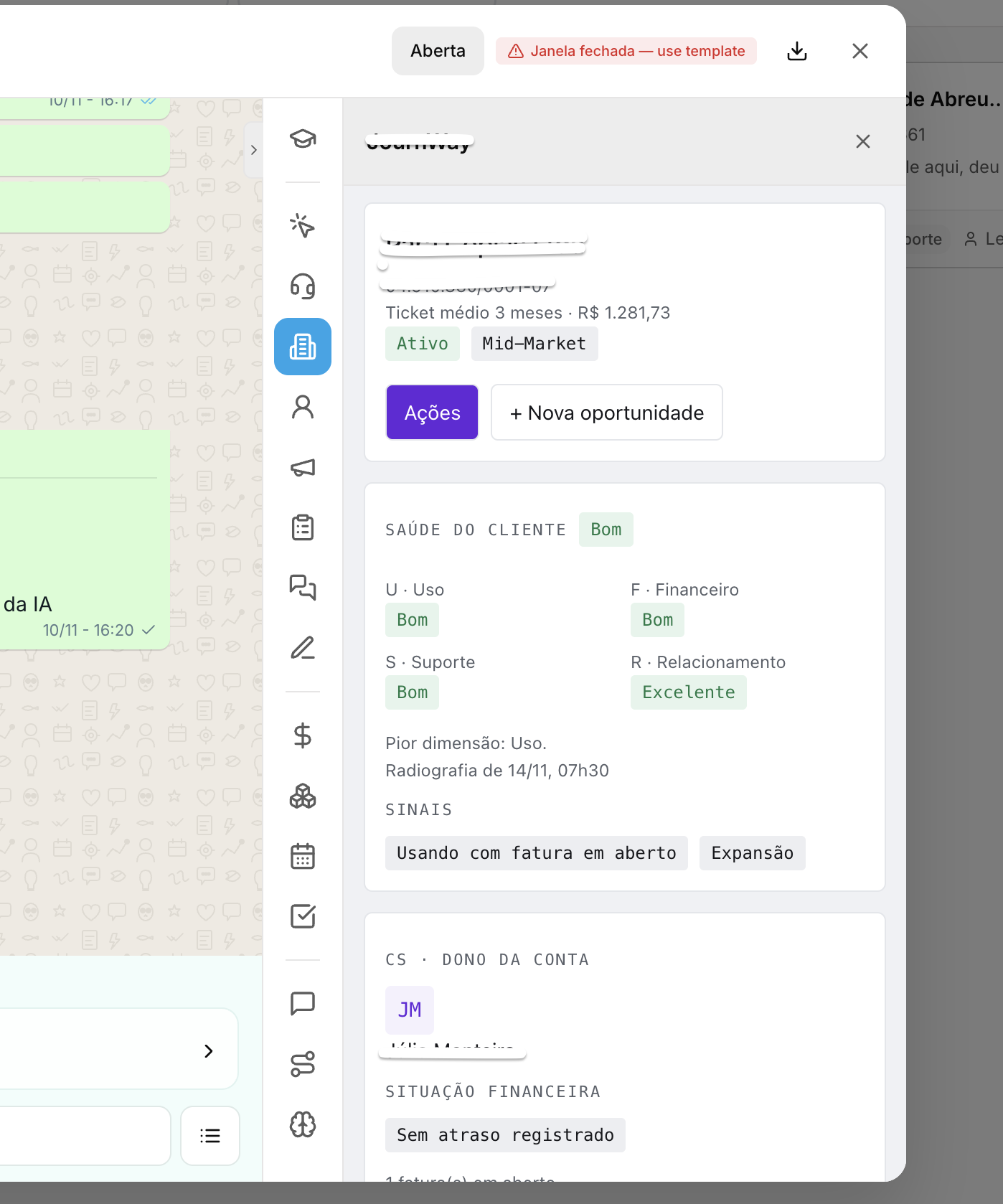
Data where your team works The app brings customer and internal system data into the conversation. Relationship, usage and financial context stay at hand to guide the reply. The operator enters the required data and queries the system without leaving the modal. The result appears right there: less searching and copying, and more time to resolve the case.
How yapt. helps06 / 06
“We want to use AI, but we need to know what it can query and do.”
Define the role, access and boundaries before applying AI.
Review instructions, knowledge and capabilities. Test the agent as a draft, publish when ready and configure which agents and team members can use the connection. Sensitive changes require renewed confirmation of access grants.
Distinguish the agent serving customers, the Mentor offering guidance and the person deciding during work.
Control connection access and review grants when sensitive configuration changes.
In practice
01Define
Responsibilities, access and boundaries for each role.
02Validate
Test responses and review queries and actions.
03Track
Observe usage and adjust configurations with the team.
Enlarge real screenReal product screen. The example illustrates configuration, not a customer result. Interface in Portuguese.
AI agents, mentors and integrations
Agents for customers. Copilots for teams. Connections for work.
In the yapt. artificial intelligence platform, agents serve customers, copilots guide people and connections bring system data into the process. Knowledge, instructions and permissions define how each role works.
01
Artificial intelligence agents
Handle the expected requests with configured knowledge, capabilities and handoff rules.
02
AI copilots and mentors
The Mentor guides operators in the conversation context, answers questions and suggests the next step.
03
API integrations
Available CRM, ERP and other system APIs bring queries and actions to agents and authorized team members.
From conversation to real work
Three ways to build. More capacity for your business.
See how to create and test a customer agent, prepare a Mentor to guide the team and build a connection to query a system. In each chapter, the need you describe becomes a configuration the team can review.
From conversation to testingReal screens · demonstration
yapt. · MarketingFrom conversation to testingReal screens · demonstration
Describe the service the agent should provide. The conversation prepares a draft.
00:00 / 00:45
Real screens from the demonstration environment with test data. Agent and copilot in draft, with no published channel. Portuguese interface. Edited to shorten waiting times.
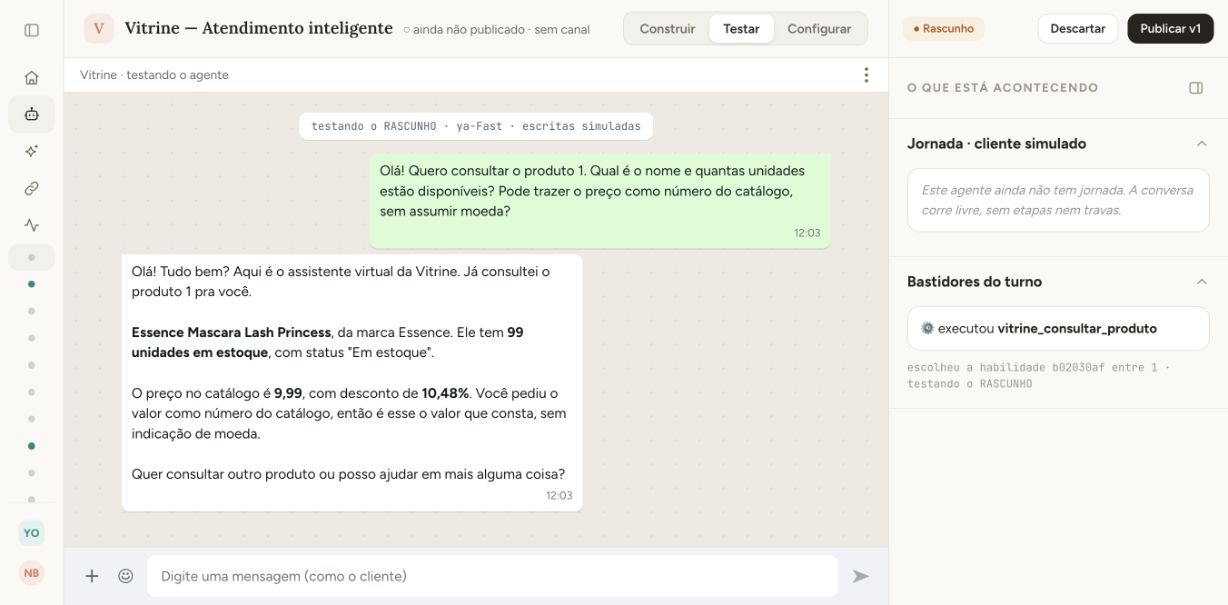
A yapt. demonstration in three chapters: agents, copilots and connections. Product interface in Portuguese. Describe the service the agent should provide. The conversation prepares a draft. The draft receives the catalog lookup capability alongside the service instructions. In the Test tab, validate the customer conversation before publishing to a channel. The test looks up the product and responds with its name, price and stock from the demonstration catalog. For the human team, describe a copilot that guides the operator during service. The preview records the “For operator” role. This example remains a draft, with no channel. In the test, the copilot reads the case, looks up the catalog and suggests the next action. The team receives a suggested reply and the reasoning behind it to decide how to proceed. Provide the documentation and what you need to look up. The builder proposes a connection for review. Review the proposal and the displayed data names: product, price, stock and category. Once applied, the names are stored in the connection’s lookup capability. In the agent test, the execution details confirm the lookup ran. The connection supplies the response.Download the video demo
Demonstration with real screens, draft agents and sample data. Interface in Portuguese.
Build with context and control
Describe the need. Review the application before putting it to work.
Build agents, copilots and connections through conversation in yaAgents. Organize knowledge, review access and test with your team. For steps, activities and communications, combine the application with yapt. flows and sequences.
The application starts with your process and evolves through real work.
Your team can select a problem, organize knowledge and access, and apply an initial scenario. You can also work with specialists for implementation and ongoing improvement, depending on the delivery model you choose.
01
Diagnose
Understand the problem, repetitive effort, knowledge and systems involved.
02
Build and test
Prepare an agent, copilot or connection; review its behavior with the team before use.
03
Track and improve
Observe usage, listen to the team and adjust instructions and capabilities based on real work.
Scope, channels, APIs, access and features are defined according to each company’s needs and configuration.
Before you begin
Clarity to build. Criteria for putting it to use.
How do artificial intelligence agents and copilots work?
An AI agent serves the customer according to its role, knowledge and tools. A copilot or Mentor guides a team member during service without speaking directly to the customer; the person decides what to apply. The conversational builder prepares agents and connections from what you describe.
Do we need to code to create agents and connections?
Building starts through chat: describe the goal and review the configuration prepared in yaAgents. A connection depends on an existing API, documentation and authorized access. You can work with specialists to assess feasibility and the details of applying it to your process.
Can the copilot help train the team?
The Mentor guides and teaches during real work: it uses the conversation context and configured knowledge to clarify questions and suggest responses and next steps. The person reviews and applies the guidance.
How can AI agents integrate with APIs, CRM and ERP systems?
In yaAgents, building through chat prepares connections to existing APIs, such as CRM and ERP APIs, for the queries and actions available in the system. Workflows and intelligent rules have their own API and webhook configuration paths. Feasibility depends on documentation, access, rules and the features enabled for the account.
Can the same connection be used by AI, the team and automations?
A connection’s capabilities can be linked to agents and made available to team members, according to permissions. The Mentor can use permitted queries from the agent, with its own limits. Flows and sequences have their own integration configuration paths; the diagnosis defines how each feature contributes to the process.
How do we control what AI and the team can do?
We define the role, instructions, knowledge and available capabilities. An agent can be tested as a draft before publication. Connections have access grants for agents and authorized team members; in human customer service, write actions require confirmation. Sensitive changes require access grants to be reviewed.
Where do we start and how do we evaluate results?
Start with a concrete problem, such as a recurring question, team guidance or a manual lookup in another system. Your team can build and test the scenario and work with specialists when needed. Define indicators and comparable periods to track quality, effort, handoffs and usage; the economic impact also considers business data and costs.
 Applied artificial intelligence platform