Artificial intelligence for sales

Artificial intelligence for sales.More revenue and productivity.

Cold leads and manual tasks cost revenue. yapt. applies AI to qualification and follow-ups, with a WhatsApp CRM, sales pipeline, conversations and activities connected to your systems. Your team runs the operation and can choose support from our specialists.

Official Meta Partner · 40M+ messages per month · 16 years.

yapt. · Sales
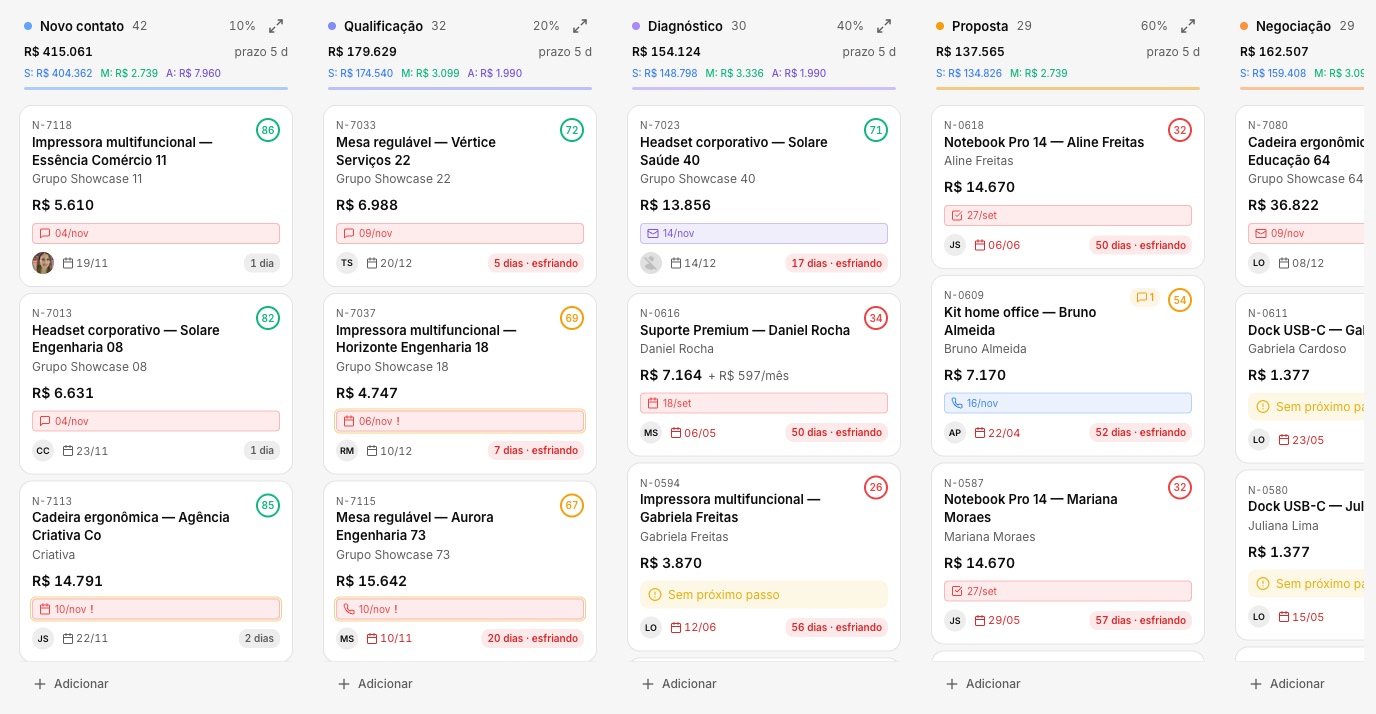
The next step for every deal
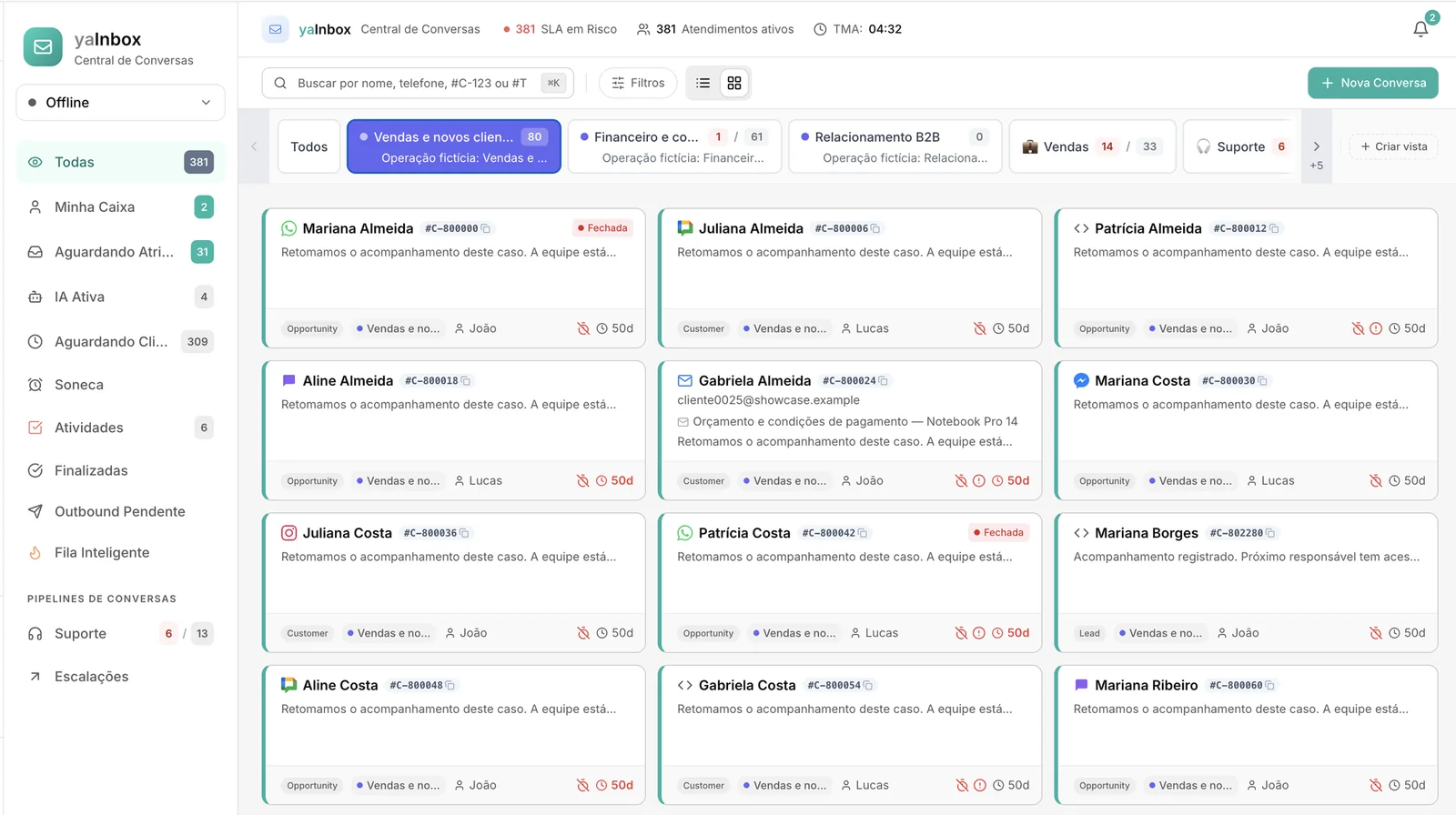
A real yapt. screen with deals organized by sales pipeline stage.

Real product screen · sample data

Inside the sales operation

1,900+ companies have trusted New Way with their operations

  • Natura
  • White Martins
  • Nutrivet
  • Seanet
  • ML Gomes
  • Fleury
  • Banco Daycoval
  • Volvo

Revenue and productivity at every stage

How much of your target is lost before closing?

Every opportunity without a next step, negotiation without context and hour spent looking for information reduces selling capacity. Explore where yapt. applies AI, organization and data to move deals forward.

How yapt. solves it

“The salesperson spends time finding out who can actually buy.”

Prepare the opportunity before involving the salesperson.

AI agents use your company's criteria to qualify, gather available context and distinguish who is ready, needs nurturing or is not a fit. The team receives a foundation to continue the sale.

  • Transcribe audio and extract information from documents in enabled workflows, reducing the time needed to reconstruct the customer's needs.
  • When configured, the agent checks available times and books the selected option, rechecking availability.

In practice

  1. Understand

    Source, needs and available context.

  2. Qualify

    Your own criteria and conversation information.

  3. Prepare

    Summary and next step for the team.
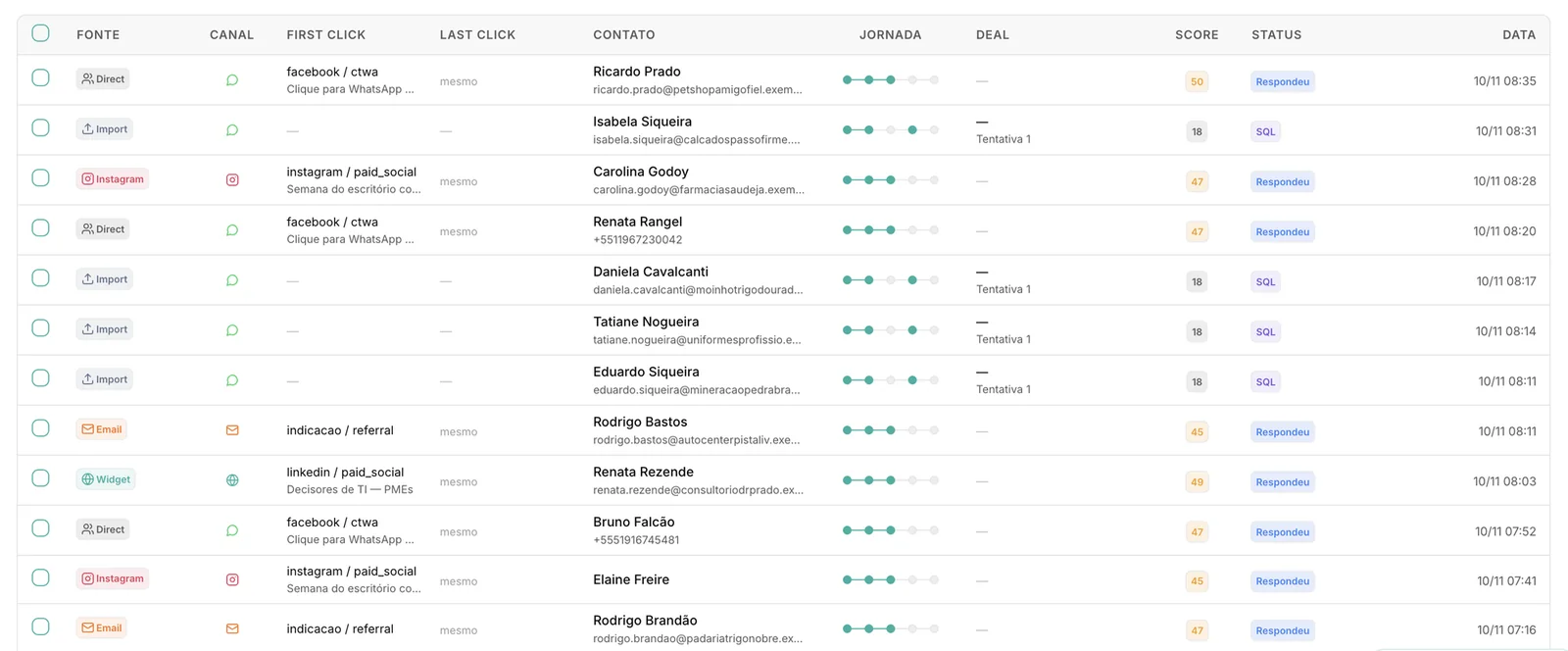
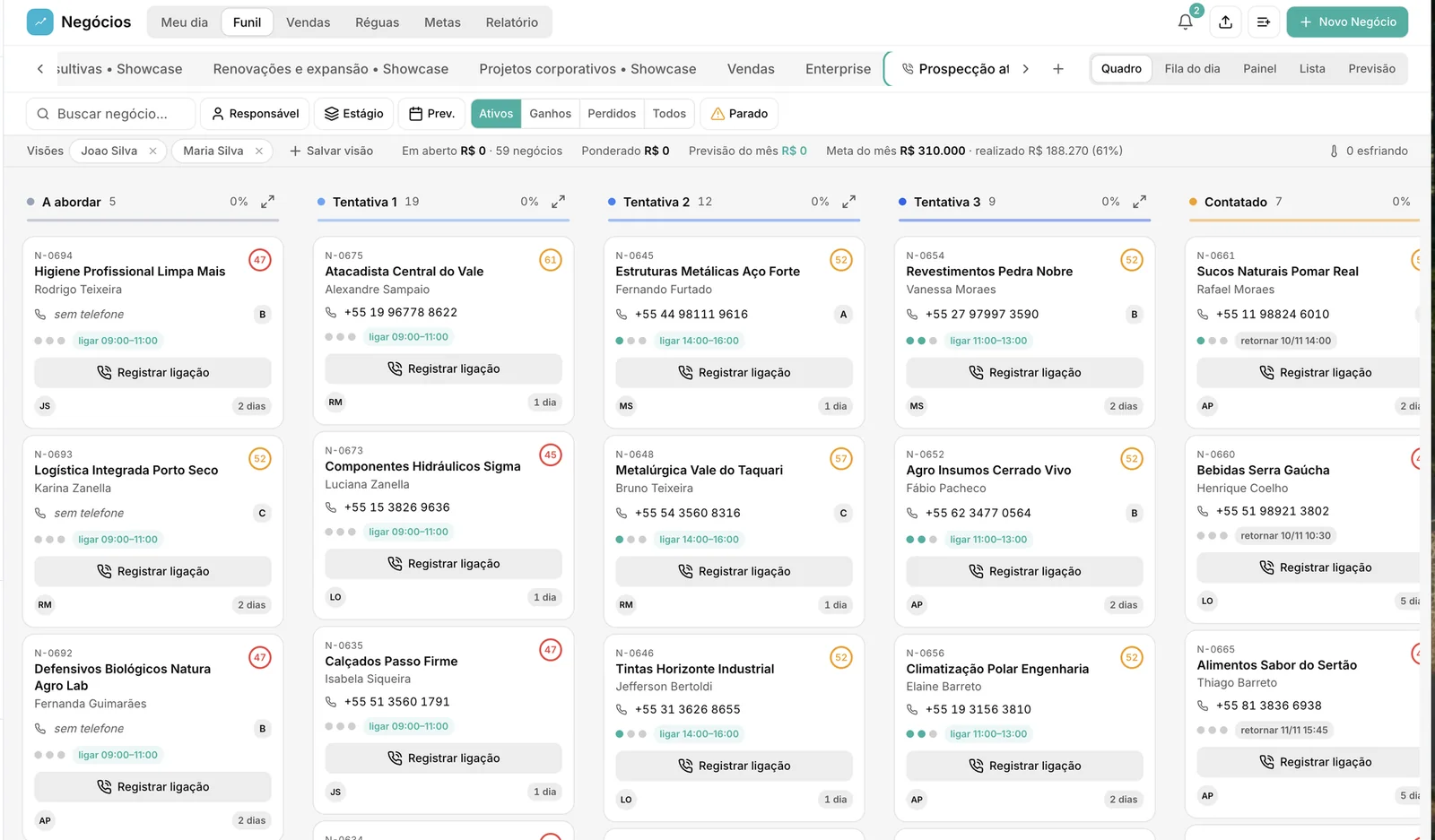
A real yapt. screen with leads, source, score and relationship stage. Expand real product screen
Product screens in Portuguese · configuration examples.

What to track

Time to qualification and progress of opportunities that fit.

How yapt. solves it

“We make attempts, but lose track of callbacks and history.”

Turn isolated attempts into prospecting with continuity.

Organize the prospecting queue, record call outcomes and keep agreed callbacks linked to the opportunity. When the contact progresses, context follows the handoff to Sales.

  • Import contacts with duplicate handling and identification of existing customers or deals.
  • Record calls and callbacks so the day's work follows a clear sequence.

In practice

  1. Organize

    Queue, priorities and contact windows.

  2. Record

    Outcome, notes and next attempt.

  3. Advance

    Opportunity and history in the sales pipeline.

A real yapt. prospecting screen with an opportunity queue and next actions. Expand real product screen
Product screens in Portuguese · configuration examples.

What to track

Attempts, completed callbacks and prospecting-to-opportunity conversion.

How yapt. solves it

“Opportunities go cold while the team tries to keep up with the day.”

Give every opportunity a next step.

My day brings together overdue, current and upcoming activities, as well as deals without a next step. Alerts and sequences help continue deals that need attention.

  • Complete, reschedule or postpone activities without losing their link to the deal or conversation.
  • Configure sequences for stalled opportunities and proposals at the defined stage, with tasks and alerts for the team.

In practice

  1. See

    Activities and opportunities that call for action.

  2. Prioritize

    Overdue work, stage deadlines and inactivity.

  3. Continue

    Configured tasks, messages and alerts.

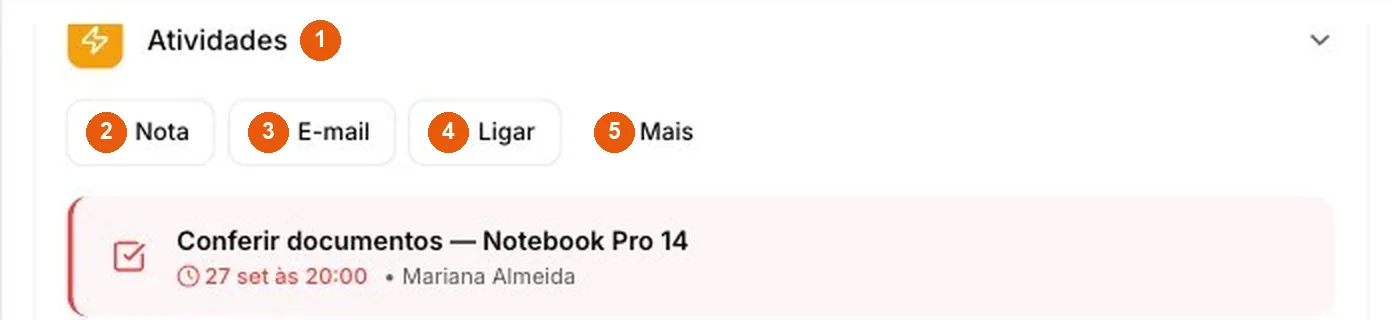
A real screen of activities linked to a deal in yapt. Expand real product screen
Product screens in Portuguese · configuration examples.

What to track

Overdue activities, opportunities without a next step and progress by stage.

How yapt. solves it

“Every salesperson has to look for information and reconstruct the negotiation.”

Less time searching. More context to negotiate.

Bring together conversations, activities, participants and history in the deal. The copilot prepares summaries, suggests responses and proposes next steps, while the team decides what to send and apply.

  • Identify decision-makers, buyers and other participants to understand who is involved in the negotiation.
  • Bring data from enabled integrations into the conversation and use the copilot to prepare tasks, follow-ups or contact updates.

In practice

  1. Gather

    Conversations, participants and deal information.

  2. Guide

    Summary, sources and copilot suggestions.

  3. Apply

    Actions approved by the salesperson.

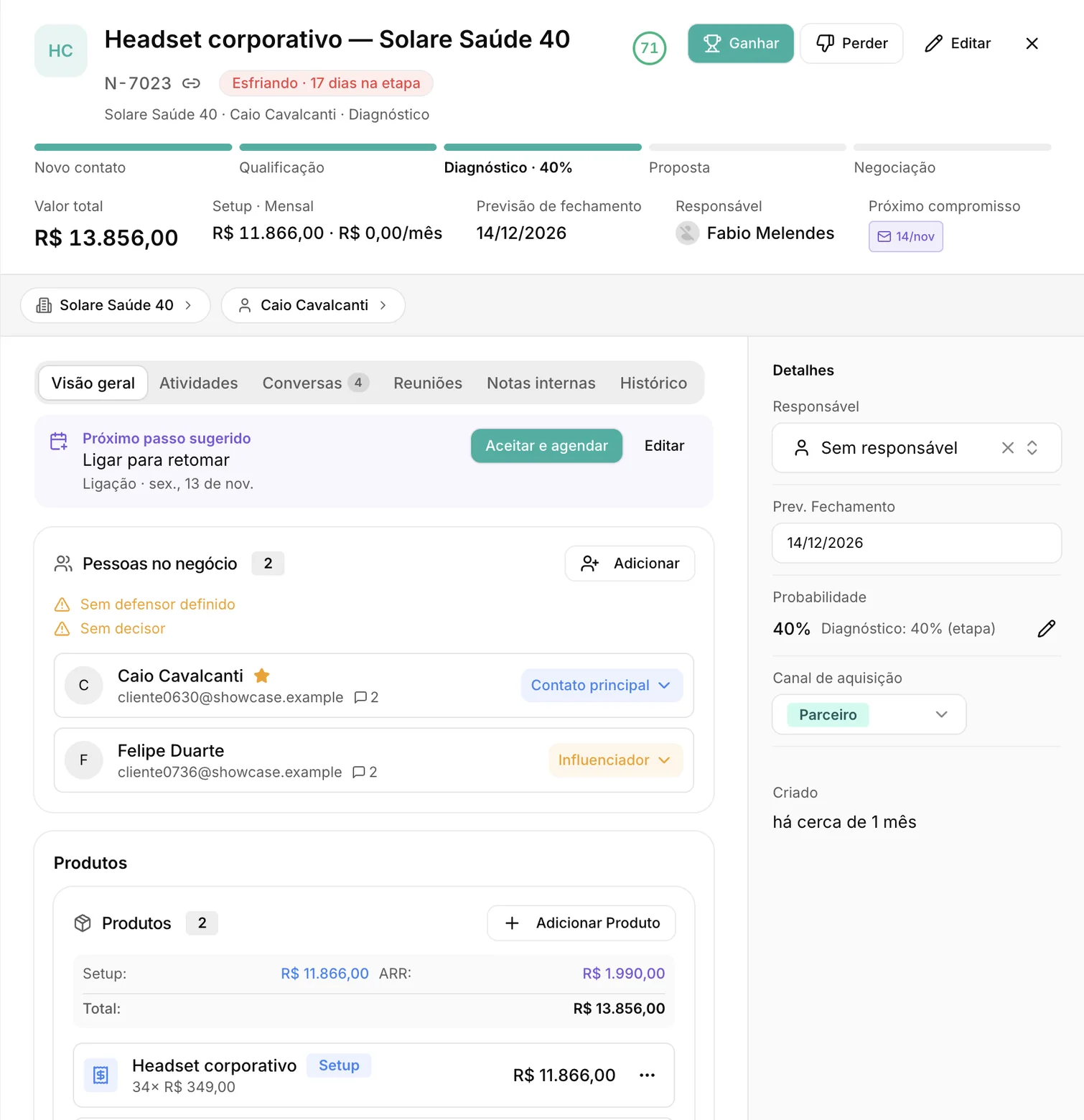
A real yapt. deal screen with details, owner and sales context. Expand real product screen
Product screens in Portuguese · configuration examples.

What to track

Preparation time, negotiation continuity and completed activities.

How yapt. solves it

“We send the proposal, but tracking versions and decisions becomes manual work.”

Shape the proposal. Keep the negotiation visible.

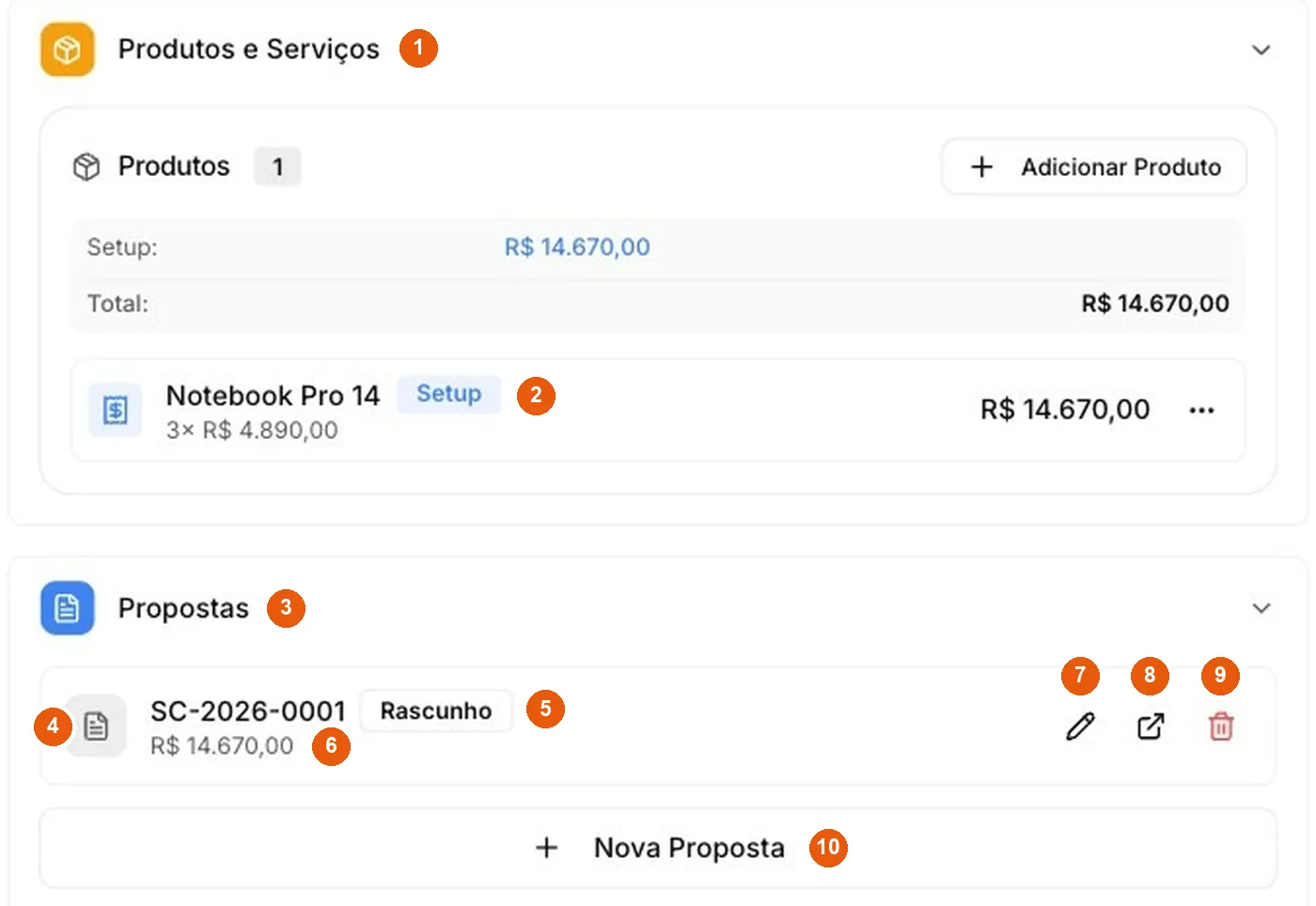
Prepare proposals linked to the deal, reusing products, templates and terms. Track versions and status, and provide a link for the customer to view and accept.

  • Keep the proposal and negotiation connected so the team knows which version is being discussed.
  • Record continuity in the deal and preserve the distinction between an accepted proposal, a confirmed sale and payment.

In practice

  1. Prepare

    Products, recipient, template and terms.

  2. Track

    Versions and status linked to the deal.

  3. Formalize

    Customer viewing and acceptance.

A real proposal preparation screen with products and terms linked to the deal. Expand real product screen
Product screens in Portuguese · configuration examples.

What to track

Time to decision, accepted proposals and conversion to a confirmed sale.

How yapt. solves it

“The pipeline is full, but we only discover too late that the target is at risk.”

See what is missing from your target while you can still act.

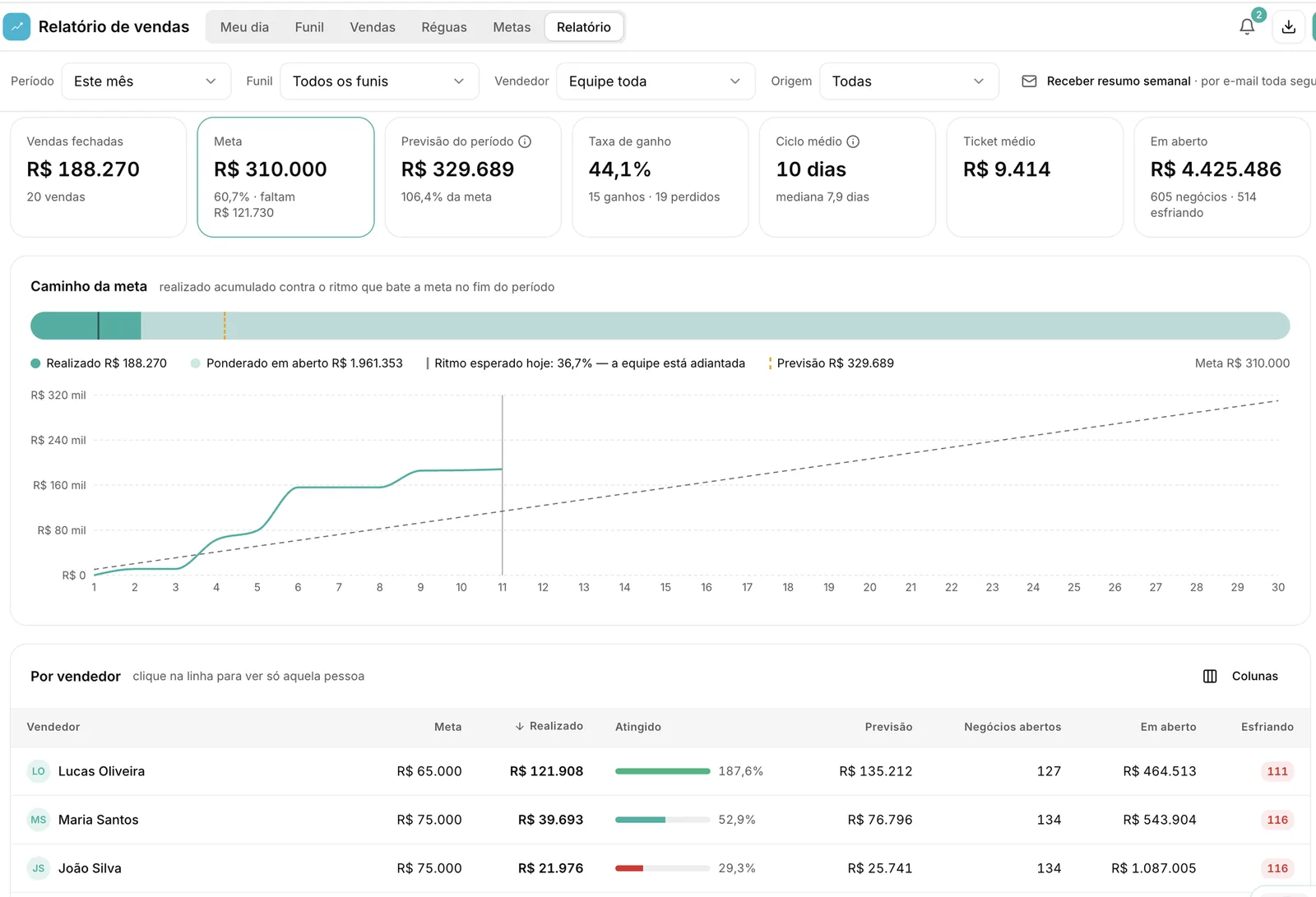
Track targets, actual results and the pace of salespeople and teams. The sales report shows conversion, time by stage and loss reasons, with clear criteria for interpreting the forecast.

  • See where deals stall and which loss reasons need investigation.
  • Read the forecast according to the rules and history used; it guides assessment and does not guarantee closing.

In practice

  1. Compare

    Target, actual results and pace for the period.

  2. Locate

    Stages, conversion and loss reasons.

  3. Act

    Management priorities to support the team.

A real yapt. sales target screen with results and tracking for the period. Expand real product screen
Product screens in Portuguese · configuration examples.

What to track

Actual results, conversion, time by stage, losses and progress toward the target.

How yapt. solves it

“After the sale, account follow-through depends on memory.”

Keep the relationship moving with an owner and a next step.

Organize customers into portfolios with owners, deals, conversations and relationship information. Use tasks and alerts to guide follow-up after the sale.

  • Make it clear who looks after each account and what has already been agreed in the relationship.
  • Configure kickoff, after-sales and renewal follow-up with tasks and alerts, according to the company's process.

In practice

  1. Define

    Portfolio, owners and team roles.

  2. Connect

    Customer history, conversations and deals.

  3. Track

    Follow-up tasks and alerts.

Operational example

The sale starts the next stage of the relationship

  1. A deal is completed and the customer needs to move to the next stage.

  2. The team organizes owners and follow-up activities.

  3. The relationship continues with visible history and responsibilities.

What to track

Accounts with an owner, planned follow-ups and opportunities to continue the relationship.

Inside the sales operation

From conversation to decision. The deal stays connected.

Follow AI preparing context, prospecting, negotiation and sales indicators. Explore the journey and next steps in the product.

From conversation to sales managementDemo · sample data · UI in Portuguese

The journey starts in Workspace, with conversations and deals connected.

Demonstration with sample data. Features and results depend on the company's configuration, data and process.

Artificial intelligence in your sales operation

AI prepares opportunities. Your team moves deals forward.

In the same AI-powered CRM, the sales pipeline, conversations and activities share customer context. Agents prepare opportunities, copilots guide your team and integrations bring in data from your systems. Our specialists can support implementation and ongoing improvement.

Qualification for SDRs

AI agents collect information and qualify leads against configured criteria, preparing context for the sales team.

Copilots that guide

Summaries, suggestions and proposed actions during the conversation, with the seller deciding what to do.

Follow-ups with context

Intelligent sequences and activities keep follow-ups connected to the deal, conversations and pipeline stage.

Sales pipeline management

Lead source, history, targets and indicators help managers find bottlenecks and track opportunities.

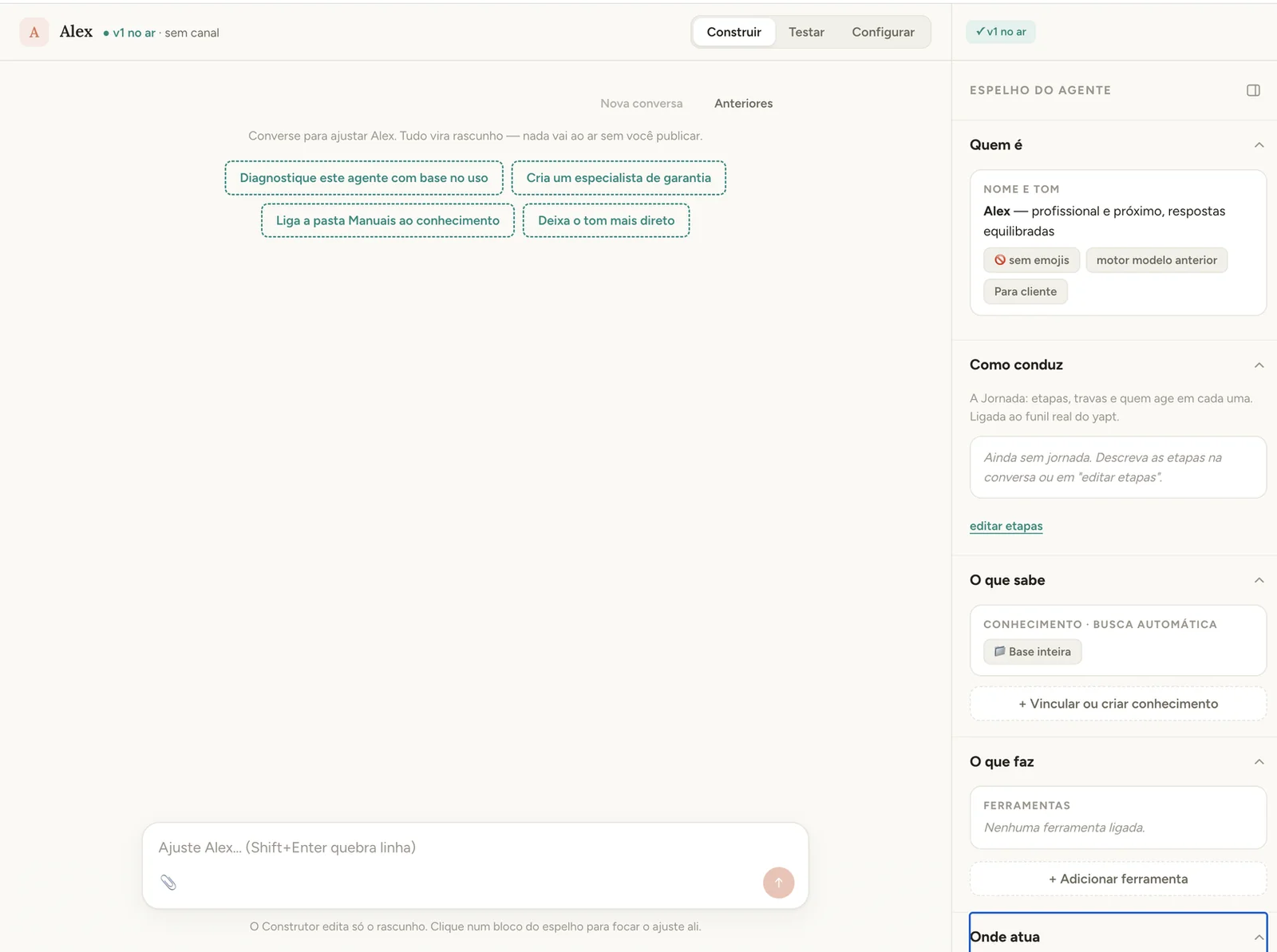
yaAgents · build through conversation

Describe how your team sells. Prepare AI to work with them.

In yaAgents, describe the qualification criteria, guidance and tools your operation needs. Your team reviews and tests the setup and can choose support from our specialists to implement and improve the solution.

Explore yaAgents
A real screen of yapt.'s AI agent builder.

From assessment to AI in action

Your sales process has its own needs. AI needs to know them.

Define where to apply AI to prospecting, negotiation and follow-up. Your team can use the platform or choose our specialists to support implementation and ongoing improvement.

01

Assess

Understand incoming opportunities, pipeline bottlenecks and the team's time spent.

02

Apply

Configure the first scenario, AI criteria, rules and necessary connections.

03

Improve

Guide the team, track indicators and adjust what needs to improve.

Scope, channels, integrations and features are defined according to each company's needs and configuration.

Before getting started

Clarity for management. Continuity for salespeople.

How does a WhatsApp CRM with artificial intelligence work?

yapt. brings contacts, conversations, deals and activities into the same context. AI can qualify leads, summarize history and suggest replies; sequences organize follow-ups under defined rules. Your company decides where an agent acts and where a seller reviews, approves or takes over the negotiation.

How does the manager track productivity and targets?

My day organizes activities, overdue work, next steps and signs of deals that need attention. The sales report brings together targets, actual results, conversion, time by stage and loss reasons, helping management decide where to support the team.

How does artificial intelligence help SDRs and prospecting?

Agents can qualify leads against configured criteria and prepare context for an SDR or seller. The queue organizes opportunities and planned follow-ups; your team records calls, notes and next attempts in the deal. Sequences and activities help maintain follow-up continuity.

Is the sales forecast a revenue guarantee?

No. The forecast uses rules, stage probabilities and history to help assess the period. A won deal, accepted proposal, confirmed order and money received are different situations and must be interpreted using the right criteria.

Can AI read audio, documents and data from our systems?

Transcription, document analysis and integration tools can prepare information for AI and the team when enabled and configured. Format and processing limits apply; integrations depend on available systems, APIs and access.

Do we need to implement everything at once?

We can prioritize one bottleneck and define a first scenario with clear indicators. Modules, permissions, data, integrations and team readiness guide the scope and its evolution.

Do I need to hire specialists to use the platform?

You can use the platform with your own team or combine yapt. with specialists supporting its application. New Way also offers consulting for a defined problem, with or without the platform. The assessment helps identify the right approach for your operation.

Real product screen

Use the image controls to expand and close it.

Your next improvement starts here

Let’s continue on WhatsApp

We could not open the diagnosis right now. You can continue on WhatsApp.

Continue on WhatsApp