Use automations with artificial intelligence to connect steps, WhatsApp conversations and data from your systems. Combine the yaFlows builder and intelligent rules for tasks, follow-ups and continuity. Your team can operate with specialist support. Building workflows through conversation with iavéh is rolling out gradually.
1,900+ companies have trusted New Way with their operations
Process automation, from input to the next step
What stalls when someone has to remember, copy or chase?
A contact without a follow-up, a task that was not created and data left in another system interrupt the journey. Explore eight process and WhatsApp automation scenarios to keep work moving with AI, workflows and intelligent rules.
How yapt. helps01 / 08
“Every new routine depends on someone building, explaining and chasing each step.”
Turn everyday work into a process that moves forward.
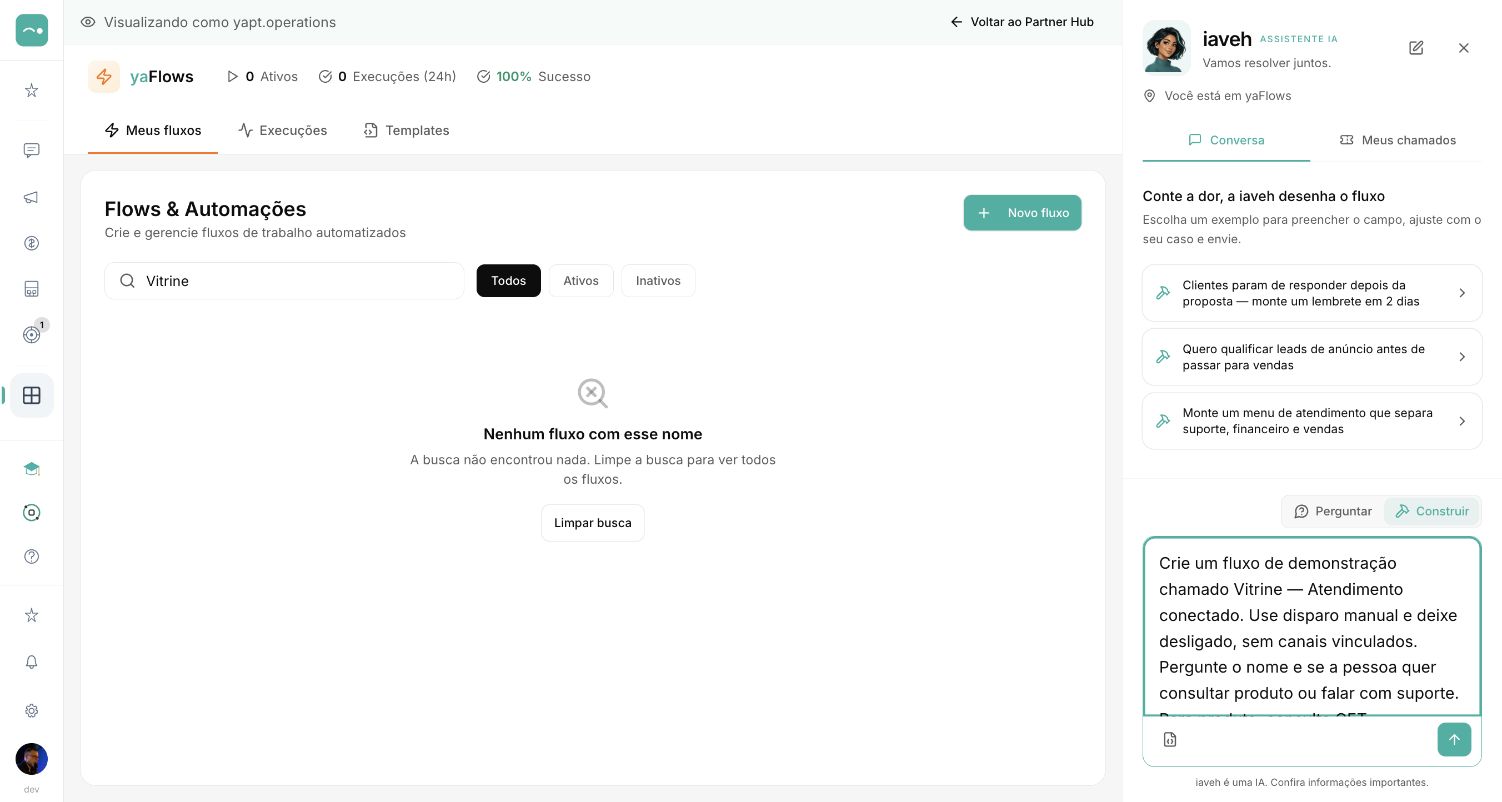
In yaFlows, connect messages, conditions, waits, schedules, AI and business actions in a visual workflow. Building through conversation with iavéh is rolling out gradually: describe what you need, review the proposal and adjust the steps in the builder.
Alternate AI and human steps, connecting qualification, data collection and handoff to the team.
Use buttons, lists and WhatsApp Flows forms to gather the information needed and continue the journey.
In practice
01Describe
Define the starting point, the objective and what needs to happen.
02Build
Combine conditions, data, AI and actions in the visual builder.
03Review
Check the path and follow its execution before improving it.
AI building · gradual rollout
From conversation to a reviewed flow.Product demo · Portuguese UI
yapt. · MarketingFrom conversation to a reviewed flow.
DescribeDescribe
BuildBuild
DecideDecide
Product demo · Portuguese UI
iavéhConstruirNova conversa ⋯
yaFlows
Automações
O que vamos construir?
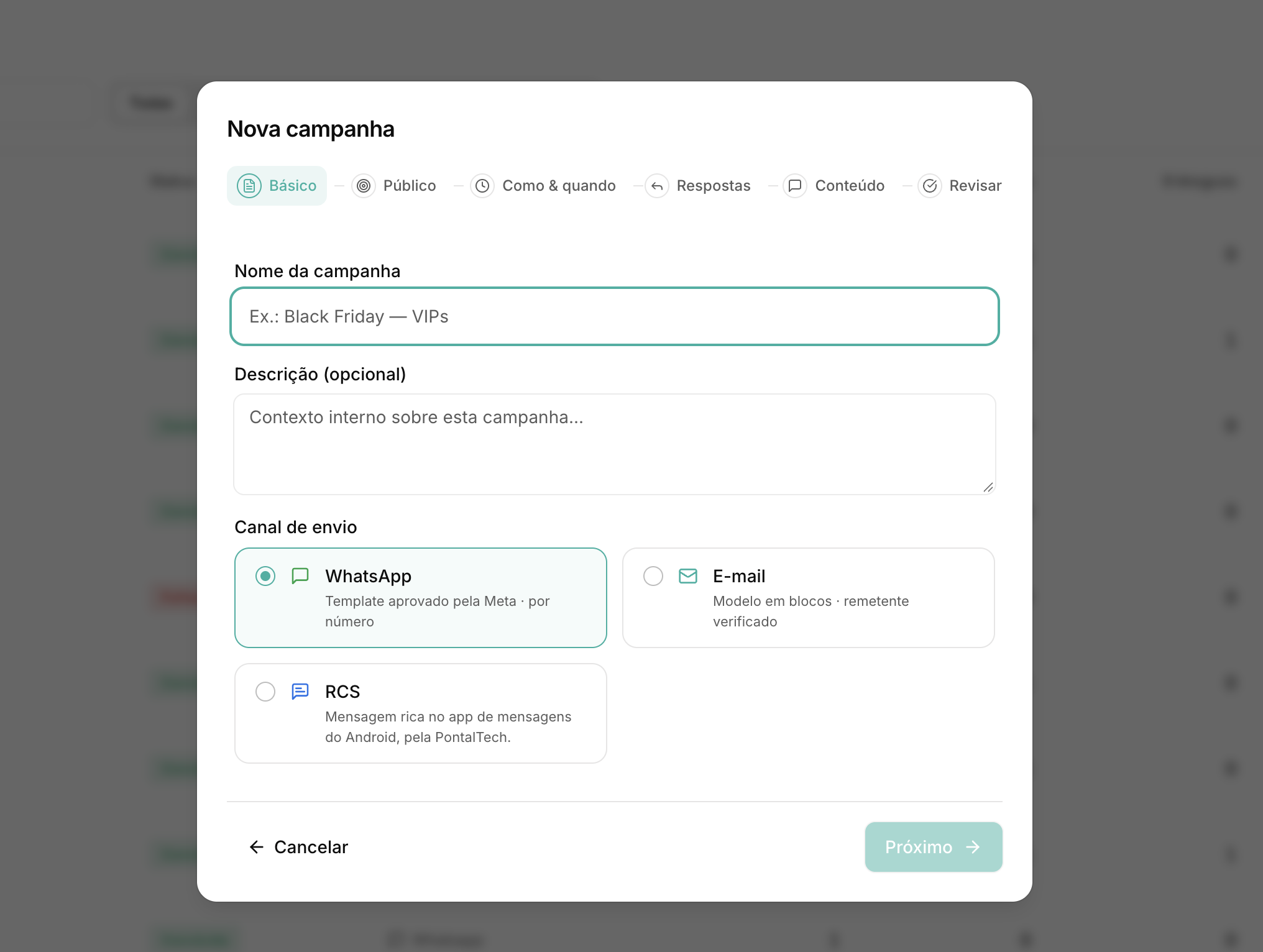
Crie o fluxo Vitrine — Atendimento conectado. Disparo manual. Pergunte nome e escolha: produto ou suporte. Consulte o produto ou confirme o suporte e conclua. Deixe desligado, sem canais.
Montei uma proposta para você conferir. Nada é ativado sem a sua revisão.
Proposta de fluxo
Vitrine — Atendimento conectado
Perguntar nome e escolha, consultar o produto ou confirmar o suporte e concluir.
Gatilho
Disparo manual
Canais
Nenhum canal vinculado
Caixas
Início → Nome e escolha → Produto ou suporte → Concluir
AplicarO fluxo é criado desligado.
Descreva o que precisa…↑
Vitrine — Atendimento conectadoDesligadoProblemas Testar Histórico de execuções Salvar
QuadroRoteiroAuto-organizar
◉
InícioDisparo manual
▱
Enviar mensagemNome e escolha
Produto ou suporte?
↗
Requisição HTTPConsultar produto
Salvar retorno: produto
✓
Enviar mensagemConfirmar suporte
Confirmar e concluir
− 100% + ⊞
CondiçãoConferir caminhos ×
⑂
Quando seguir por este caminho?
Escolha do cliente ⌄
É igual a ⌄
Consultar produto
Se atenderConsultar produto→
Caso contrárioConfirmar suporte→
Cada caminho segue a condição definida para o processo.
Describe the Vitrine flow: manual trigger, product or support choice and a catalogue query.
00:00 / 00:15
Real screens and reproduced product interfaces with demonstration examples. Interface in Portuguese.
A yapt. automation demonstration: configuration, steps and monitoring. Describe the Vitrine flow: manual trigger, product or support choice and a catalogue query. Review before applying. The new flow starts switched off, ready for review in yaFlows. In yaFlows, the Board shows how the steps connect. In this example, messages and paths lead to a product query or support confirmation. The choice between product and support defines the next path in this example. Filters and conditional paths route each case to its configured treatment.
“We invest in the campaign, but communication stops after the first contact.”
Keep interest moving toward the next opportunity.
Combine campaigns and communication journeys to nurture, recover and follow up with contacts. Use audiences, events, conditions and intervals to decide who receives each message through WhatsApp or email, and when the sequence should continue or stop.
Continue the conversation with nurture messages, reminders and follow-ups based on contact interest.
Connect campaign sends and automated journeys to the history that marketing and sales use in their work.
In practice
01Segment
Choose the audience and the moment they enter the communication.
02Communicate
Prepare messages, dates, intervals and paths based on interaction.
03Monitor
Observe replies, clicks and exits to adjust the sequence.
Keep interest moving through communication.Product demo · Portuguese UI
yapt. · MarketingKeep interest moving through communication.
NurtureNurture
CommunicateCommunicate
DecideDecide
Product demo · Portuguese UI
Boas-vindas e acompanhamento • DemonstraçãoRascunho← Voltar Salvar
Réguas inteligentes
Uma sequência de ações, do gatilho ao próximo passo.
Quando
◉
Contato criadoTodas as origens
Alterar
Fazer
1.◷Esperar24 horas
2.▱Enviar mensagemContinuar a comunicação
3.⑂Se respondeuContinuar pelo caminho configurado
CondiçãoConferir caminhos ×
⑂
Quando seguir por este caminho?
Escolha do cliente ⌄
É igual a ⌄
Consultar produto
Se atenderConsultar produto→
Caso contrárioConfirmar suporte→
Cada caminho segue a condição definida para o processo.
The rule follows customer interest from a defined event.
00:00 / 00:15
Real screens and reproduced product interfaces with demonstration examples. Interface in Portuguese.
A yapt. automation demonstration: configuration, steps and monitoring. The rule follows customer interest from a defined event. Combine messages, waits and conditions to continue communication with context. Campaigns and rules connect communication to available channels. Choose the channel, audience and timing for each send according to configuration. The choice between product and support defines the next path in this example. Filters and conditional paths route each case to its configured treatment.
“The proposal was sent. Following up depends on the seller remembering.”
Keep opportunities moving, with the next action ready.
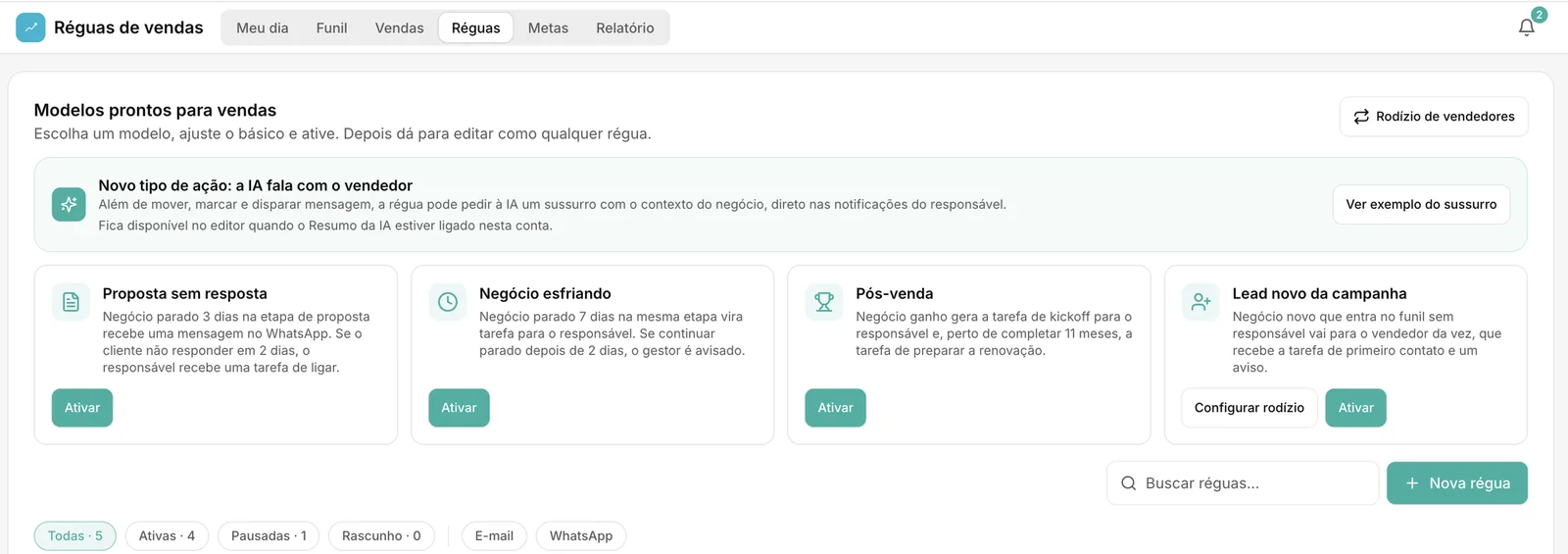
Use sales journeys to follow up on unanswered proposals, stalled deals and after-sales work. Steps can create activities, notify owners, organize round-robin assignment and request AI guidance using the deal context.
Turn deals with no progress into visible next actions for sellers and managers.
Bring context and AI guidance to the owner, with tasks and communications connected to the pipeline.
In practice
01Identify
Define the stage, the sign of a stall or the change in the deal.
02Prepare
Combine follow-up, an activity and a notification for the owner.
03Continue
Track replies and changes to continue or end the journey.
The next contact has a next step.Product demo · Portuguese UI
yapt. · MarketingThe next contact has a next step.
Follow upFollow up
ActAct
Create activitiesCreate activities
Product demo · Portuguese UI
Proposta sem resposta • DemonstraçãoRascunho← Voltar Salvar
Réguas inteligentes
Uma sequência de ações, do gatilho ao próximo passo.
Quando
◉
Negócio parado na etapaProposta • 3 dias sem avanço
Alterar
Fazer
1.◷Esperar1 dia
2.▤Criar atividadeRetomar a proposta
3.⑂Se respondeuContinuar pelo caminho configurado
▤1.Criar atividade⌃
Tipo de atividade *
📋 Tarefa⌄
Título *
Retornar ao cliente
Use {{contact.name}}, {{deal.title}} para variáveis
Descrição (opcional)
Conferir o andamento e retornar.
Vence em (dias)
1
Horário (opcional)
10:00
Prioridade
Normal⌄
Atribuir a
Responsável da conversa⌄
Responsável do deal
✓Responsável da conversa
Sales rules start from the situations that let an opportunity go cold.
00:00 / 00:15
Real screens and reproduced product interfaces with demonstration examples. Interface in Portuguese.
A yapt. automation demonstration: configuration, steps and monitoring. Sales rules start from the situations that let an opportunity go cold. Unanswered proposals, stalled deals and post-sale work can have configured next steps. Time without progress and deal stage help define when to act. The sequence can create an activity, notify the owner and prepare the next step. A configured action can create the next deal or service activity. Configure the next activity and connect follow-up to the person responsible for the work.
“A ticket changes stage and the team has to check everything for the service to continue.”
Bring automated follow-through to service cases too.
Coming soon, service journeys will extend automation to tickets and service stages. The aim is to organize activities, updates and notifications as a case progresses, connecting follow-through to the journey your company needs to deliver.
Plan continuity for cases that depend on a reply, documentation or a handoff between owners.
Prepare service follow-through with events, conditions and actions tied to its stages.
In practice
01Map
Define stages, outstanding items and moments that need attention.
02Prepare
Plan activities, data and communications for each situation.
03Measure
Define indicators to assess the routine when the feature is released.
Service rules · coming soon
Preview of service rules.Product demo · Portuguese UI
yapt. · MarketingPreview of service rules.
Services · coming soonServices · coming soon
Create activitiesCreate activities
Update dataUpdate data
Product demo · Portuguese UI
Acompanhamento do serviço • DemonstraçãoPrévia • Em breve← Voltar Salvar
Réguas inteligentes
Uma sequência de ações, do gatilho ao próximo passo.
Quando
◉
Caso entrar na etapaEm andamento
Alterar
Fazer
1.◷EsperarPrazo definido no serviço
2.▤Criar atividadeConferir andamento do caso
3.⑂Verificar etapa do casoSeguir ou encerrar a sequência
▤1.Criar atividade⌃
Tipo de atividade *
📋 Tarefa⌄
Título *
Retornar ao cliente
Use {{contact.name}}, {{deal.title}} para variáveis
Descrição (opcional)
Conferir o andamento e retornar.
Vence em (dias)
1
Horário (opcional)
10:00
Prioridade
Normal⌄
Atribuir a
Responsável da conversa⌄
Responsável do deal
✓Responsável da conversa
✎2.Atualizar campo do contato⌃
Campo do contato
Acompanhamento⌄
Valor
Aguardando retorno
Preview: service rules to organize follow-up for each case.
00:00 / 00:15
Real screens and reproduced product interfaces with demonstration examples. Interface in Portuguese.
A yapt. automation demonstration: configuration, steps and monitoring. Preview: service rules to organize follow-up for each case. Stages, deadlines and owners guide the planned sequence. Coming soon. A configured action can create the next deal or service activity. Configure the next activity and connect follow-up to the person responsible for the work. Automation can also update a field defined for the process. Configured field updates reduce repeated manual data entry.
How yapt. helps05 / 08
“The conversation moves forward, but someone still has to create the task and fill in the fields.”
Turn events into activities and organized data.
Create activities from deal or conversation events, update defined fields and keep the process supplied with the information it needs. Combine rules, variables, lookups and AI to reduce repetitive work between steps.
Prepare follow-up tasks in the context where the work happens.
Reduce copying and repeated data entry with fields and actions configured for each situation.
In practice
01Define
Choose the event and the data needed by the process.
02Automate
Configure the planned activity, field or update.
03Connect
Keep the routine linked to the deal, contact or service conversation.
Activities and fields follow the process.Product demo · Portuguese UI
yapt. · MarketingActivities and fields follow the process.
Create activitiesCreate activities
Update dataUpdate data
ActAct
Product demo · Portuguese UI
▤1.Criar atividade⌃
Tipo de atividade *
📋 Tarefa⌄
Título *
Retornar ao cliente
Use {{contact.name}}, {{deal.title}} para variáveis
Descrição (opcional)
Conferir o andamento e retornar.
Vence em (dias)
1
Horário (opcional)
10:00
Prioridade
Normal⌄
Atribuir a
Responsável da conversa⌄
Responsável do deal
✓Responsável da conversa
✎2.Atualizar campo do contato⌃
Campo do contato
Acompanhamento⌄
Valor
Aguardando retorno
Proposta sem resposta • DemonstraçãoRascunho← Voltar Salvar
Réguas inteligentes
Uma sequência de ações, do gatilho ao próximo passo.
Quando
◉
Negócio parado na etapaProposta • 3 dias sem avanço
Alterar
Fazer
1.◷Esperar1 dia
2.▤Criar atividadeRetomar a proposta
3.⑂Se respondeuContinuar pelo caminho configurado
A configured action can create the next deal or service activity.
00:00 / 00:15
Real screens and reproduced product interfaces with demonstration examples. Interface in Portuguese.
A yapt. automation demonstration: configuration, steps and monitoring. A configured action can create the next deal or service activity. Configure the next activity and connect follow-up to the person responsible for the work. Automation can also update a field defined for the process. Configured field updates reduce repeated manual data entry. Time without progress and deal stage help define when to act. The sequence can create an activity, notify the owner and prepare the next step.
How yapt. helps06 / 08
“Contacts arrive, but routing and triage still take up the team’s time.”
Give incoming work a destination.
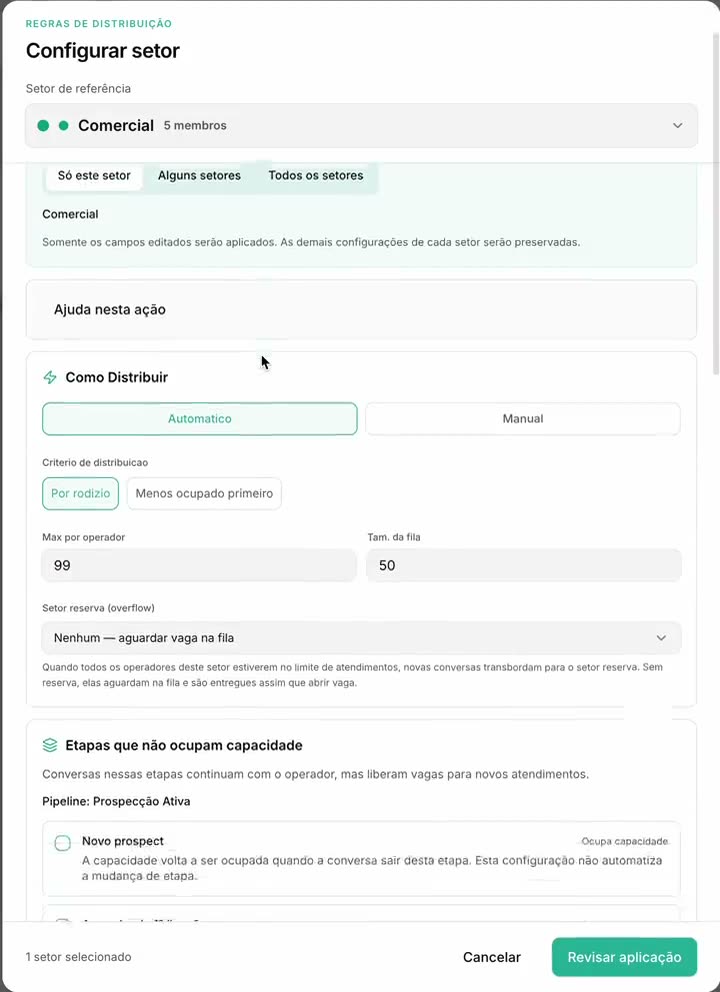
Combine information gathering, conditions and AI qualification to direct incoming demand. Use transfers to teams and assignment rules such as round-robin to prepare the handoff to the owner with the available context.
Prepare routing based on the topic, profile and contact information.
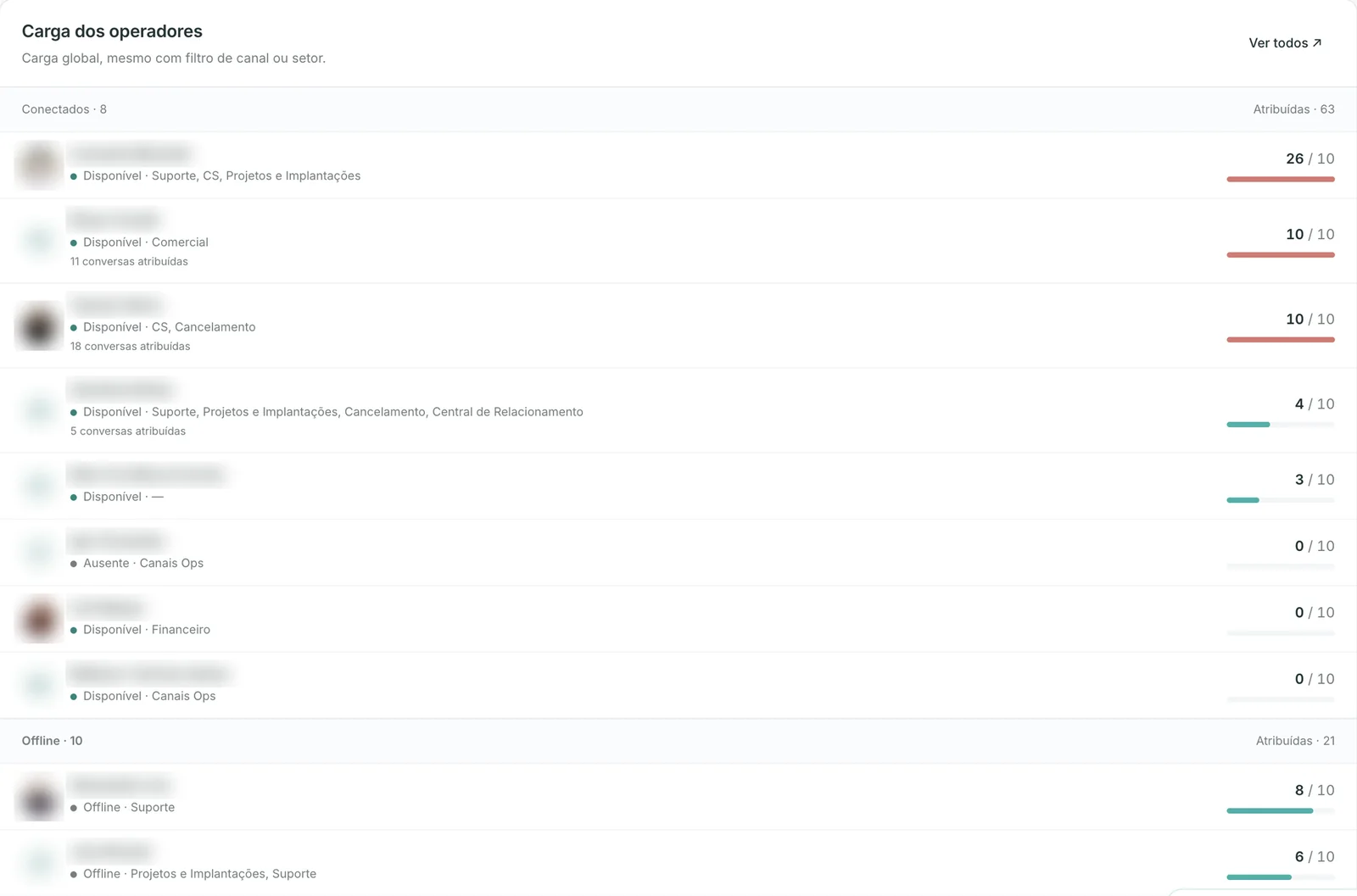
Connect triage and assignment to the activities and context the team needs to continue.
In practice
01Understand
Gather the topic, profile and information behind the request.
02Route
Apply filters, conditions and assignment rules.
03Continue
Hand off to the team or owner with the data already gathered.
From demand to its owner.Product demo · Portuguese UI
yapt. · MarketingFrom demand to its owner.
RouteRoute
CapacityCapacity
DecideDecide
Product demo · Portuguese UI
CondiçãoConferir caminhos ×
⑂
Quando seguir por este caminho?
Escolha do cliente ⌄
É igual a ⌄
Consultar produto
Se atenderConsultar produto→
Caso contrárioConfirmar suporte→
Cada caminho segue a condição definida para o processo.
Routing criteria are part of the operational configuration.
00:00 / 00:15
Real screens and reproduced product interfaces with demonstration examples. Interface in Portuguese.
A yapt. automation demonstration: configuration, steps and monitoring. Routing criteria are part of the operational configuration. Round-robin, least busy and capacity limits help route demand to the team. Track workload to understand the team’s available capacity. Demand, assigned conversations and limits help review routing choices. The choice between product and support defines the next path in this example. Filters and conditional paths route each case to its configured treatment.
“Each tool holds part of the information, and the team has to bridge the gap.”
Make data part of the automation.
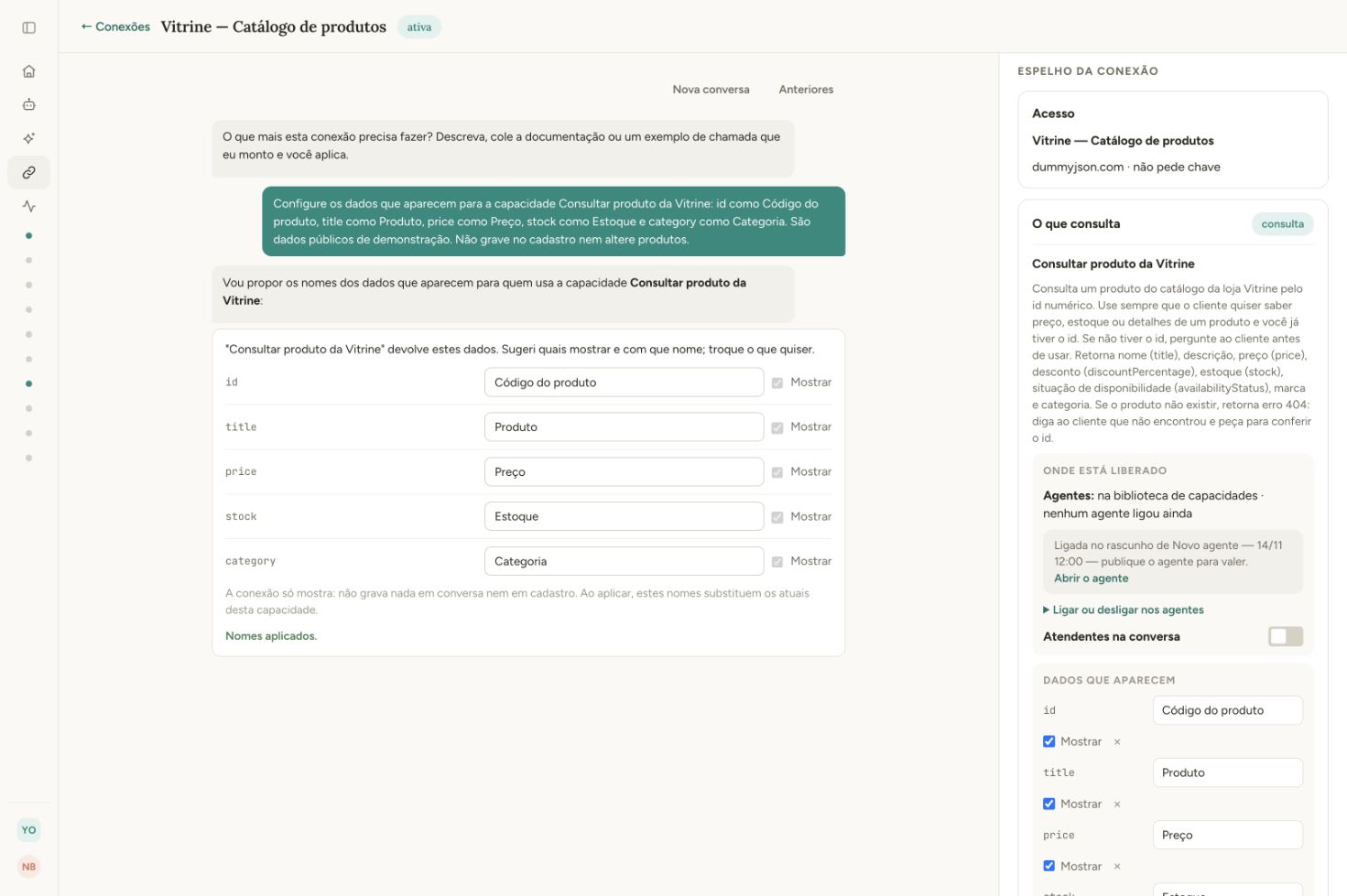
Build connections through conversation in yaAgents and configure queries and actions for the process. Workflows, automated journeys and agents can exchange data with systems through APIs and webhooks according to the defined resources and access. The Mentor uses authorized queries to guide the team.
Keep handoffs between systems from depending on someone copying information.
Combine data and actions in automations, with queries also available to authorized AI and people.
In practice
01Connect
Describe the API, required data and query or action capability.
02Use the data
Bring inputs and results into process conditions and actions.
03Monitor
Check the response to decide how the journey should continue.
Integration takes part in the operation.Product demo · Portuguese UI
yapt. · MarketingIntegration takes part in the operation.
ConnectConnect
Exchange dataExchange data
DecideDecide
Product demo · Portuguese UI
Requisição HTTPConsultar produto ×
Conecte esta etapa ao sistema
GET ⌄
https://dummyjson.com/products/1
produto
30 segundos
titleEssence Mascara Lash Princess
stock99
id1
Exemplo de retorno: usar nome e estoque do produto na mensagem e concluir.
Testar chamada
CondiçãoConferir caminhos ×
⑂
Quando seguir por este caminho?
Escolha do cliente ⌄
É igual a ⌄
Consultar produto
Se atenderConsultar produto→
Caso contrárioConfirmar suporte→
Cada caminho segue a condição definida para o processo.
Describe the API and the data your operation needs to query or send.
00:00 / 00:15
Real screens and reproduced product interfaces with demonstration examples. Interface in Portuguese.
A yapt. automation demonstration: configuration, steps and monitoring. Describe the API and the data your operation needs to query or send. Conversational building prepares capabilities; each scenario gets its configured access. In this example, the HTTP step queries product 1 in the public catalogue. The response is stored as produto to report name and stock. Review and test the path before activating it. The choice between product and support defines the next path in this example. Filters and conditional paths route each case to its configured treatment.
“The routine should have run, but we only find the failure later.”
See what ran. Find where the process stopped.
Follow executions, steps and responses to understand the path of each workflow. In automated journeys, configure entry conditions and exits so communication follows the contact and deal context. Review the automation and improve it based on what the operation shows.
Locate the step and response that need investigation in the execution details.
Use entry, exit and re-entry conditions to organize journey continuity.
In practice
01Review
Check triggers, messages, conditions and actions before activation.
02Observe
Inspect the execution and the response from each step.
03Adjust
Investigate failures and review paths with the team.
Understand each execution.Product demo · Portuguese UI
yapt. · MarketingUnderstand each execution.
ReviewReview
BuildBuild
DecideDecide
Product demo · Portuguese UI
Histórico de execuçõesVitrine — Atendimento conectado ⋯
ROTEIRO ILUSTRATIVO · PRODUTO
Exemplo de execução
FlowVitrine — Atendimento conectado
StatusConcluído · exemplo
✓
Etapa 1Disparo manual
Início manual previsto neste exemplo.
Concluído
✓
Etapa 2Nome e escolha
Perguntar nome e escolha entre produto e suporte.
Concluído
✓
Etapa 3Consultar produto
GET /products/1 · retorno salvo como produto.
Concluído
✓
Etapa 4Informar e concluir
Informar nome e estoque do produto e encerrar.
Concluído
Vitrine — Atendimento conectadoDesligadoProblemas Testar Histórico de execuções Salvar
QuadroRoteiroAuto-organizar
◉
InícioDisparo manual
▱
Enviar mensagemNome e escolha
Produto ou suporte?
↗
Requisição HTTPConsultar produto
Salvar retorno: produto
✓
Enviar mensagemConfirmar suporte
Confirmar e concluir
− 100% + ⊞
CondiçãoConferir caminhos ×
⑂
Quando seguir por este caminho?
Escolha do cliente ⌄
É igual a ⌄
Consultar produto
Se atenderConsultar produto→
Caso contrárioConfirmar suporte→
Cada caminho segue a condição definida para o processo.
Execution history helps review each step. The product sequence shown here is illustrative.
00:00 / 00:15
Real screens and reproduced product interfaces with demonstration examples. Interface in Portuguese.
A yapt. automation demonstration: configuration, steps and monitoring. Execution history helps review each step. The product sequence shown here is illustrative. Steps, responses and failures help investigate and adjust before expanding deployment. In yaFlows, the Board shows how the steps connect. In this example, messages and paths lead to a product query or support confirmation. The choice between product and support defines the next path in this example. Filters and conditional paths route each case to its configured treatment.
WhatsApp and process automation
Workflows execute. Journeys follow up. AI and connections add context.
Combine WhatsApp automation, follow-ups and system data with the workflow. The visual builder and intelligent rules execute the conditions and actions configured for your business process.
yaFlows: automation builder
A visual builder combining messages, conditions, waits, artificial intelligence and business actions.
Intelligent follow-up rules
Nurturing, follow-ups, activities and updates linked to marketing and sales events. Services coming soon.
AI and connections bring context
Queries, data and actions integrate systems with the work, using configured access and resources.
From a need to execution
A connected journey, step by step.
See how to design the routine in yaFlows, prepare journeys for key moments and use connections to bring data into the process. The team reviews the paths and follows the execution.
AI building · gradual rollout
From a need to an automated operation.Product demo · Portuguese UI
yapt. · MarketingFrom a need to an automated operation.
BuildBuild
Keep work movingKeep work moving
MonitorMonitor
Product demo · Portuguese UI
iavéhConstruirNova conversa ⋯
yaFlows
Automações
O que vamos construir?
Crie o fluxo Vitrine — Atendimento conectado. Disparo manual. Pergunte nome e escolha: produto ou suporte. Consulte o produto ou confirme o suporte e conclua. Deixe desligado, sem canais.
Montei uma proposta para você conferir. Nada é ativado sem a sua revisão.
Proposta de fluxo
Vitrine — Atendimento conectado
Perguntar nome e escolha, consultar o produto ou confirmar o suporte e concluir.
Gatilho
Disparo manual
Canais
Nenhum canal vinculado
Caixas
Início → Nome e escolha → Produto ou suporte → Concluir
AplicarO fluxo é criado desligado.
Descreva o que precisa…↑
Vitrine — Atendimento conectadoDesligadoProblemas Testar Histórico de execuções Salvar
QuadroRoteiroAuto-organizar
◉
InícioDisparo manual
▱
Enviar mensagemNome e escolha
Produto ou suporte?
↗
Requisição HTTPConsultar produto
Salvar retorno: produto
✓
Enviar mensagemConfirmar suporte
Confirmar e concluir
− 100% + ⊞
Boas-vindas e acompanhamento • DemonstraçãoRascunho← Voltar Salvar
Réguas inteligentes
Uma sequência de ações, do gatilho ao próximo passo.
Quando
◉
Contato criadoTodas as origens
Alterar
Fazer
1.◷Esperar24 horas
2.▱Enviar mensagemContinuar a comunicação
3.⑂Se respondeuContinuar pelo caminho configurado
Histórico de execuçõesVitrine — Atendimento conectado ⋯
ROTEIRO ILUSTRATIVO · PRODUTO
Exemplo de execução
FlowVitrine — Atendimento conectado
StatusConcluído · exemplo
✓
Etapa 1Disparo manual
Início manual previsto neste exemplo.
Concluído
✓
Etapa 2Nome e escolha
Perguntar nome e escolha entre produto e suporte.
Concluído
✓
Etapa 3Consultar produto
GET /products/1 · retorno salvo como produto.
Concluído
✓
Etapa 4Informar e concluir
Informar nome e estoque do produto e encerrar.
Concluído
Describe the Vitrine flow: manual trigger, product or support choice and a catalogue query.
00:00 / 00:36
Real screens and reproduced product interfaces with demonstration examples. Interface in Portuguese.
A yapt. automation demonstration: configuration, steps and monitoring. Describe the Vitrine flow: manual trigger, product or support choice and a catalogue query. Review before applying. The new flow starts switched off, ready for review in yaFlows. In yaFlows, the Board shows how the steps connect. In this example, messages and paths lead to a product query or support confirmation. The rule follows customer interest from a defined event. Combine messages, waits and conditions to continue communication with context. Sales rules start from the situations that let an opportunity go cold. Unanswered proposals, stalled deals and post-sale work can have configured next steps. Describe the API and the data your operation needs to query or send. Conversational building prepares capabilities; each scenario gets its configured access. Execution history helps review each step. The product sequence shown here is illustrative. Steps, responses and failures help investigate and adjust before expanding deployment.
Demonstration using product interfaces and sample data. Conversational workflow building is rolling out gradually; service journeys are coming soon.
yaFlows + iavéh · gradual rollout
Describe the process. Review the workflow. Move the operation forward.
Building workflows through conversation with iavéh is rolling out gradually. Describe the process, review the proposal and apply it when ready. Applying it creates an inactive workflow in yaFlows; review the steps and activate it in a separate action. Then follow executions and results with the team.
Automation starts with understanding what needs to improve.
Your team can identify repeated effort, organize rules and select an initial process. You can work with specialists to build and improve automations, depending on the delivery model you choose.
01
Diagnose
Map the journey, bottlenecks, data and manual effort affecting delivery.
02
Build and review
Prepare workflows, journeys and integrations with the people who know the process.
03
Monitor and improve
Observe execution and indicators to adjust routines with the team.
Scope, channels, access and integrations are defined for each operation. Building with iavéh is rolling out gradually; service journeys are coming soon.
Before automating
Clarity to design. Visibility to improve.
How can yaFlows and intelligent rules automate processes?
In process automation, yaFlows organizes the workflow: it collects information, applies conditions and performs configured actions. Intelligent rules follow moments in the journey with communications, follow-ups, activities and updates based on events, intervals and conditions. Both can participate in the same process.
Can we already create workflows by talking to iavéh?
Building yaFlows through conversation with iavéh is rolling out gradually. You describe the need and review the proposal before applying it. The visual builder lets you check and adjust the steps; conversational building availability depends on the rollout for your account.
Which areas can use intelligent journeys?
Marketing and sales journeys support nurture sequences, follow-ups, proposals, stalled deals and after-sales work according to configuration. Service journeys are coming soon to extend follow-through to tickets and service stages.
Can yaFlows automate WhatsApp conversations?
Yes. The builder combines messages and templates, buttons, lists and WhatsApp Flows forms. It also collects data, applies surveys, conditions and A/B tests, waits for responses or events, schedules steps and connects AI, activities and CRM actions. Depending on enabled channels, permissions and features, it can send Instagram messages and internal notifications, route conversations and integrate systems.
Can automations send and receive data from other systems?
Yes. APIs, webhooks and connections can bring input data and results into builder workflows, automated journeys and AI agents according to the configuration of each path. The Mentor can use authorized queries to guide the operator. An integration depends on the available API, documentation and system access.
How do we monitor execution and control follow-through?
Review paths before activation and follow execution details to investigate steps and responses. In journeys, define entry, exit and re-entry conditions, such as a contact reply or stage change, according to the scenario. The team retains control over adjustments and use.
Where do we start, and how do we assess the result?
Start with a process involving manual effort or missing follow-through. Your team can organize rules, data and actions and work with specialists when needed. Define indicators and comparable periods to track time between steps, activities, failures, interventions and journey progress, considering your operation’s data and costs.
 Automations with artificial intelligence









 iavéh