Artificial intelligence for support.More resolutions and efficiency.
yapt. applies AI to WhatsApp customer service, connecting tickets, queues and a knowledge base. Agents and copilots help resolve requests with context and reduce waiting and rework. Specialists can support implementation and ongoing improvement.
1,900+ companies have trusted New Way with their operations
The cost of inefficient support
What is inefficient support costing you in revenue, productivity and trust?
Customers left waiting, recurring problems and agents stuck on manual tasks: the cost goes beyond support. It shows up in poor experiences, wasted capacity and revenue that never materializes. yapt. connects AI and the platform to organize support. Specialists can help identify bottlenecks and implement the solution.
How yapt. solves it01 / 07
“The customer comes back and has to explain everything again.”
Continue where the customer left off.
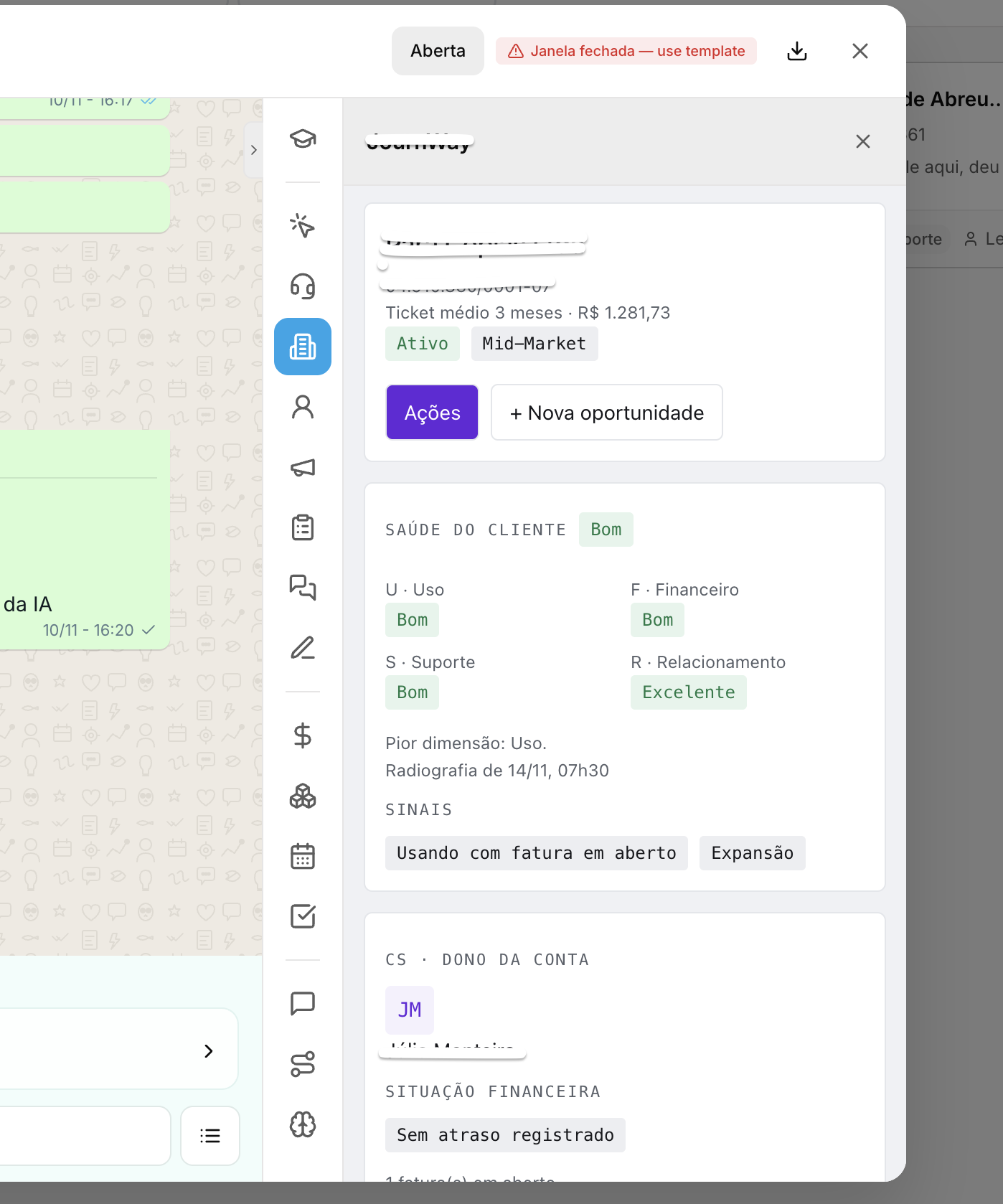
When the customer is identified, AI and the team can use available history and linked tickets to understand the reason for contact. Service gains context before asking for the story to start again.
Configure AI to check the contact's tickets and help distinguish an ongoing case from a new request.
Prepare a summary or note in the configured workflow and hand over to a person with the available history and context.
In practice
01Recognize
Customer and available history.
02Understand
Open tickets and the reason for contact.
03Continue
Next step with AI and the team.
Same customer. Context preserved.Demo · sample data · UI in Portuguese
yapt. · SupportSame customer. Context preserved.
CustomerContext
TicketsHistory
TeamSummary
Demo · sample data · UI in Portuguese
Workspace
DashboardVeja os números do atendimento e das vendas em um só lugar.
InboxAtenda seus clientes por WhatsApp, e-mail e redes sociais em uma tela só.
HistóricoEncontre qualquer conversa já encerrada, com tudo que foi dito.
CalendárioGerencie agendamentos e disponibilidade da sua equipe.
Operações
Inteligência em CanaisSaiba quais linhas oficiais pode usar, quanto pode enviar e o que a Meta mudou.
Filas e gestão de filasDistribua as conversas entre a equipe com regras de fila e prioridade.
Operadores e produtividadeAcompanhe sua equipe em tempo real: quem está online, em pausa ou atendendo.
IAVou chamar o time de suporte. O histórico do ticket e o resumo desta conversa vão junto.
Conversa atribuída a Ana Pereira
NOTA INTERNA
Resumo para o time: Caio, da Solare Saúde 40, quer continuar o ticket #T-1042 (instalação dos headsets). A falha continua em todos os equipamentos. Já consultamos o histórico; cliente pediu atendimento humano. O ticket #T-1087, de faturamento, segue separado.
Ana PereiraOlá, Caio! Já li o resumo e o histórico do #T-1042. Vou continuar daqui com você.
ResponderNota interna
Escreva sua mensagem...
1
Suporte6 / 13
‹TodosVendas e novos clientes 80Operação fictícia: Vendas e atendimentoFinanceiro e cobrança 61Operação fictícia: FinanceiroSuporte 6 / 13Relacionamento B2B 0›
#T-1042 · Instalação dos headsets: precisamos confirmar o ajuste com a equipe.
Isabela Melo#C-801856Aberta
Gostaria de acompanhar o chamado que já está em aberto.
Felipe Duarte#C-800736Aberta
Enviei a documentação solicitada. Podemos continuar o atendimento.
Mariana Almeida#C-800000Aberta
Obrigada! Estou verificando a orientação com o nosso time.
Juliana Almeida#C-800006Aberta
Precisamos de ajuda para concluir a configuração.
Patrícia Almeida#C-800012Aberta
Vou enviar os dados para a análise técnica.
Filas
RadarRegrasExperiência
Filas
RadarRegrasExperiência
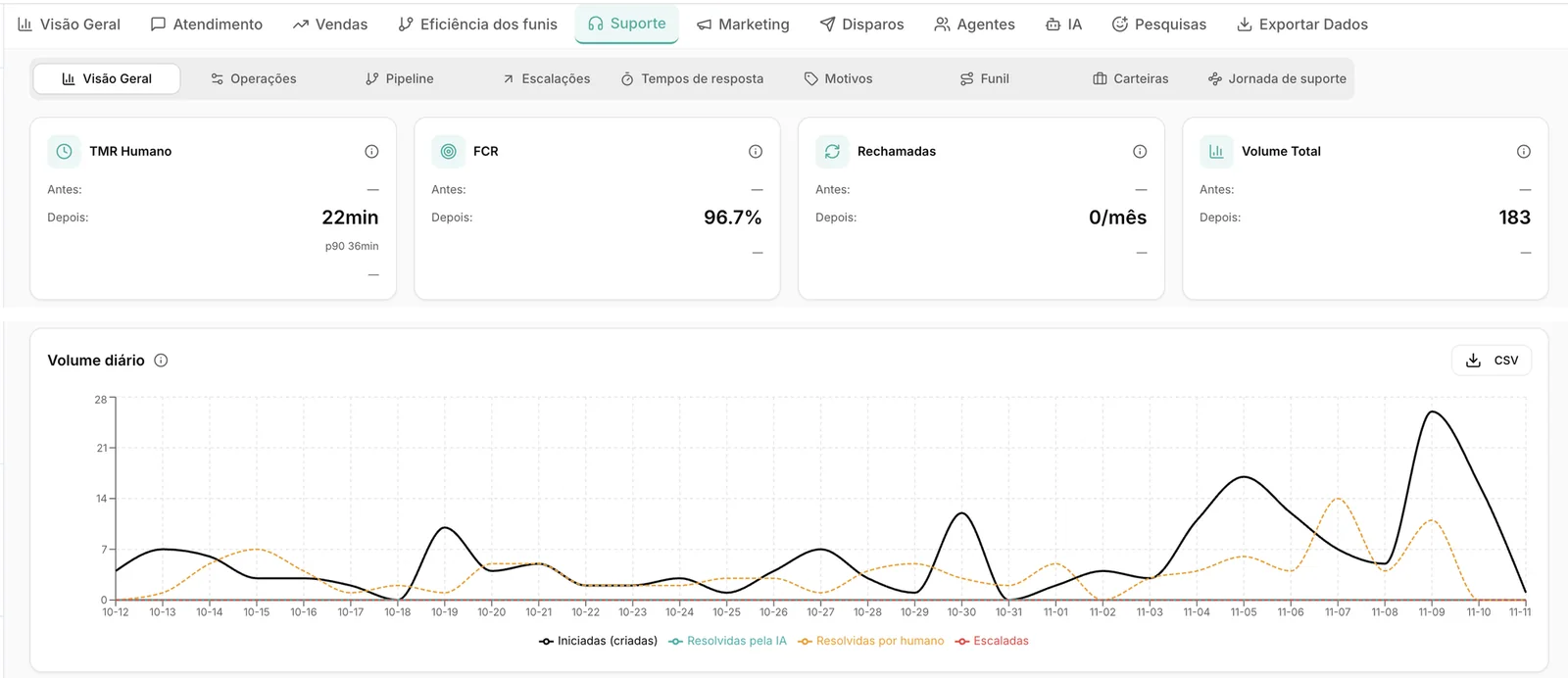
Painel de Suporte
Acompanhamento de performance — antes vs depois
12/10/2026até11/11/2026
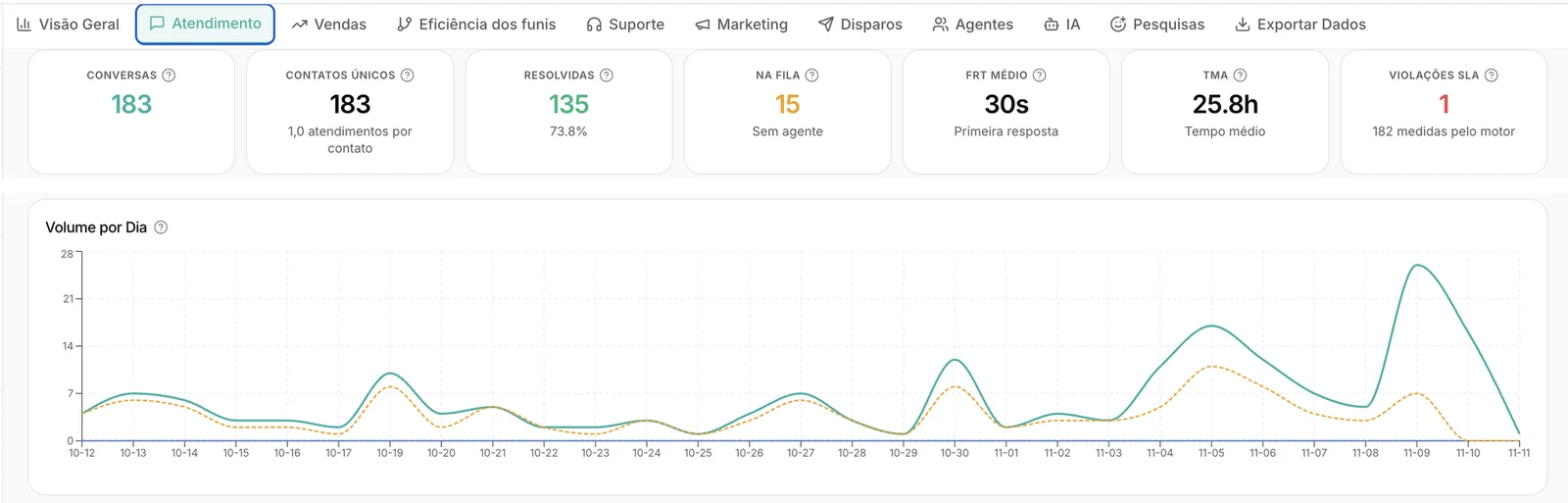
Atendimento
12/10/2026até11/11/2026Todos os canaisTodos os setores
Visão GeralAtendimentoVendasEficiência dos funisSuporteMarketingDisparosAgentesIAPesquisasExportar Dados
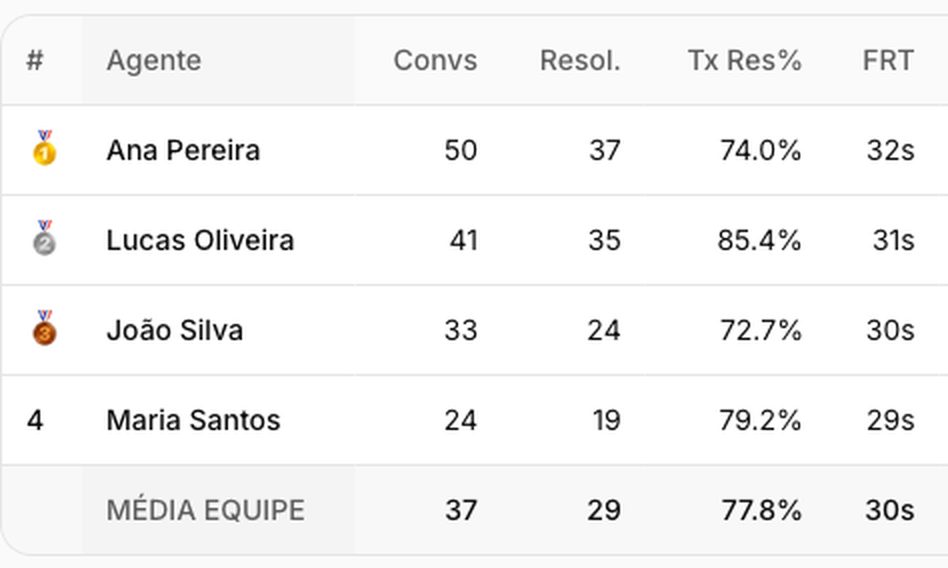
Relatório de Agentes
Ranking, performance individual e produtividade
12/10/2026até11/11/2026Todos os agentesTodos os canais
RankingIndividualProdutividade
CSV
The customer arrives on WhatsApp. The conversation starts with the available context.
00:00 / 00:19
Interface reproduced from the product, with an illustrative customer and conversation. Ticket lookup, summaries and handoff depend on the configured workflow.
How yapt. solves it02 / 07
“The queue grows, urgent requests stay hidden and part of the team is overloaded.”
Balance queues, capacity and team productivity.
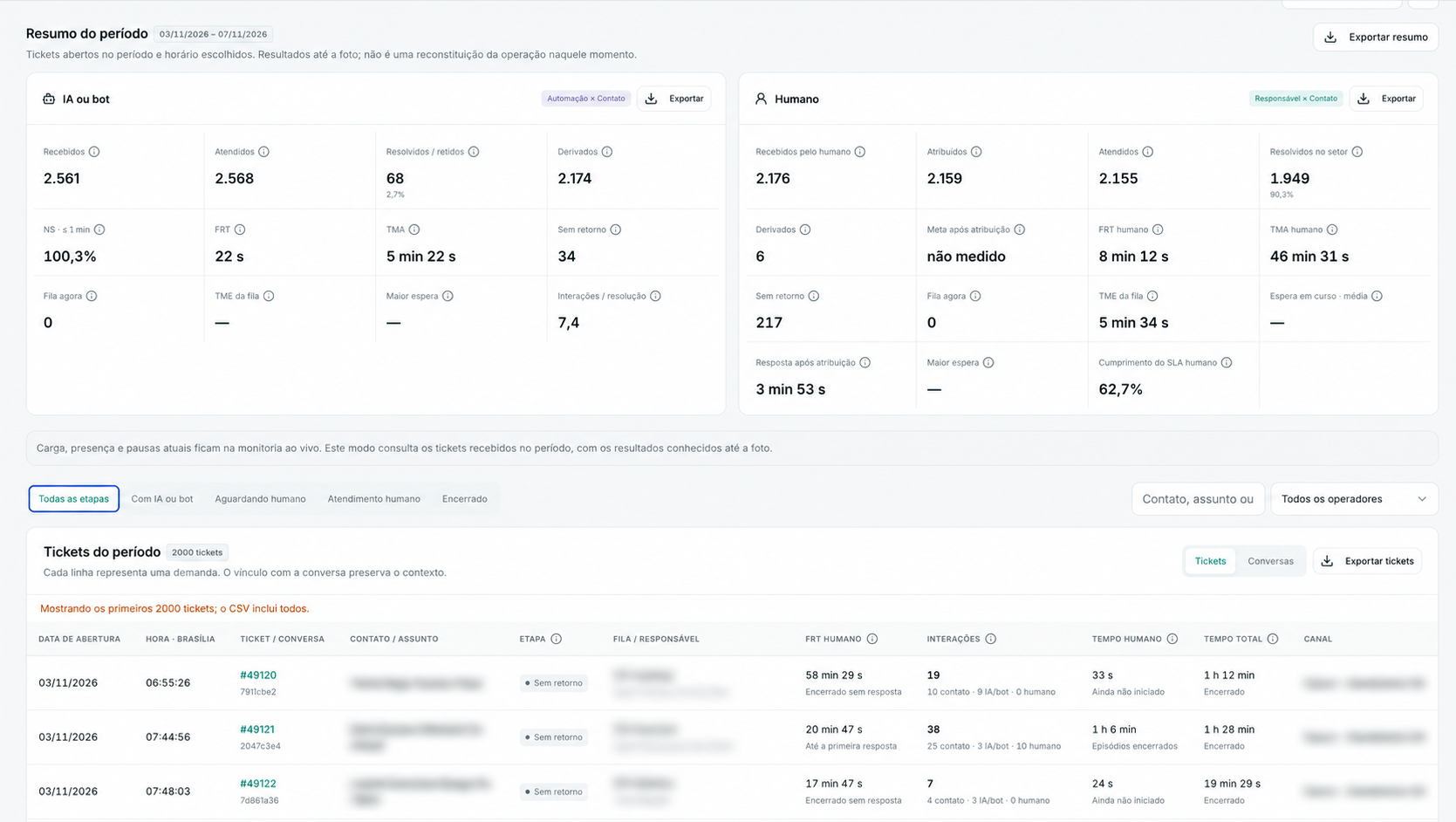
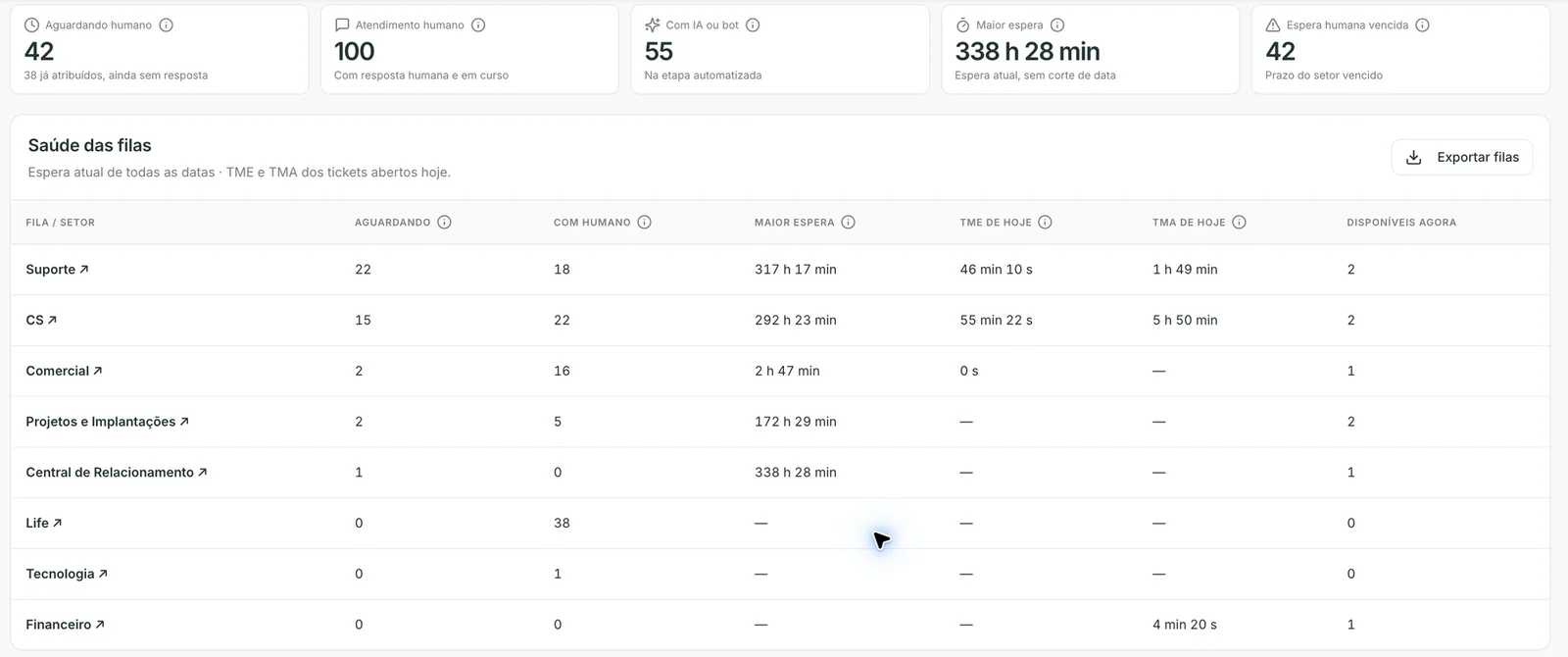
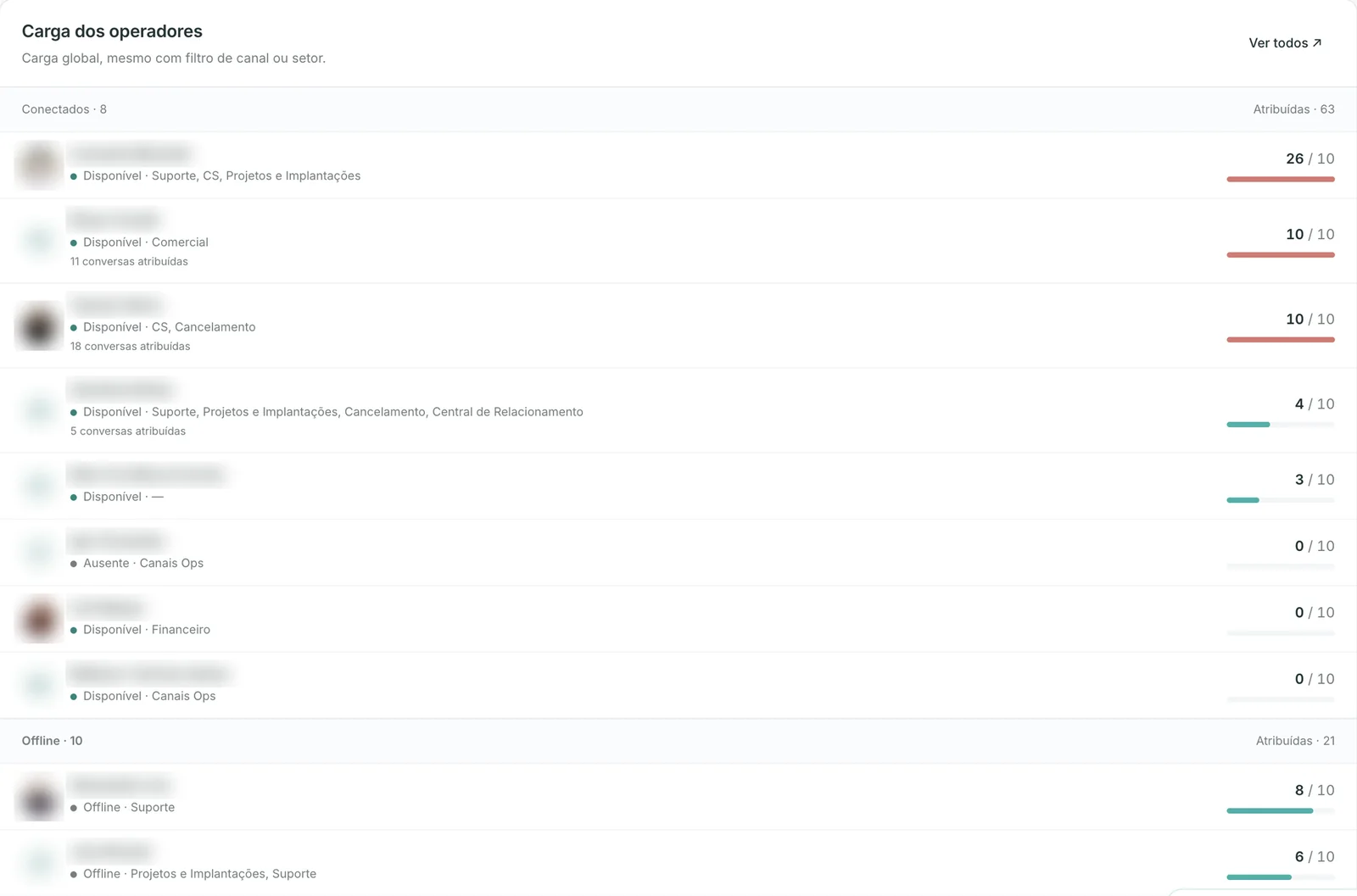
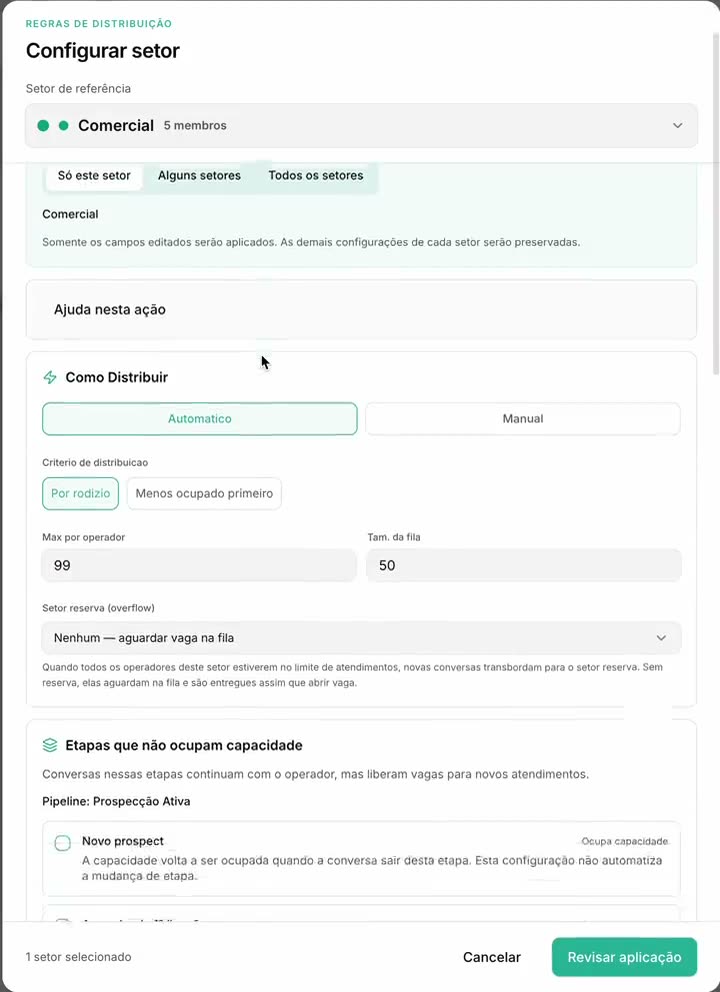
See demand, waiting time and workload by agent and queue. Combine priorities, capacity and customer portfolios to distribute work better and discover where the team needs support.
Use round-robin or least-busy routing in the configured automatic mode, respecting priorities and team limits.
Track productivity by agent and queue, and organize owners and portfolios, when enabled, to keep service moving.
In practice
01See
Queues, waiting time and agent productivity.
02Distribute
Rules, priorities and team capacity.
03Track
Workload, continuity and progress by queue.
From queues to team productivity.Demo · sample data · UI in Portuguese
yapt. · SupportFrom queues to team productivity.
QueueWaiting
OperatorsCapacity
ManagementProductivity
Demo · sample data · UI in Portuguese
Workspace
DashboardVeja os números do atendimento e das vendas em um só lugar.
InboxAtenda seus clientes por WhatsApp, e-mail e redes sociais em uma tela só.
HistóricoEncontre qualquer conversa já encerrada, com tudo que foi dito.
CalendárioGerencie agendamentos e disponibilidade da sua equipe.
Operações
Inteligência em CanaisSaiba quais linhas oficiais pode usar, quanto pode enviar e o que a Meta mudou.
Filas e gestão de filasDistribua as conversas entre a equipe com regras de fila e prioridade.
Operadores e produtividadeAcompanhe sua equipe em tempo real: quem está online, em pausa ou atendendo.
IAVou chamar o time de suporte. O histórico do ticket e o resumo desta conversa vão junto.
Conversa atribuída a Ana Pereira
NOTA INTERNA
Resumo para o time: Caio, da Solare Saúde 40, quer continuar o ticket #T-1042 (instalação dos headsets). A falha continua em todos os equipamentos. Já consultamos o histórico; cliente pediu atendimento humano. O ticket #T-1087, de faturamento, segue separado.
Ana PereiraOlá, Caio! Já li o resumo e o histórico do #T-1042. Vou continuar daqui com você.
ResponderNota interna
Escreva sua mensagem...
1
Suporte6 / 13
‹TodosVendas e novos clientes 80Operação fictícia: Vendas e atendimentoFinanceiro e cobrança 61Operação fictícia: FinanceiroSuporte 6 / 13Relacionamento B2B 0›
#T-1042 · Instalação dos headsets: precisamos confirmar o ajuste com a equipe.
Isabela Melo#C-801856Aberta
Gostaria de acompanhar o chamado que já está em aberto.
Felipe Duarte#C-800736Aberta
Enviei a documentação solicitada. Podemos continuar o atendimento.
Mariana Almeida#C-800000Aberta
Obrigada! Estou verificando a orientação com o nosso time.
Juliana Almeida#C-800006Aberta
Precisamos de ajuda para concluir a configuração.
Patrícia Almeida#C-800012Aberta
Vou enviar os dados para a análise técnica.
Filas
RadarRegrasExperiência
Filas
RadarRegrasExperiência
Painel de Suporte
Acompanhamento de performance — antes vs depois
12/10/2026até11/11/2026
Atendimento
12/10/2026até11/11/2026Todos os canaisTodos os setores
Visão GeralAtendimentoVendasEficiência dos funisSuporteMarketingDisparosAgentesIAPesquisasExportar Dados
Relatório de Agentes
Ranking, performance individual e produtividade
12/10/2026até11/11/2026Todos os agentesTodos os canais
RankingIndividualProdutividade
CSV
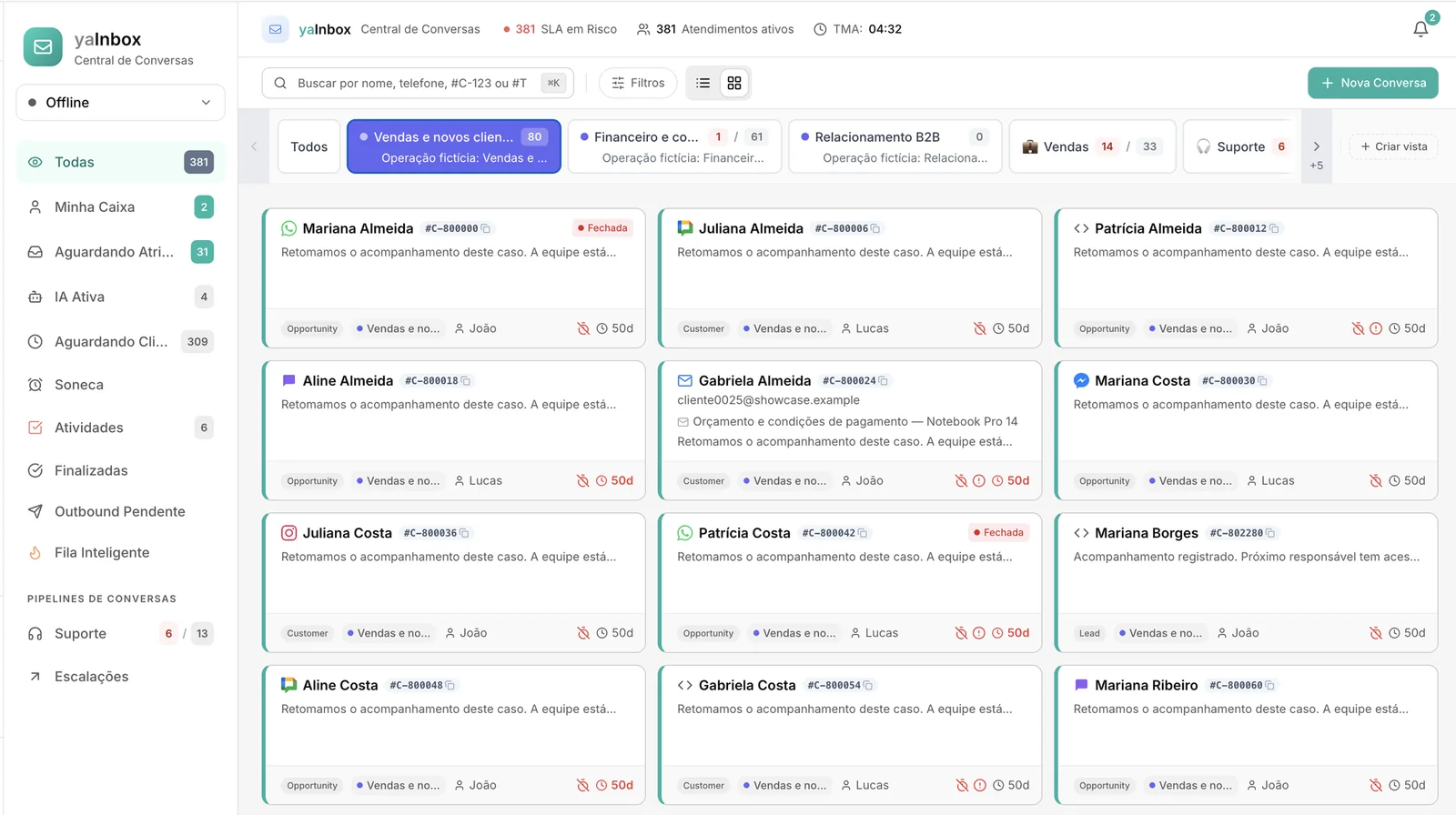
Support conversations are organized by team and service stage.
00:00 / 00:24
Real screenshots and reproduced product interfaces, with operational examples. Configuration and availability vary by operation; figures are not a promise of improvement.
How yapt. solves it03 / 07
“Service changes hands and nobody knows what still needs to be resolved.”
Keep track of the entire case.
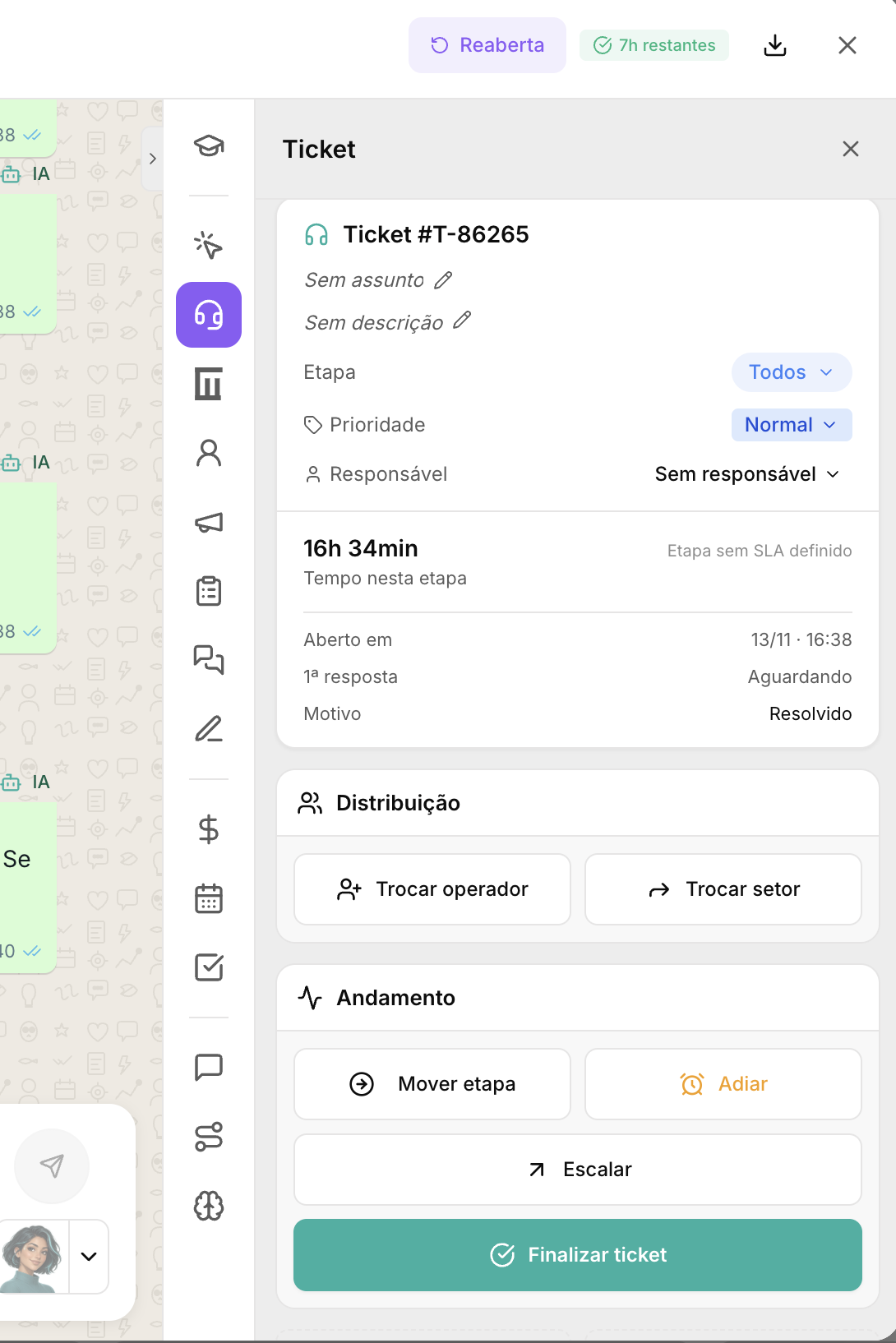
Connect tickets, conversations, stages and owners. Separate topics when necessary and track specialist routing without losing the trail of what has already happened.
Check open tickets and organize new topics or sub-tickets according to the team's defined triage.
Record the handoff to another team with a reason and ownership, preserving case continuity.
In practice
01Organize
Case, topic and linked conversations.
02Track
Stages, owners and pending work.
03Route
Reason, destination and case history.
Expand real product screenScreens from different teams and configuration examples. Interface in Portuguese.
How yapt. solves it04 / 07
“The agent looks for answers across several manuals and repeats attempts.”
Apply business knowledge to every interaction.
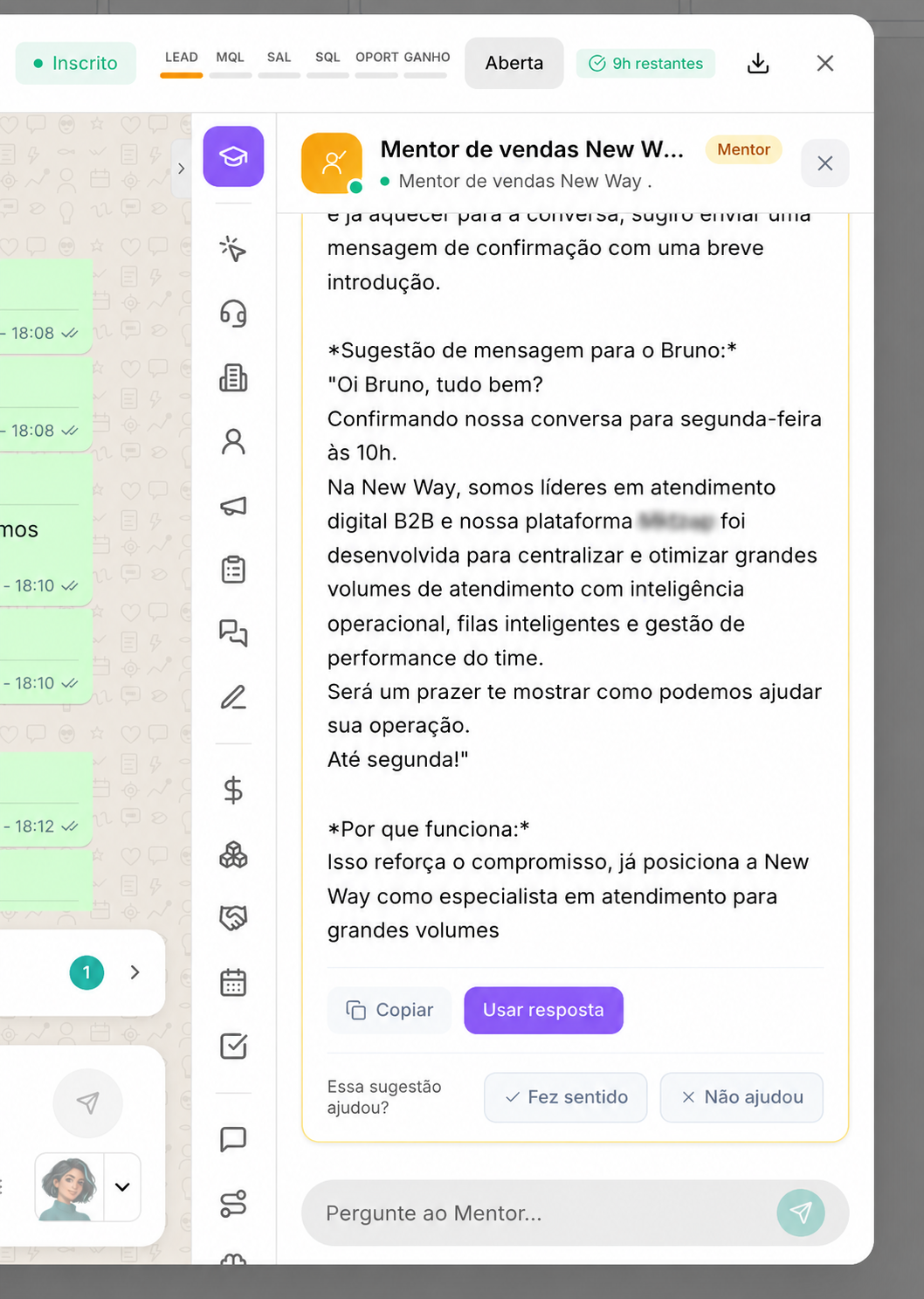
Organize manuals, product knowledge and procedures to support L1 and L2 routines. AI and the copilot help prepare responses and next steps using the guidance configured for the scenario.
Configure stages, prerequisites and routing for when a routine does not progress.
Review knowledge and procedures with the people responsible for approval; the agent decides what to use from copilot suggestions.
In practice
01Organize
Products, manuals and guidance.
02Guide
Procedures and applicable context.
03Review
Team responses and next steps.
Expand real product screenScreens from different teams and configuration examples. Interface in Portuguese.
How yapt. solves it05 / 07
“The customer waits while the agent opens other screens and copies information.”
Build integrations through conversation. Bring data into service.
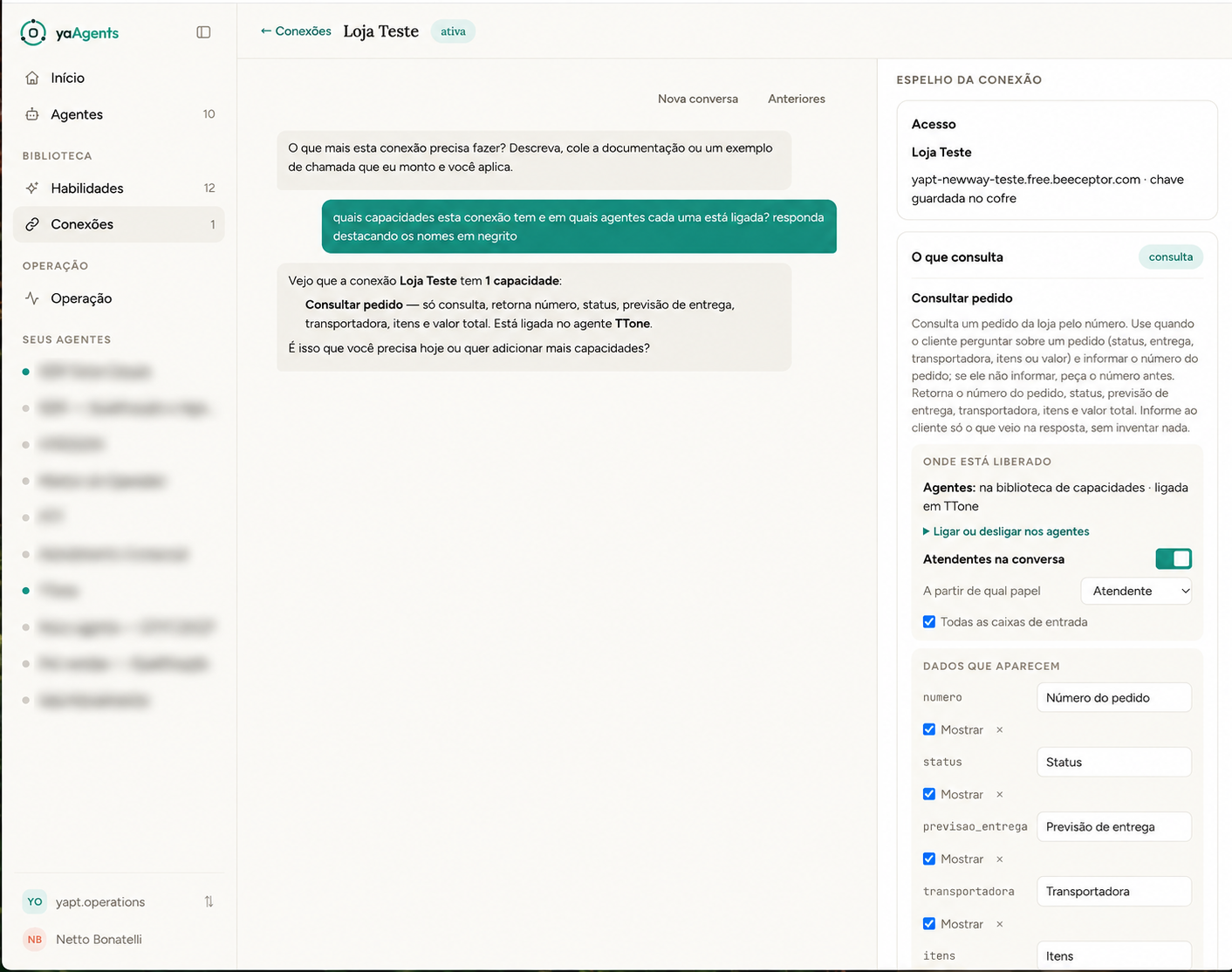
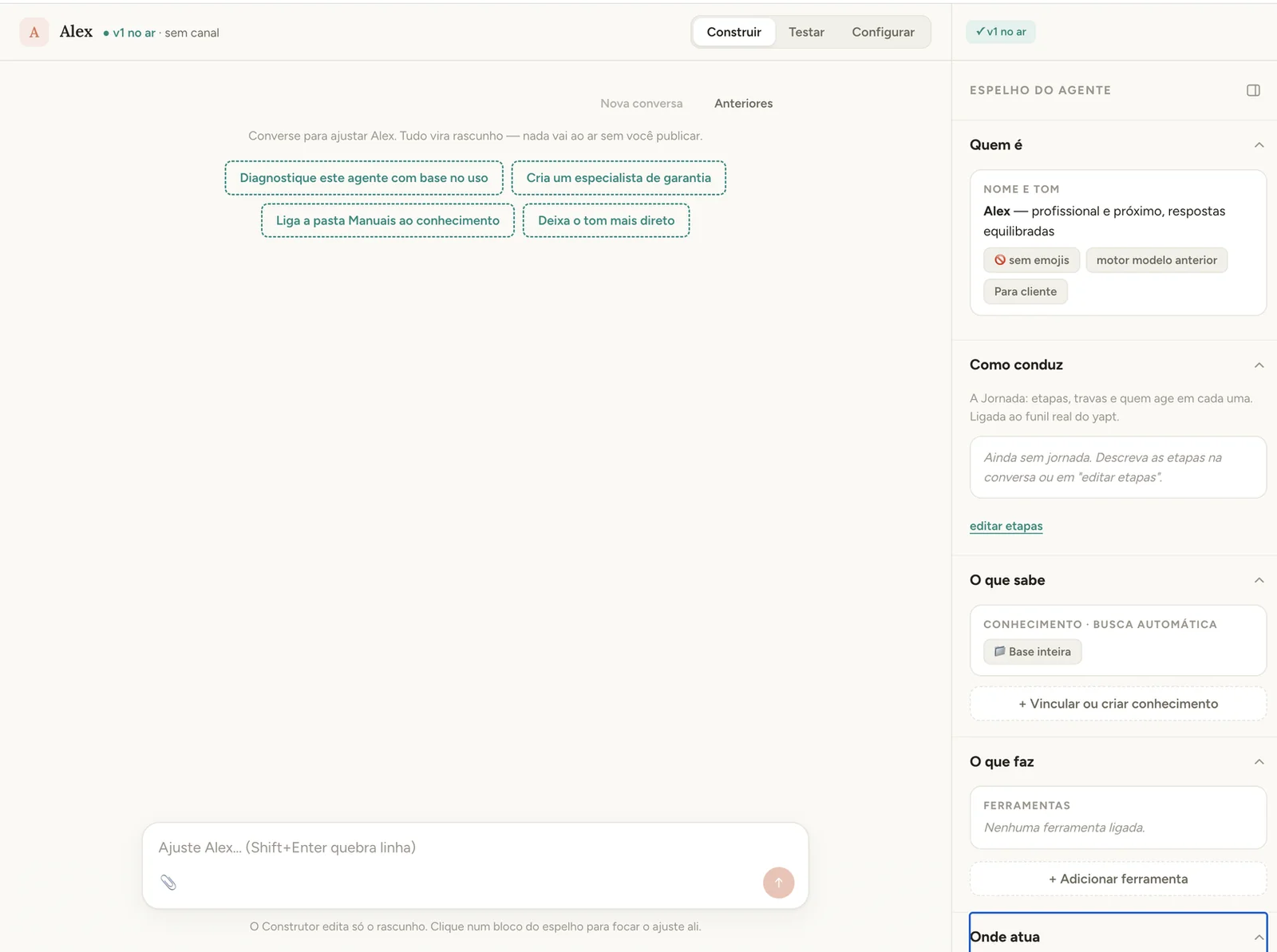
In yaAgents, describe what you need to look up or do and build the integration through conversation, using available systems and APIs. Display internal system data within the conversation modal and give AI tools to look up information and perform configured actions.
Build and adjust connections through conversation in yaAgents, with configuration and access review.
At least 30% higher agent productivity, with internal system data in the conversation and less screen switching, copying and manual lookup.
In practice
01Describe
The need, system and API documentation.
02Connect
Queries, actions and required permissions.
03Serve
Data and tools in the conversation, for AI and agents.
From connection to conversation
01
Build the integration through conversation
Describe the query, connect the API and define which data is available to AI and your team.
Real product screenshots · interface in Portuguese.
How yapt. solves it06 / 07
“AI responds quickly, but the customer is still waiting for a person or a resolution.”
See the waiting that an automatic response does not resolve.
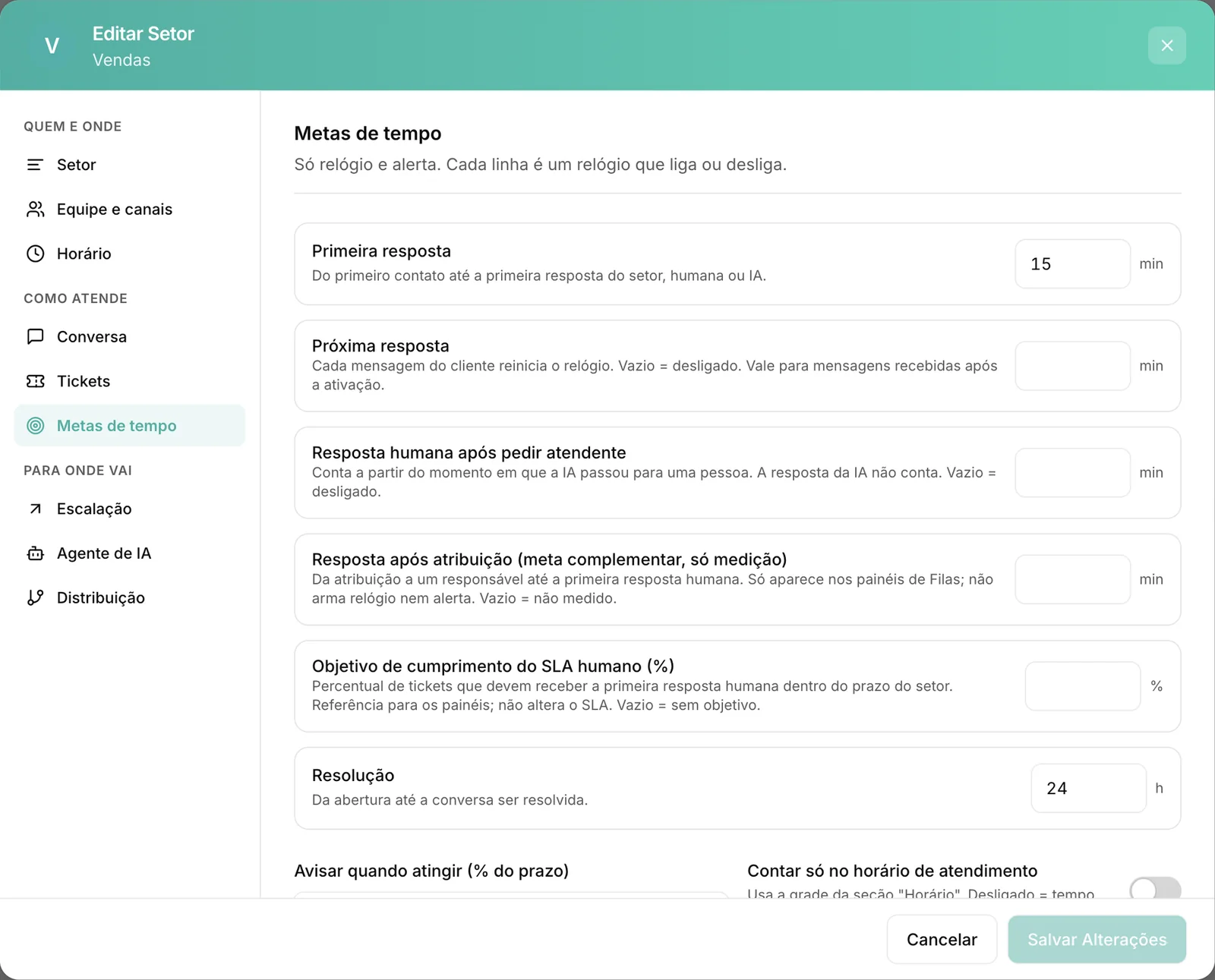
Define deadlines and track the handoff between AI and the team. Distinguish waiting, first human response, continuity and resolution to investigate where service is taking too long.
Configure targets by team and enable the time controls that fit the process.
Open the cases behind the indicators to investigate delays, without confusing assignment with a response to the customer.
In practice
01Define
Time targets and service hours.
02Distinguish
AI response, waiting and human response.
03Track
Operational deadlines and issues.
Expand real product screenScreens from different teams and configuration examples. Interface in Portuguese.
How yapt. solves it07 / 07
“We close tickets, but don't know where time is lost or how the customer felt afterward.”
Measure the journey to resolution. Investigate rework.
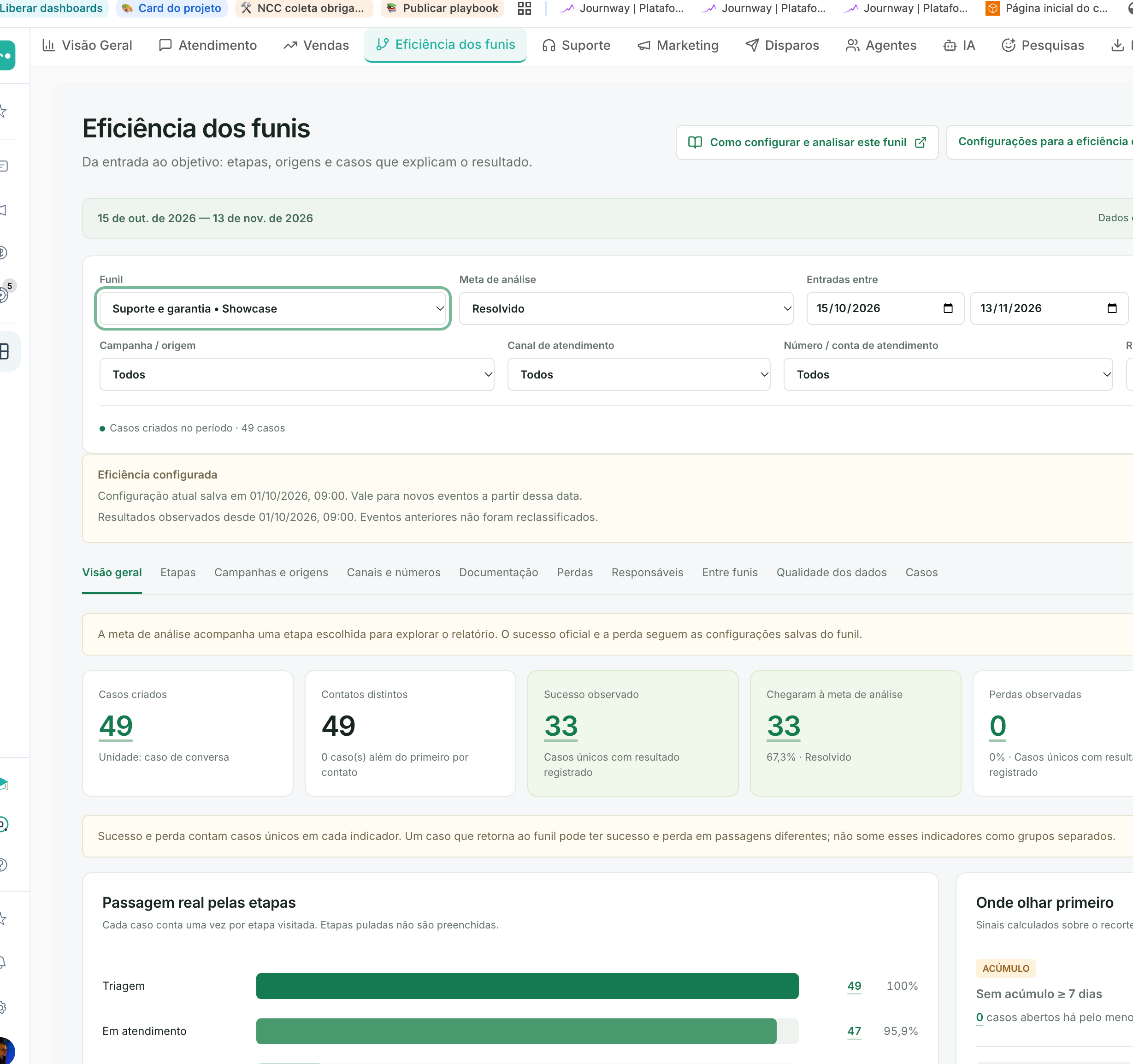
Track waiting, work, stage progress, reopenings and transfers. Combine case analysis with available satisfaction surveys to decide where to improve.
Check case journeys and identify waiting or repeated team transfers.
Read CSAT, NPS, comments and response rates when surveys have been sent and answered.
In practice
01Observe
Cases, times and handoffs between teams.
02Investigate
Reopenings, bottlenecks and feedback received.
03Improve
Priorities and tracking changes.
Expand real product screenScreens from different teams and configuration examples. Interface in Portuguese.
Inside the support operation
The customer is the same. Context continues.
Follow customer recognition, ticket lookup, configured records and handoff to a person. Then explore queues, capacity and operational indicators.
From service to operational efficiencyDemo · sample data · UI in Portuguese
yapt. · SupportFrom service to operational efficiency
CustomerContext
TicketsHistory
TeamSummary
QueuesCapacity
ManagementQuality
Demo · sample data · UI in Portuguese
Workspace
DashboardVeja os números do atendimento e das vendas em um só lugar.
InboxAtenda seus clientes por WhatsApp, e-mail e redes sociais em uma tela só.
HistóricoEncontre qualquer conversa já encerrada, com tudo que foi dito.
CalendárioGerencie agendamentos e disponibilidade da sua equipe.
Operações
Inteligência em CanaisSaiba quais linhas oficiais pode usar, quanto pode enviar e o que a Meta mudou.
Filas e gestão de filasDistribua as conversas entre a equipe com regras de fila e prioridade.
Operadores e produtividadeAcompanhe sua equipe em tempo real: quem está online, em pausa ou atendendo.
IAVou chamar o time de suporte. O histórico do ticket e o resumo desta conversa vão junto.
Conversa atribuída a Ana Pereira
NOTA INTERNA
Resumo para o time: Caio, da Solare Saúde 40, quer continuar o ticket #T-1042 (instalação dos headsets). A falha continua em todos os equipamentos. Já consultamos o histórico; cliente pediu atendimento humano. O ticket #T-1087, de faturamento, segue separado.
Ana PereiraOlá, Caio! Já li o resumo e o histórico do #T-1042. Vou continuar daqui com você.
ResponderNota interna
Escreva sua mensagem...
1
Suporte6 / 13
‹TodosVendas e novos clientes 80Operação fictícia: Vendas e atendimentoFinanceiro e cobrança 61Operação fictícia: FinanceiroSuporte 6 / 13Relacionamento B2B 0›
#T-1042 · Instalação dos headsets: precisamos confirmar o ajuste com a equipe.
Isabela Melo#C-801856Aberta
Gostaria de acompanhar o chamado que já está em aberto.
Felipe Duarte#C-800736Aberta
Enviei a documentação solicitada. Podemos continuar o atendimento.
Mariana Almeida#C-800000Aberta
Obrigada! Estou verificando a orientação com o nosso time.
Juliana Almeida#C-800006Aberta
Precisamos de ajuda para concluir a configuração.
Patrícia Almeida#C-800012Aberta
Vou enviar os dados para a análise técnica.
Filas
RadarRegrasExperiência
Filas
RadarRegrasExperiência
Painel de Suporte
Acompanhamento de performance — antes vs depois
12/10/2026até11/11/2026
Atendimento
12/10/2026até11/11/2026Todos os canaisTodos os setores
Visão GeralAtendimentoVendasEficiência dos funisSuporteMarketingDisparosAgentesIAPesquisasExportar Dados
Relatório de Agentes
Ranking, performance individual e produtividade
12/10/2026até11/11/2026Todos os agentesTodos os canais
RankingIndividualProdutividade
CSV
Service starts with AI connected to the customer’s context.
00:00 / 01:00
Demonstration with sample data. Features, records and actions depend on configuration. Indicators must be read according to each report's period and criteria.
Intelligence applied to resolution
AI prepares service. People and processes connect to resolution.
The platform connects knowledge and customer history to tickets and service actions. Your team can work with specialists to configure AI and improve processes.
AI in customer service
History, tickets and the knowledge base help agents respond and route each case with context.
A copilot for the team
Knowledge, summaries and suggestions support the agent, who keeps control over what to apply.
Smart queues
Configured rules, priorities and routing organize the next steps in customer service.
Tickets and SLAs in view
Waiting times, deadlines and the ticket journey help identify bottlenecks and guide support decisions.
yaAgents · build through conversation
Describe how your support works. Prepare AI to work with it.
Organize instructions, knowledge and tools through conversation in yaAgents. Specialists can help your team review the configuration, test scenarios and improve AI in customer service.
Your support operation has its own needs. AI implementation needs to understand them.
The assessment considers contact reasons, the knowledge base, queues and systems. Specialists can help choose the first scenario and implement AI.
01
Assess
Understand where there is waiting, repeated work and context loss in the customer journey.
02
Apply
Configure the first scenario, AI, knowledge, queues and necessary connections.
03
Improve
Guide the team, review knowledge and track the scenario's indicators.
Scope, channels, integrations and features are defined according to each company's needs and configuration.
Before getting started
Clarity for those who serve. Visibility for those who decide.
Can AI work in L1 and L2 support?
We can configure agents and procedures for service routines using company knowledge and permitted actions. Scope is defined and tested by scenario, with a handoff to the team when the routine needs human intervention.
Does AI know who the customer is and which tickets they already have?
When the contact is identified and tools are configured, AI can check tickets and use available context. Data, memory and inherited history follow the operation's settings and limits.
What happens when a person needs to take over?
The workflow can check context, generate a summary or note and route service according to configured actions. The handoff preserves available records; generating a summary and transferring are steps that must be part of the workflow.
How do we track deadlines after AI responds?
An automatic response and the first human response are different situations. The team can configure targets and enable time controls according to its process. Assigning a conversation to an agent is not the same as responding to the customer.
Do we need to replace the systems we already use?
The diagnosis defines what to centralize in yapt. and what needs to stay connected. In yaAgents, we can build connections through conversation and make queries, actions and data available within service. Integration depends on the systems, APIs, access and tools available.
How do we assess whether support has become more efficient?
We define the period, cases and criteria before comparing. Waiting, working time, stage progress, reopenings, transfers and answered surveys help investigate bottlenecks. An isolated indicator does not prove quality or savings.
Does AI learn and change procedures on its own?
Knowledge and procedures need organization, review and responsible owners. The implementation can define approval criteria and guide which content AI uses; improvements follow the review process and the company's configuration.
How do an AI chatbot, tickets and the team work together?
An implementation can combine an AI chatbot for WhatsApp customer service, tickets to track each case and copilots to guide the team. The knowledge base provides context; queue rules and SLAs help organize the work. Actions and handoffs depend on the workflow and permissions defined for the operation.
 Artificial intelligence for customer support